

As previously mentioned, the inputs to the Business Logic are the Engine Events and the Raw Data Events.
Raw Data Events received by the Business Logic are determined by the registration function within which the code requests a specific set of raw data events defined by their Event type and Resource identifiers.
In the Business Logic, registration also associates a user-defined subroutine that is executed in order to handle the Raw Data Event once an event is received. (By default, it is the OnXXXEvent, which should be renamed to something more meaningful.)
The Engine Events are triggered by the engine according to the associated Contract and Metric definitions. Once the Engine Event is triggered and received, the engine executes the pertinent event handler. Each Engine Event has an implicit event handler. These event handlers are functions and procedures defined on top of the VBScript. The event handler that handles the registration and the “result” function are both mandatory to implement in the code. All other event handlers are optional. However, the Business Logic does not deal with Engine Events for which event handlers are not implemented. Therefore, it is good practice to leave them all in place (even if not being used) to allow for future enhancements.
Note: When writing the Business Logic script it is important to implement all of the Engine events in order to be able to cover all the final possibilities. For example, even if during the first stage of the implementation a timeslot definition was not applicable, but will be in the future, then all the formulas will require amendment. It is therefore recommended for the Business Logic Expert to define the behavior "in timeslot" and "out of timeslot" periods in advance, even if initially it is not applicable, so that when the behavior is introduced, the required system changes are trivial.
Following are various Engine Events and their event handlers:
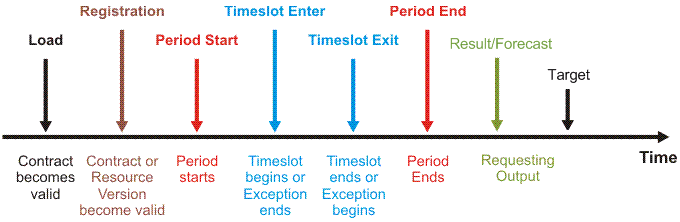
The following are the steps followed by the calculation mechanism (PslWriter service) in order to process a single Business Logic formula:
Note: When the contract version is first committed and a forecast has been selected the Forecast function is called instead of the result function. This, however, occurs only this one time for each version)
During each calculation cycle, the Engine evaluates what the relevant Engine Events and Raw Data Events are based upon the calculation time period. It will first sort them by time and then send them to the relevant formulas for calculation. The time of the Raw Data Event is its timestamp and the time of the Engine Event is its triggered time. Both these types of events are then combined in a time sequence, and sent for calculation.
The timings of the Events are according to the associated local Metric, but the Time parameter of the event handlers (ie, OnPeriodStart (Time)) and the timestamp of the Raw Data Event is according to their value in UTC. The Engine compares them according to their values at UTC, so as to use a constant point of reference.
Example:
If a Metric's timezone difference from UTC is two hours (i.e. GMT+2), and an incident opening event has its timestamp as 10:00 AM, then inside the Engine the timestamp that the event handler will be using is actually shifted accordingly and really starts at 8:00am UTC. Assuming the Adapter is configured to use this same timezone, then the raw data events will be shifted back 2 hours to UTC in the database also. When the events are being passed to the Business Logic, the calculation Agent responsible for calculation the Events for the period starting at 10:00 AM will actually be using the UTC time for events, which will be 8:00am onwards. However, if you use the out.log message in the code to print out the timestamps, it will show the timestamp shifted to UTC and hence will show 8:00 AM, despite the specified period (according to the Metric) being for 10am.
In the following calculation requirement it is important to convert the timestamp of the event before using it:
If a Metric is to calculate the number of incidents that were closed on the same day that they were opened, then it is necessary to compare each incident's opening and closing time. If an incident's opening and closing time fall on the same day (and within a defined timeslot), the incident will be counted.
It may happen that during the process of shifting the incident to UTC from its original local time the day will change.(ie. again using GMT+2). An incident opened at 1am, will be shifted back to 11pm the previous day in UTC) It will then not be counted even when it should have been. This is a situation where the time has to first be converted back to the local Metric time, and only then be compared. For such a case, use the GetLocaleTime(utcTime) method. This method converts a time given in an UTC time zone into the time zone of the local Metric.
The following is the event handler code:
Sub OnIncidentEvent(eventDetails)
   If dateDiff("d",Tools.GetLocaleTime(eventDetails.time),_
     Tools.GetLocaleTime(eventDetails("ClosedAt)))=0 then
          CountIncidents=CountIncidents+1
   End If
End Sub
|
Copyright © 2013 CA.
All rights reserved.
|
|