

In the previous step, there were a number of Rejected Events created during the execution of the Adapter. These Rejected Events were stored in a RejectedEvents.txt file, but were also stored as Pending Translation entries in the CA Business Service Insight Database. The next step in the process of loading raw data into the system is to provide a translation of what has been measured so that CA Business Service Insight can use this data as required.
Raw Data events could be rejected either due to the Event Type OR the Resource not being defined in the system. The pending events are defined by what type of Translation Table they came from. The most common examples are having the Event Types coming from one Translation table, and the resources coming from another Translation table.
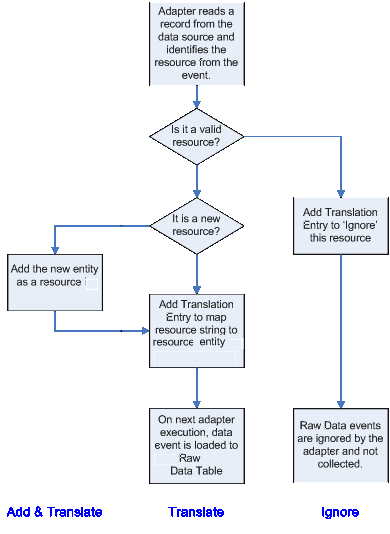
When a new Resource is encountered by the Adapter (say for example, that a new server is added to the network monitoring tool and shows up as a new entry in the data source from this monitoring tool) it can be added to the resource model of the system. There are two steps you need to take for this new resource to become reportable in CA Business Service Insight.
You first need to create the resource as an CA Business Service Insight entity (a resource) and then a translation needs to be entered. This provides the link between the string representation found in the data-source, and the entity defined as a Resource in CA Business Service Insight. This 2-step process can be performed in a single action via the user interface in a process known as 'Add and Translate' whereby the new resource and the necessary Translation entry may be created in a single procedure. When adding and translating, multiple entries may be selected provided they have the same allocation settings. Performing Translation is the process of creating the match between the data source value and the CA Business Service Insight Entity. When creating Translations, an entry is added to the Translation table with the matched values. Then, on subsequent queries to the data-source, the adapter will automatically know how to handle this new value.
At this stage, the Adapter has already run and sent requests for Translation for each value in the Translation fields. The events associated with these values were rejected and are waiting to be sent to CA Business Service Insight once the Translation has been completed. Translations can be done manually or automatically using a Translation script.
The following Translation actions are possible for pending Translation entries:
Translate: Allows creation of an entry in the Translation table, making the match between a data source value and the relevant CA Business Service Insight Entity. The CA Business Service Insight Entity to which Translations are made must already exist. (A good example of this may be in the case of a misspelled resource from a data source. There may be different names given in the data-source which are actually referring to a single logical entity. That is, Server001 and SERVER001. CA Business Service Insight resources are case-sensitive.)
The following flowchart summarizes the cases for using these options:
|
Copyright © 2013 CA.
All rights reserved.
|
|