

The Adapter wizard is a newer feature of the CA Business Service Insight User Interface and provides guidance in creating a new Adapter, using a more intuitive interface than the XML Editor. The wizard guides you through a series of tabs containing all the information required to create an Adapter, and at the end allows you to download a copy of the compiled XML configuration file. There are, however, some limitations to what the wizard can do.
It currently does not allow you to:
When creating a new Adapter via the wizard there are four options to choose from, as shown in the following figure:
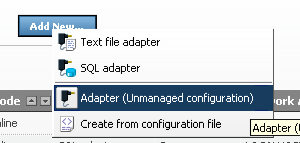
The first two options allow you to create either a Text File Adapter or SQL Adapter using the Wizard interface. The next option Adapter (Unmanaged Configuration) is the option to choose when adding a preconfigured Adapter that you have built using the XML Editor. This option does not allow you to further edit the configuration for this Adapter using the wizard at a later time. The final option Create from Configuration File allows you to upload a pre-configured Adapter configuration and have the system import it into the wizard interface for further editing. This option requires that none of the wizard limitations mentioned above is implemented in that particular configuration.
Beyond this point, the configuration options of the Adapter wizard provide the same functionality described for the manual Adapter configuration. Its purpose is to provide a simpler and friendlier interface for editing the configuration settings. Since the same functions and principles as in the manual alternative apply refer to the relevant sections for details.
|
Copyright © 2013 CA.
All rights reserved.
|
|