

The function of the Adapter is to read the data from the data source and normalize it into the format of an Event. Each Event in CA Business Service Insight is composed of the following fields:
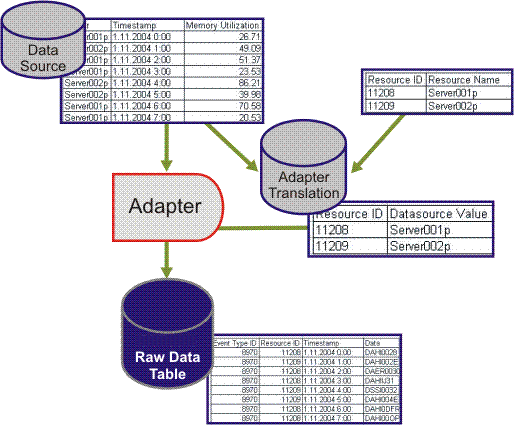
The Adapter needs to link the original fields in the data source into the corresponding CA Business Service Insight Resource fields. To do this, it uses a translation table that contains the value found in the data source and corresponding CA Business Service Insight Resource ID.
The process of attaching the Resource ID and Event Type ID to the relevant data source value is called Adapter translation. During this process, the translation table is created with the matching values. This table is used by the Adapter in order to populate the relevant Event Type ID and Resource IDs in the Event record that it is creating. Independent tables are created for translating Resources and Event types.
As mentioned previously, the Resource ID and Event Type ID are used for registration purposes, while the data field and Timestamp values are used for actual calculations.
The Timestamp field is also used by the engine to determine the order and timing of Events sent for calculations.
Event Type definition is done manually in CA Business Service Insight based on the input data source and required output.
Note: Resource definition can be performed either manually or automatically using translation scripts (see Resources and their Management for additional details).
The following figure shows the interaction between the data source, Adapter translation table, Adapter, and CA Business Service Insight raw data table.
|
Copyright © 2013 CA.
All rights reserved.
|
|