

In case of implicit enrollment, you do not need to call RiskMinder’s createUserRequest message explicitly from your application’s code to create a user in RiskMinder database. Instead when RiskMinder generates the ALERT advice for an "unknown user", it automatically calls the function to enroll the user.
For this enrollment to work, it is important that you first set the Mode of User Enrollment as Implicit in the Miscellaneous Configurations page of Administration Console.
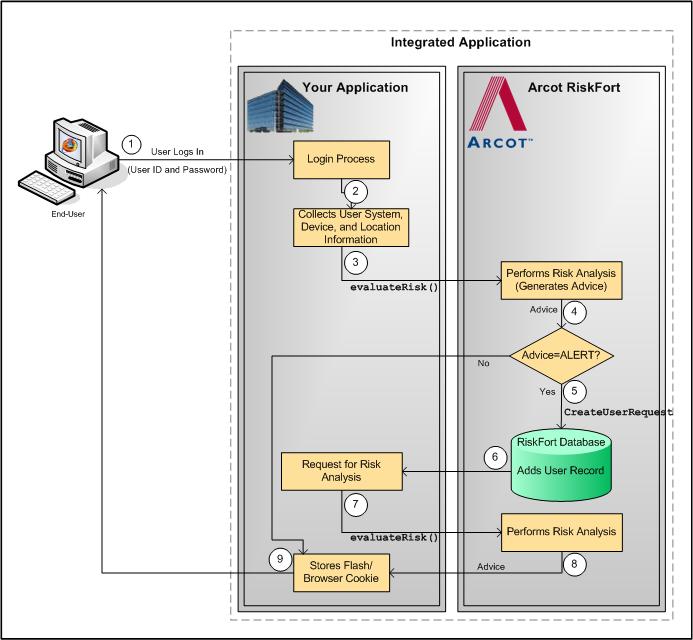
The steps for the implicit enrollment workflow are:
Your system validates if the user exists in your system. If the user name is not valid, then your application must take appropriate action.
At this stage, your application collects information from the user’s system that will be used by RiskMinder for analyzing risk:
At this stage, your application must call the evaluateRisk() function in riskfortAPI. In this call, you must pass all the user and device information that you collected in the preceding step to RiskMinder.
In this case, because the user is not yet "known" to the RiskMinder system, the default ALERT advice is generated.
For an ALERT advice that is generated, RiskMinder uses the createUserRequest message in the ArcotUserRegistrySvc Web service to create the user record in the RiskMinder database. With this, the user is enrolled with RiskMinder.
Book: See "Managing Users and Accounts" in the CA RiskMinder Web Services Developer’s Guide for detailed information on the createUserRequest message.
At this stage, your application must again call the evaluateRisk() function in riskfortAPI. In this call, you must ensure that you pass all the user and device information that you collected in Step 2 to RiskMinder.
In this case, RiskMinder executes the rules and generates the risk score and the advice.
After the user has been created, your application must store the Device ID returned by evaluateRisk() as a cookie on the device that user is using for the current transaction.
The following figure illustrates the implicit enrollment workflow when RiskMinder automatically creates the user.
|
Copyright © 2013 CA.
All rights reserved.
|
|