

During authentication, when a user specifies the credential in the authentication page, the credential is first verified by AuthMinder Server, after which the user is authenticated. The following workflow lists the steps for ArcotID PKI authentication:
Note: In case of other credentials, see chapter, "Authenticating Users" for details of operations to invoke.
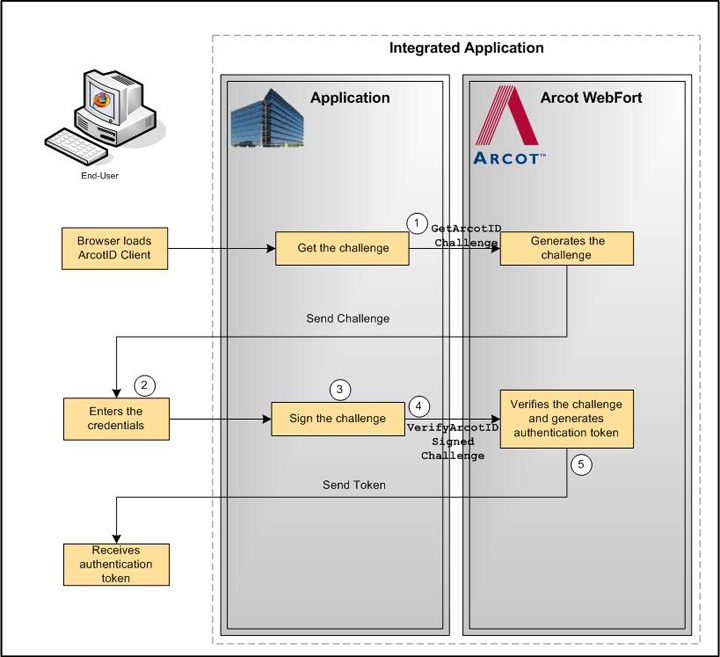
Your application loads the ArcotID PKI Client and makes an explicit call to fetch the challenge. See "ArcotID PKI Authentication" for more information on the Web services details.
User specifies the user name and ArcotID PKI password to log in.
The ArcotID PKI Client signs the challenge.
Your application invokes the verifyArcotIDSignedChallenge operation of the ArcotWebFortAuthSvc service to verify the challenge that is signed by using the ArcotID PKI Client.
See "ArcotID PKI Authentication" for more information on the API used for authenticating users with their ArcotID PKI credential.
If the verifyArcotIDSignedChallenge operation returns the successful response, then the authentication token generated indicates that the user is authenticated successfully.
See "Verifying the Authentication Tokens" for more information on the different tokens supported by AuthMinder.
The following figure illustrates the workflow for ArcotID PKI authentication process:
|
Copyright © 2013 CA.
All rights reserved.
|
|