

Use this procedure to configure an access map.
Follow these steps:
VLAN access-map map_name [0-65535]
For example:
vlan access-map SA-Capture 10
match ip address acl_name
For example:
match ip address 101
Action {forward | forward [capture] | drop | redirect }
For example:
action forward
Example:
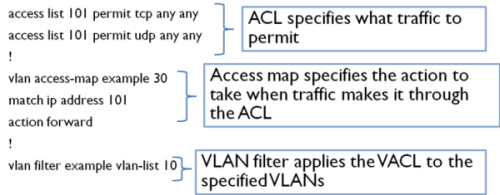
The VACL in the example is configured to deny ICMP traffic on VLAN 10. The ACL permits TCP and UDP traffic only, which implicitly denies all other Layer 3 traffic. The access map applies the ACL with a priority of 30 and specifies that traffic meeting the ACL is forwarded to its destination. The vlan filter command applies the access map to VLAN 10.
|
Copyright © 2015 CA Technologies.
All rights reserved.
|
|