

View Packets counter statistics for information about Steelhead-optimized TCP packet data that the CA Standard Monitor receives on a particular Monitor NIC.
Important: Before you begin, synchronize the monitoring device. The monitoring device must be synchronized to display its counter windows.
The Packets counter displays the following information:
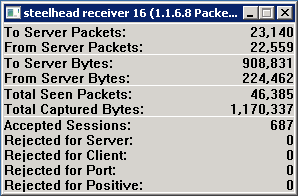
Identifies the total number of packets that are sent from a client to a server.
Identifies the total number of packets that are sent from a server to a client.
Identifies the total number of bytes sent from a client to a server.
Identifies the total number of bytes sent from a server to a client.
Identifies the total number of packets that match a specified application port, client network, and server subnet.
Note: If the monitor is performing normally, the number of Total Seen Packets matches the number of Received Packets. If the monitor cannot inspect all the packets that it receives, the number of Total Seen Packets falls below the number of Received Packets. In this case, the number of Dropped Packets also increases. For more information, see Dropped Packets.
Identifies the total byte count for packets that match a specified application port, client network, and server subnet.
Note: The CA Standard Monitor inspects each packet header to determine whether the packet matches a specified application port, client network, and server subnet. For more information, see Total Seen Packets.
Identifies the number of TCP sessions that match a valid application/server/network combination on the management console.
Identifies the number TCP sessions where the server IP did not match a server subnet.
Identifies the number TCP sessions where the client IP did not match a client network.
Identifies the number TCP sessions where the server port matched the list of ports that the management console ignores.
Reserved for future use.
|
Copyright © 2014 CA Technologies.
All rights reserved.
|
|