

|
At a Glance |
|
|
Catalog |
System |
|
Category |
Database Appliances |
|
User volumes |
yes |
|
Min. memory |
160 MB |
|
OS |
Linux |
|
Constraints |
no |
|
Questions/Comments |
|
MYSQL is a database appliance based on the MySQL database engine (http://www.mysql.org). It provides an easy way to add a database to any application.
MYSQL stores the database on an application-defined volume that can be configured on each MYSQL instance. MYSQL automatically creates an empty database when it starts on an empty volume.
|
Name |
Latest Version |
OS |
MySQL |
|
MYSQL64 |
3.0.1-2 |
CentOS 6.2 |
5.5.34 |
Resources
|
Resource |
Minimum |
Maximum |
Default |
|
CPU |
0.10 |
16 |
0.40 |
|
Memory |
160 MB |
32G |
512 MB |
|
Bandwidth |
1 Mbps |
2 Gbps |
250 Mbps |
Terminals
|
Name |
Dir |
Protocol |
Description |
|
in |
in |
MYSQL |
Receives MySQL database requests |
|
log |
out |
CIFS |
Network file system for storing error log. This terminal may be left unconnected if not used. |
|
mon |
out |
CCE |
Sends performance and resource usage statistics. This terminal may be left unconnected. |
The default interface is enabled. It is intended for diagnostics and troubleshooting (over SSH).
User Volumes
|
Volume |
Description |
|
data |
Volume for the database data storage. |
The data volume can optionally contain a my.cnf file in its top directory, which includes MYSQL configuration options. See the Custom Configuration section for more details.
Important! The data volume must exclusively dedicated to the MYSQL instance (cannot be shared with other appliances).
Properties
|
Property name |
Type |
Description |
|
auto_create |
Integer |
Whether to create the database if it does not exist. Possible values are 1 to create it and 0 to prevent auto creation (to avoid accidental overwrite in case of corrupted volumes). If set to 0 and a database does not exist on the user volume, the appliance starts in maintenance mode (MySQL daemon not started). Default: 1 |
|
error_log_filename |
String |
Fully qualified file name for the error log file, relative to the log file system (for example, /mysql_logs/my.log). If empty, error logging is disabled. Default: empty |
|
error_log_level |
String |
Error logging level. Possible values are: error logs only errors, warn logs both warnings and errors. This property is not case sensitive. Default: error |
|
timezone |
String |
Specifies the time zone used in the appliance. If this property is empty, timezone is not modified and left as-is. A list of supported time zones is available here. Default: empty |
Important! If error_log_filename is specified and the log terminal is not connected or the file system cannot be mounted, the MYSQL appliance will fail to start.
Custom Configuration
MYSQL64 allows the use of a custom MYSQL configuration file which can provide additional configuration options or can overwrite the existing configuration that is specified in /etc/my.cnf.
To use a custom configuration, create a file named my.cnf and place it in the top directory of the data volume. The format of the file should follow the MYSQL options file syntax as described on their website.
For example, the following can be used to tune MYSQL64 for better performance when using InnoDB (the default MYSQL64 configuration is optimized for MyISAM). The example is based on using 512M of memory (default for MYSQL64).
[mysqld]
# Shrink down MyISAM buffers
key_buffer = 512K
myisam_sort_buffer_size = 512K

# Make InnoDB the default storage engine (optional)
default-storage-engine = INNODB

# Set InnoDB buffer size
innodb_buffer_pool_size=350M
innodb_log_file_size=128M
innodb_log_buffer_size=4M
innodb_thread_concurrency=8

# If you do not have too many tables use this option, so you will not have uncontrolled innodb main tablespace growth which you cannot reclaim.
innodb_file_per_table=1
Error Messages
The following messages may appear in either the appliance log file or the system log of the grid controller when the appliance fails to start:
Insufficient permissions for root@% in the mysql database.
Simple Two-tier Application
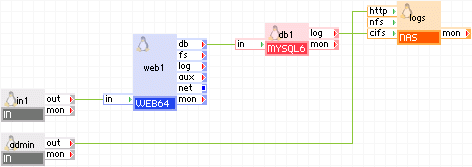
The following diagram shows a typical usage of the MYSQL appliance in a two-tier web application:
Appliances in use:
The client request arrives on the in1 gateway. The gateway forwards the requests to the web1 server, which serves the request. When the scripts (for example, Perl or PHP) on web1 want to access data, they use the db1 appliance through the db terminal. The db1 appliance is configured to store its log files within the root directory of the share that is exposed by logs.
Using a browser, administrators connect to the admin gateway to view the mysql log files. The admin gateway forwards the requests to the logs NAS appliance.
Example property configuration:
|
Property name |
Value |
Notes |
|
auto_create |
1 |
Create the database if the volumes are empty. |
|
error_log_filename |
/my.log |
Name of error log file that is to be stored on the logs data volume. |
|
error_log_level |
error |
Error logging level |
Note: The data volume must also be configured on the db1 appliance and the logs appliance. To create application volumes that can be used here, see the Grid User Guide.
Scalable Two-tier Application
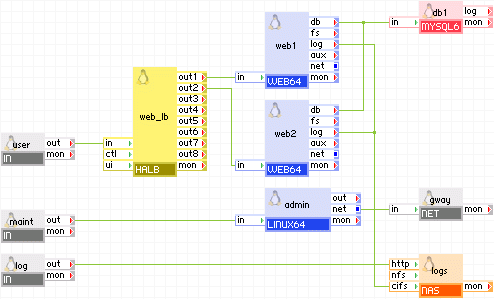
The following diagram shows a typical usage of the mysql appliance in a two-tier web application in which the database is used to share state and data between multiple, load-balanced web servers. In addition, this example has the following inputs:
Appliances in use:
Client request arrive on the user gateway. The gateway forwards the requests to the web_lb load balancer, which directs the request to one of the web servers web1 and web2. The web servers access the db database.
The db database writes its error log to the logs appliance through the log terminal. In addition, an administrator can log in through the log gateway to the logs appliance and view the database error log files.
Additionally, an administrator can log in over SSH through the maint gateway to the admin server. From the admin server, the administrator can access the db database for statistics or changing the database schema. The admin server can access the Internet through the gway gateway, for example, to download a newer version of libraries or the database schema.
Example property configuration:
|
Property name |
Value |
Notes |
|
auto_create |
1 |
Create the database if the volumes are empty. |
|
error_log_filename |
/my.log |
Name of error log file that is to be stored on the logs data volume. |
|
error_log_level |
error |
Error logging level |
Note: The data volume must also be configured on the db appliance and the data volume must also be configured on the logs appliance.
The maint, admin, gway, and log appliances are not required for the operation of the two-tier application. If present, the admin server may have cron jobs for database scrubbing, sending e-mail, and so on.
mysql> GRANT ALL PRIVILEGES ON *.* TO 'monty'@'%'
    ->     IDENTIFIED BY 'some_pass' WITH GRANT OPTION;
MYSQL64 uses the following third-party open source packages in addition to the 3rd party open source packages used by its base class LUX64.
|
Copyright © 2013 CA.
All rights reserved.
|
|