

Latest version: 3.0.1-1
|
At a Glance |
|
|
Catalog |
System |
|
Category |
Application Servers |
|
User volumes |
yes |
|
Min. memory |
192 MB |
|
OS |
Linux |
|
Constraints |
no |
|
Questions/Comments |
|
TOMCAT64 is an application server appliance that is based on the Sun Java machine and Apache Tomcat, a Java Servlet and JavaServer Pages container that is developed under the Apache license.
The main documentation for Tomcat is at tomcat.apache.org. Tomcat provides standards-compliant support for Servlets and JSPs. Tomcat can work as a standalone web server or as an application server.
This appliance serves static web content, automatically deploys web applications, and executes servlets and JavaServer Pages from a user-configurable content volume. The paths to the documents are configurable, and a single NAS appliance providing the content can be shared between multiple instances of TOMCAT64.
The appliance serves HTTP/1.1 and HTTP/1.0 protocol for web clients and AJP 1.3 for requests from front-end servers (ex. Apache with mod_proxy_ajp).
Like WEB64 servers, the appliance has three generic output terminals that are intended for accessing external services from scripts on the content volume. The db terminal is used for accessing various databases. The fs terminal is used for accessing shared file storage (using NFS). The aux terminal is created for sending email messages to an SMTP server.
Use the log terminal to connect the appliance to a shared file system where the appliance can store log files.
Configuration of the server is defined using various properties. These properties are designed to cover the most usage variants in an easy-to-configure way. In most cases, you only have to set a few to a non-default value.
|
Name |
Latest version |
OS |
Java machine version |
Apache Tomcat version |
|
TOMCAT64 |
3.0.1-1 |
CentOS 6.2 (64 bit) |
IBM JDK 1.6.0.11 |
6.0.35 |
Resources for TOMCAT64
|
Resource |
Minimum |
Maximum |
Default |
|
CPU |
0.1 |
16 |
0.3 |
|
Memory |
192 MB |
64G |
512 MB |
|
Bandwidth |
1 Mbps |
2 Gbps |
250 Mbps |
Be aware of the following:
The amount of memory is configured based on the quantity of the applications that are deployed on the appliance and their memory requirements.
Memory Requirements for Storing Java Application Sessions
In addition for memory for Java applications, some amount of memory must be available to store application sessions. Each empty session (with no additional data stored) uses close to 2kbytes of memory. That memory is used during the session lifetime (the default session lifetime is 30 min). Session lifetime can be configured by modifying or adding an additional section to the web.xml configuration file of an application. For example including this code below configures the session lifetime to be 1 minute:
  <session-config>
    <session-timeout>1</session-timeout>
  </session-config>
If 10k unique visitors are expected in 30 min, an additional 20Mb of free memory is required. In general: Required amount of memory = Maximum number of simultaneous active sessions * average size of a session.
Important! If not enough memory is available, tomcat may malfunction. This depends upon the user applications that are running in tomcat and is not a limitation of the appliance itself.
Terminals
|
Name |
Direction |
Protocol |
Description |
|
in |
in |
HTTP |
Serves HTTP requests coming from web clients. Supports the HTTP/1.1, HTTP/1.0 and AJP protocols. |
|
db |
out |
Any |
Access to a database server. Usage is defined by whatever scripts reside on the content volume (if any). This terminal may be left unconnected if not used. |
|
fs |
out |
NFS |
Access to a network file system for shared file storage, providing read/write file access over NFS. Usage is defined by whatever scripts reside on the content volume (if any). Software on the content volume 'sees' the mounted remote file system as /mnt/fs in the appliance's filesystem space. This terminal may be left unconnected if not used. The connected server must have a read/write share named /mnt/data exported over NFS. |
|
log |
out |
CIFS |
Access to a CIFS-based network file system for storing access and error logs. This terminal may be left unconnected if not used. The connected server must allow anonymous logins and have a read/write exported share named share. |
|
aux |
out |
Any |
Access to a SMTP server for sending outgoing e-mail. |
|
net |
out |
Any |
Gateway output for subnet access. |
|
mon |
out |
CCE |
Sends performance and resource usage statistics to MON appliance. |
The default interface is enabled. It is intended for diagnostics and troubleshooting (over SSH). Future versions of this appliance may disable SSH access.
User Volumes
|
Volume |
Description |
|
content |
Volume for the storage of tomcat applications, applications data, temporary and work files. This volume is only used if the content_on_fs property set to off. |
Properties
|
Property Name |
Type |
Description |
|
content_on_fs |
String |
Specifies whether the content is relative to the file system at the fs terminal or is on the content volume. Default: off (on the content volume) |
|
hostname |
String |
Host name of the website. Default: localhost |
|
tomcat_port |
Integer |
Port where Tomcat listens for incoming HTTP requests. Default: 8080 |
|
session_timeout |
Integer |
Time-out for the user session, in minutes, during which the appliance keeps all the data associated with the user session in memory. Default: 30. |
|
max_connections |
Integer |
Maximum number of allowed concurrent connections. When this number is reached, new connections are still accepted, but their processing is delayed until another connection is closed. Default: 100 |
|
heap_size |
Integer |
Memory allocated for Java heap (the -Xmx Java option), in megabytes. If 0, this value is automatically calculated. Default: 0 |
|
perm_size |
Integer |
Memory allocated for Java permanent objects (the -XX:PermSize Java option), in megabytes. If 0, this value is automatically calculated. Default: 0 |
|
app_base |
String |
Root directory for the documents, work and temp files. A typical structure of Tomcat 's ${catalina.base} directory will be created in this folder: shared for libraries that are common to all java-applications; temp and work for temporary and work files; and subdirectory defined in work_dir property - analogue of ${catalina.base}/webapps. Default: empty |
|
work_dir |
String |
Directory where the documents to be served are located. Also used for auto-deployment purpose. More information is available at Tomcat's website - Automatic Application Deployment . Default: webapps |
|
timezone |
String |
Specifies the time zone used in the appliance. If this property is empty, the timezone is not modified and left as-is. A list of supported time zones is available here. Default: empty |
Logging Properties
|
Property Name |
Type |
Description |
|
logs_enabled |
String |
Completely enables or disables logging. Default: no |
|
logs_base_dir |
String |
Directory where log files are stored. Default: empty, logs will be placed in root of mounted NAS volume |
|
error_log_filename |
String |
Filename prefix for the error log. Default: catalina |
|
log_level |
String |
Logging level. The values are, increasing verbosity level, SEVERE, WARNING, INFO, CONFIG, FINE, FINER, FINEST, ALL. More detailed description of log levels is available in the Tomcat documentation. Default: INFO |
|
enable_access_log |
String |
Enables or disables access log. Default: no |
|
access_log_filename |
String |
Filename prefix for the access log. Default: access.log |
Possible Startup Errors
If appliance startup fails, the following errors may be logged into the system log:
|
Error message |
Description |
|
ERROR: Logs are enabled, but log terminal is not connected. |
log terminal is not connected, but logs_enabled or enable_access_log is set to yes. |
|
ERROR: Property content_on_fs is 'off' but the local content volume is missing. |
The content_on_fs is set to off, specifying that the data volume must be mounted locally, but the appliance cannot mount content volume. Most probable cause is that the content volume is not formatted, or is not defined in the appliance properties. |
|
ERROR: Failed to mount nfs share. |
The appliance cannot mount nfs share. The probable cause is that fs is not connected or the appliance was started before NAS (or whatever appliance is connected to the fs terminal) |
|
Message |
Description |
|
Data storage has less than 5% of free disk space |
The data volume accessed through the fs terminal has less than 5% of free disk space. It is advised to increase the size of the volume. |
|
Data storage has less than 1% of free disk space |
The data volume accessed through the fs terminal has less than 1% of free disk space. Immediate attention required; possible data loss may occur. |
|
Content volume has less than 5% of free disk space |
The content volume on the appliance has less than 5% of free disk space. It is advised to increase the size of the volume. |
|
Content volume has less than 1% of free disk space |
The content volume on the appliance has less than 1% of free disk space. Immediate attention required; possible data loss may occur. |
Performance
The performance of the appliance may be affected when logging is turned on (either error logging enabled by logs_enabled = yes or access logging - enable_access_log equals yes). The following table contains benchmark results (specified in rps units - requests per second) performed when logs are disabled with the Apache Benchmark utility that ships with Apache web server version 2.0 and 2.2. More information for ab is available on the Apache website. The following settings were used for benchmarking: "bw=500M mem=2G cpu=2".
|
concurrency |
rps |
|
1 client concurrency |
2800-3200 rps |
|
10 client concurrency |
7500-7900 rps |
|
100 clients concurrency |
7700-8100 rps |
Simple Java-enabled Website
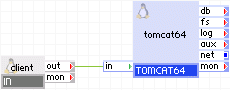
The TOMCAT64 appliance serves applications from the content volume.
Appliances in use:
|
Property name |
Value |
Notes |
|
hostname |
www.mysite.org |
Hostname of site. |
|
app_base |
MyApp |
Not Applicable |
|
content_on_fs |
off |
TOMCAT64 uses the user volume content for all content. |
|
timezone |
EST |
EST timezone. |
|
tomcat_port |
80 |
Standard port for the HTTP protocol. |
The client requests arrive on the IN gateway. The gateway forwards the requests to the TOMCAT64 server, which serves the request.
Two-tier Application with Database and Log
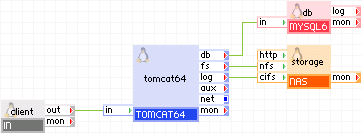
The following diagram shows a typical usage of the appliance with database, log, and content on a network storage.
Appliances in use:
Example property configuration:
|
Property Name |
Value |
Notes |
|
hostname |
www.mysite.org |
Hostname of site |
|
app_base |
MyApp |
Not Applicable |
|
content_on_fs |
on |
TOMCAT64 uses remote storage through the fs terminal for all content |
|
timezone |
EST |
EST timezone |
|
tomcat_port |
80 |
Standard port for HTTP protocol |
|
max_connections |
200 |
Max of 200 concurrent users |
|
logs_enabled |
yes |
Enables error logs |
|
logs_base_dir |
MyApp_Log_Dir |
Not Applicable |
|
log_level |
INFO |
Not Applicable |
|
error_log_filename |
error_log |
Error log name |
|
enable_access_log |
yes |
Enables access log |
|
access_log_filename |
myapp_access |
Access log name |
The client requests arrive on the IN gateway. The gateway forwards the requests to the TOMCAT64 server, which serves the request. Content and logs are on the storage appliance.
Note: Java applications can use many types of databases. It depends only on the appropriate JDBC driver in the application. TOMCAT64 can connect any database appliance to its db terminal.
WEB64 as a front end for TOMCAT64
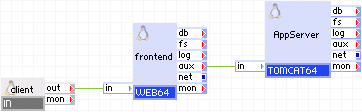
The following diagram shows the appliance as an application server and WEB64 as the front end. WEB64 serves static content and redirects all requests that require server-side processing to TOMCAT64 using the AJP protocol.
Note: Enable AJP support (enable mod_proxy and mod_proxy_ajp) in WEB64 for this mode.
Appliances in use:
Example property configuration:
|
Property Name |
Value |
Notes |
|
content_on_fs |
off |
TOMCAT64 uses the user volume content for all content |
|
timezone |
EST |
EST timezone |
Other settings have their default values.
WEB64 must be properly configured to work as the front end and communicate with TOMCAT64 using the AJP protocol.
mod_proxy and mod_proxy_ajp must be enabled by including the next lines in the apache configuration.
LoadModule proxy_module modules/mod_proxy.so
LoadModule proxy_ajp_module modules/mod_proxy_ajp.so
Some path of url space must be specified to serve by TOMCAT64, for example:
ProxyPass /path-that-served-by-tomcat ajp://aux:8009/some-servlet
ProxyPassReverse /path-that-served-by-tomcat ajp://aux:8009/some-servlet
For example:
|
path |
content |
served by |
|
/index.html |
static html document |
served by WEB64 |
|
/images/* |
static graphical files |
served by WEB64 |
|
/scripts/*.php |
dynamic content generated by php scripts |
served by WEB64 |
|
/path-that-served-by-tomcat |
dynamic content generated by jsp |
served by TOMCAT64 |
The client requests arrive on the IN gateway. The gateway forwards the requests to the front-end web server, which servers requests for static html pages, graphical files and php scripts. Requests for jsp pages or servlet pages are forwarded to AppServer and served by it.
Scalable Java-enabled Website
The following diagram shows a typical usage of the TOMCAT64 appliance with load-balancing.
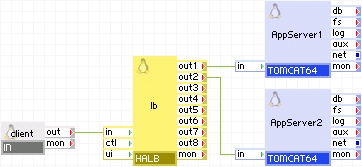
Appliances in use:
Example property configuration for both AppServer1 and AppServer2:
|
Property Name |
Value |
Notes |
|
content_on_fs |
off |
TOMCAT64 uses the user volume content for all content |
|
timezone |
EST |
EST timezone |
Other settings have their default values.
The client requests arrive on the IN gateway. The gateway forwards the requests to the lb load balancer, which directs the request to one of the servers AppServer1 and AppServer2.
Open source and third-party software that is used inside the appliance
The appliance uses the following third-party open source packages in addition to the third-party open source packages used by the base class LUX64.
TOMCAT64
|
Software |
Version |
Modified |
License |
Notes |
|
Apache Tomcat |
6.0.35 |
Yes |
Apache License v2.0 |
homepage |
|
JDK |
IBM 1.6.0.11 |
No |
Sun-BCL |
available on IBM website |
|
cifs-utils |
4.8.1 |
No |
GPLv2 |
N/A |
|
Copyright © 2013 CA.
All rights reserved.
|
|