

|
At a Glance |
|
|
Catalog |
System |
|
Category |
Application Servers |
|
User volumes |
yes |
|
Min. memory |
160 MB |
|
OS |
Linux |
|
Constraints |
no |
JBOSS64 is an application server appliance based on open source JBoss. The appliance supports two separate versions of JBoss software:
JBOSS supports a number of advanced technologies and features:
The appliance automatically deploys web applications from either a locally mounted content volume or a network file system accessible through the fs terminal. Several preconfigured execution environments, which are derived from the standard JBoss configurations, are available. The path to the application documents is configurable, and a single NAS appliance providing the content can be shared between multiple instances of JBOSS64.
The appliance has three generic output terminals that are intended for accessing external services: The db terminal is for accessing various databases; the fs terminal is for accessing shared file storage (using NFS); and the aux terminal is for sending e-mail messages to an SMTP server.
The log terminal can be used to connect the appliance to a shared file system on which the appliance can store log files.
The configuration of the server is provided through properties. These properties are designed to cover most uses in an easy-to-configure way and in most cases only a few need to be set to non-default values.
|
Name |
Latest version |
|
JBOSS64 |
2.0.1-1 |
Resources
|
Resource |
Minimum |
Maximum |
Default |
|
CPU |
0.1 |
16 |
0.25 |
|
Memory |
160 MB |
32 GB |
1 GB |
|
Bandwidth |
1 Mbps |
2 Gbps |
250 Mbps |
Memory requirements
Java applications usually require increased amount of RAM to function properly, and the amount of memory required by this appliance depends on the requirements of the running applications. The appliance may crash or not work properly if not enough memory is available. In the case of a crash, a dashboard message is recorded.
Terminals
|
Name |
Direction |
Protocol |
Description |
|
in |
in |
HTTP |
Serves HTTP requests coming from web clients. |
|
db |
out |
HTTP |
Access to a database server. Usage is defined by whatever scripts reside on the content volume (if any). This terminal may be left unconnected if it is not used. |
|
fs |
out |
HTTP |
Access to a network file system for shared file storage, providing read/write file access over NFS. The connected server must have a read/write share named /mnt/data. The mounted remote file system is 'seen' as /mnt/fs within the appliance's filesystem space. This terminal may be left unconnected if it is not used. |
|
log |
out |
CIFS |
Access to a CIFS-based network file system for storing access and error logs. The connected server must allow anonymous logins and have a read/write share named share. This terminal may be left unconnected if it is not used. |
|
aux |
out |
HTTP |
Access to an SMTP server for sending outgoing e-mail. This terminal may be left unconnected if it is not used. |
|
net |
out |
HTTP |
Gateway output for subnet access. This terminal may be left unconnected if it is not used. |
|
mon |
out |
CCE |
Sends performance and resource usage statistics. This terminal may be left unconnected if not used. |
Volumes
|
Name |
Description |
|
temp |
A mandatory read/write volume for temporary storage. Used for temporary files and application deployment. The required size depends on the size of deployed applications and re-deployment frequency. This volume is automatically cleaned upon appliance start. JBOSS monitors the free disk space on this volume and records dashboard messages when amount of free disk space drops under 5% or 2%. |
|
content |
A read/only or read/write volume for application storage. This volume is only used if the content_on_fs property is set to no, in which case this volume is mandatory. If content_on_fs is set to yes and the content volume exists, the appliance will fail to start. |
Properties
General Properties
|
Name |
Type |
Description |
|
jboss_env |
String |
One of the four modes of operation:
Default: JBoss 4, JDK 5 |
|
jboss_cfg |
String |
Configuration of JBoss. Possible values:
Default: default |
|
heap_size |
Int |
Amount of memory allocated for Java heap (the -Xms and -Xmx options). If this property equals '0', the value is auto-calculated by the appliance (approximately 70% of RAM). If this property is empty, the appliance does not pass -XMs and -XMx properties to JVM at all, and these properties may be specified directly by the user in the java_opts property. Default: 0 |
|
perm_size |
Int |
Amount of memory allocated for Java permanent objects (the -XX:PermSize and -XX:MaxPermSize options). If this property equals '0', value is autocalculated by the appliance (approximately 20% of RAM). If this property is empty, the appliance does not pass -XX:PermSize and -XX:MaxPermSize properties to JVM at all, and these properties may be specified directly by user in java_opts property. Default: 0 |
|
java_opts |
String |
This string is added to the JAVA_OPTS environment variable before launching JVM. Additional options and parameters may be specified here (ex. heap size, perm size, debug options, and so on.). Default: (empty) |
|
tcp_port |
Integer |
Port that the appliance listens on for incoming connections. Default: 8080 |
|
app_base |
String |
Directory for the user deployable applications, relative to the root of the data source (mounted content volume or NFS-mounted share). Default: deploy |
|
content_on_fs |
String |
Specifies whether the content is relative to the file system at the fs terminal or is on the content volume. |
|
timezone |
String |
Specifies the time zone used in the appliance. If this property is empty, the timezone is not modified and is left as-is. Default: (empty) |
Logging Properties
|
Name |
Type |
Description |
|
logs_enabled |
String |
Enables or disables logging. Valid values are yes or no. If the log terminal is not connected, and this property set to yes, the appliance fails to start. Default: no |
|
logs_dir |
String |
Directory where logs are stored relative to the root of the log share. Default:_(empty)_ |
|
log_filename |
String |
Filename for the log file. Default: jboss.log |
|
log_level |
String |
Logging level. {valid values and default required} |
Clustering Properties
|
Name |
Type |
Description |
|
partition_name |
String |
The name of a partition. All instances of the appliance on the grid which have same partition name are joined into a cluster. If this property is empty clustering support is disabled. Default: (empty) |
Simple web/application server
This is the simplest way to use a JBOSS64 appliance. One IN gateway routes all incoming HTTP traffic to the JBOSS64 appliance. In this scenario, JBOSS64 uses a local content volume.
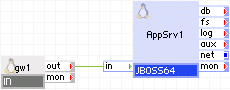
Appliances in use:
Properties in use:
|
Property |
Value |
Description |
|
jboss_env |
JBoss 4, JDK 5 |
JBoss environment in use. |
|
jboss_cfg |
default |
Default configuration of JBoss. |
|
tcp_port |
80 |
Default port for HTTP. |
|
app_base |
content |
Applications are located in /content subdirectory of the data volume. |
|
content_on_fs |
off |
Content is located on local volume. |
|
logs_enabled |
no |
No logging. |
Simple web/application server with external data store and database
This is a more complex example that uses external data storage and a database appliance.
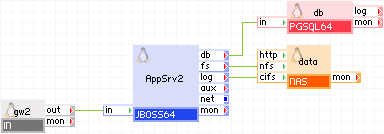
Appliances in use:
Properties in use:
|
Property |
Value |
Description |
|
jboss_env |
JBoss 5, JDK 6 |
Latest JBoss environment in use. |
|
jboss_cfg |
default |
Default configuration of JBoss. |
|
tcp_port |
80 |
Default port for HTTP. |
|
app_base |
content |
Applications are located in /content subdirectory of the NFS-mounted data volume. |
|
content_on_fs |
on |
Content is located on NFS-mounted volume. |
|
logs_enabled |
yes |
With logging. |
|
logs_dir |
/jboss_logs |
Log file is located in /jboss_logs/ subdirectory of the NAS appliance. |
|
log_filename |
jboss-runtime.log |
Log file is named "jboss-runtime.log". |
|
log_level |
EMERG |
Only emergency messages are logged. |
Application server with front end
In this example the front-end WEB64 appliance processes static content, and redirects all requests for dynamically-generated content to the back-end JBOSS64 appliance.
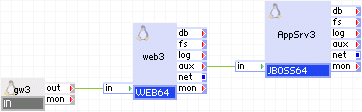
Appliances in use:
Properties in use:
|
Property |
Value |
Description |
|
jboss_env |
JBoss 4, JDK 5 |
JBoss environment in use. |
|
jboss_cfg |
default |
Default configuration of JBoss. |
|
tcp_port |
8080 |
Standard JBoss TCP port. |
|
app_base |
content |
Applications are located in /content subdirectory of the data volume. |
|
content_on_fs |
off |
Content is located on local volume. |
|
logs_enabled |
no |
No logging. |
Complex hosting environment with clustered and fault-tolerant front-end, databases, back-end servers
This is a complex application with a clustered front end, multiple clustered databases and a clustered JBoss back end.
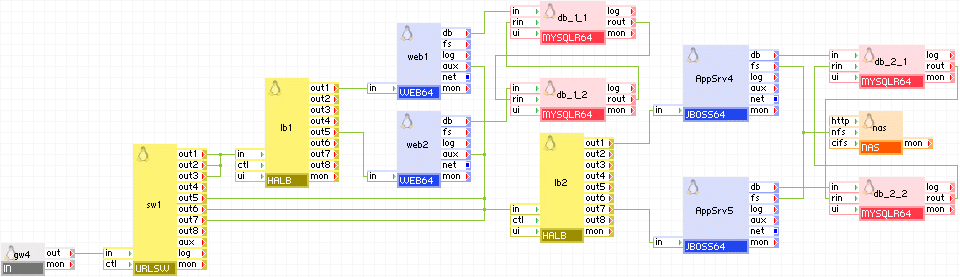
The gw4 input gateway receives incoming requests and forwards them to the URL switch sw1 which separates requests for static content (sent through output terminals 1-3, through the load balancer lb1, and thence to the web front-end servers web1 and web2) from application calls (sent through output terminals 5-7, through the back-end load balancer lb2, and then to the JBoss application servers AppSrv4 and AppSrv5). The front-end web farm (web1 and web2) processes incoming requests, and either replies with static content, or forwards requests to the back-end servers through the second load balancer lb2. The front-end servers use clustered MySQL database appliances db_1_1 and db_1_2. The second load balancer lb2 balances traffic between clustered JBoss appliances AppSrv4 and AppSrv5. These in turn use clustered database appliances db_2_1 and db_2_2. Data storage is provided via NFS by the NAS appliance nas.
Appliances in use:
Note: The URLSW appliance in this example is not shipped with CA AppLogic® for System z, but can be built using Apache and Nginx. The Apache appliance in this example is not shipped with CA AppLogic® for System z. However, CA AppLogic® for System z does provide a similar appliance named WEB64.
Properties in use:
|
Property |
Value |
Description |
|
jboss_env |
JBoss 5, JDK 6 |
Latest JBoss environment in use. |
|
jboss_cfg |
all |
'all' configuration of JBoss, includes clustering. |
|
tcp_port |
8080 |
Default port for JBoss. |
|
app_base |
content |
Applications are located in /content subdirectory of the NFS-mounted data volume. |
|
content_on_fs |
on |
Content is located on NFS-mounted volume. |
|
logs_enabled |
no |
No logging. |
|
Copyright © 2013 CA.
All rights reserved.
|
|