

Latest Version: 1.0.7-1
The WS_API_SAMPLE application provides an example of how to build a simple portal application that accesses the CA AppLogic Web Service API application that is, WS_API. This application is provided to guide developers of portals and applications which issue Web API requests to an instance of the WS_API application running on a CA AppLogic grid.
|
Property Name |
Type |
Description |
|
iface.in |
Interface |
This is the IP address at which a user can access the WS_API_SAMPLE portal. This property is mandatory. |
|
iface.net |
Interface |
This is the IP address that is used by the WS_API_SAMPLE application to issue HTTP or HTTPS based requests to the WS_API application. This property is mandatory. |
|
iface.vpn |
Interface |
This is the IP address that is used by the WS_API_SAMPLE application to issue HTTP based requests to the WS_API application over a secure VPN tunnel. This property is mandatory. |
|
dns1 |
IP |
IP address of a DNS server for host name resolutions. This property is mandatory. |
|
dns2 |
IP |
IP address of a backup DNS server for host name resolutions. Default: 0.0.0.0. |
|
api_ports |
String |
Comma-separated list of ports on which WS_API_SAMPLE application can be accessed. Default: empty |
|
hostname |
|
Host name of the website. The application uses this name to display in automatically generated pages, as well as for constructing absolute URLs, for example, in server-generated redirects (for example, as may be set up in a custom config file installed on the content volume). Note: Although explicit redirects are rarely configured, a request for a directory without the trailing '/' causes a re-direct to be issued to the client, with the '/' appended; this redirect will use the value of host_name if it is set. Setting this property correctly is recommended if the application is expected to be accessed by older clients that do not send a Host: header with their HTTP requests. If this property is set to an empty string, the host name used in the client's request is used. Default: (empty)
|
|
timezone |
String |
Specifies the time zone used in the application. If this property is empty, the timezone is not modified and left as-is. A list of supported time zones is available here. Default: empty |
|
allowed_hosts |
String |
Allowed IP address or range of IP address's in CIDR format that can access the WS_API_SAMPLE. Default: 0.0.0.0/0; (allow all) |
|
vpn_remote |
IP_owned |
This is the IP address at which the WS_API application provides services to the users through a secure VPN tunnel. Default: empty. |
|
vpn_auto_path |
String |
Authentication information for the tunnel. For the shared secret mode of operation, this is a relative path to the shared secrets file on the data volume (for example "secret.key" for a "client/secret.key" file). If the tunnel is ssh key, this property indicates the path, including filename, to the ssh public (for VPN server) or private (for VPN client) key file (for example "/1/ssh.key" for a /client/1/ssh.key public key file). Default: empty. |
Important! The IP addresses configured in the iface.vpn, iface.in and iface.net properties must be IP addresses available on your CA AppLogic grid. You can find them, together with the DNS servers on the dashboard of your grid.
|
Resources |
Min |
Max |
Default |
|
CPU |
0.45 |
72 |
1.05 |
|
Memory |
704 MB |
132 GB |
1.343 GB |
|
Bandwidth |
6 Mbps |
12 Gbps |
1.151 Gbps |
The BackupHelper application has the following volume:
|
Volume |
Description |
|
content |
File system containing scripts, logs and web interface. This volume should not be modified. |
The WS_API_SAMPLE application, it needs to be configured to access the instance of WS_API running on a CA AppLogic grid. Before starting this application, start an instance of WS_API application as explained here. The WS_API_SAMPLE can then be configured regarding properties that are set in the instance of WS_API application.
To configure the WS_API_SAMPLE
# EDIT VDC info here
<p>
<label for="location">Select Location: </label>
<select name="location">
<option value="dallas">Dallas, TX, USA</option>
<option value="sandiego">San Diego, CA, USA</option>
<option value="japan">Tokyo, Japan</option>
<option value="netherlands">Amsterdam, Netherlands</option>
</select>
</p>
The above should change to VDCs that are configured in the WS_API application. If mygrid1 and mygrid2 are two VDCs running in Dallas and San Diego respectively then above HTML code should be changed to:
# EDIT VDC info here
<p>
<label for="location">Select Location: </label>
<select name="location">
<option value="mygrid1">Dallas, TX, USA</option>
<option value="mygrid2">San Diego, CA, USA</option>
</select>
</p>
The WS_API_SAMPLE can be configured to work in one of the following modes:
In this mode, the portal uses regular HTTP based interface to issue API requests to the instance of WS_API application.
For example, curl "http://iface.in/api/v1/app/list?vdc=mygrid1".
In this mode, the portal uses secure HTTP based interface that is, HTTPS to issue API requests to the instance of WS_API application. For this to work, the api_client.pem key should be copied to the keys sub-directory on the portal volume of the WS_API_SAMPLE application.
For example, curl -k -E /mnt/fs/keys/api_client.pem "https://iface.in/api/v1/app/list?vdc=mygrid1".
In this mode, the portal uses regular HTTP based interface to issue API requests to the instance of WS_API application through a secure VPN tunnel. To create the tunnel, simple copy the client.xxxxxxxxxxxxxxxxxxxxxxxxx.key, client.xxxxxxxxxxxxxxxxxxxxxxxxxxxxxxxxx.crt and ca.crt generated on the server sub-directory of the vpn_key volume of the instance of WS_API application to the client sub-directory of the vpn_key volume of the WS_API_SAMPLE application. A secure tunnel is created once the out_vpn component is started.
For example, curl "http://aux/api/v1/app/list?vdc=mygrid1".
To access the portal through a web browser, point the browser to http://iface.in/api/portal
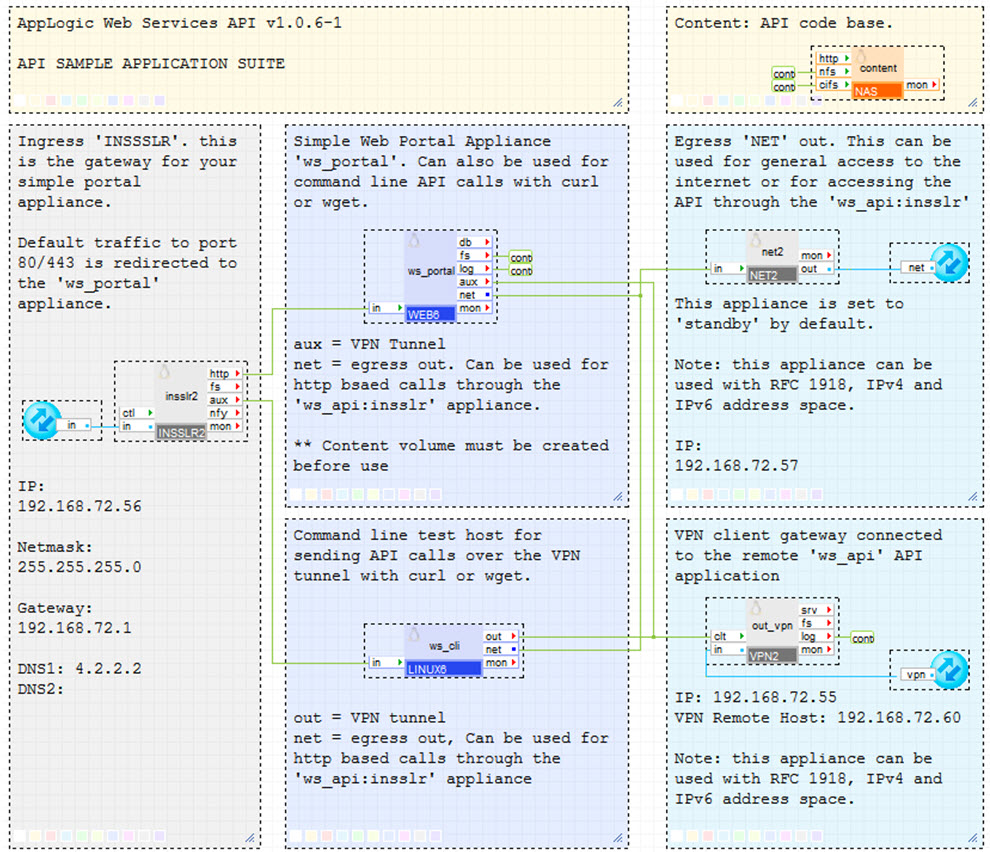
CA AppLogic Web Services 'WS_API_SAMPLE' application infrastructure is show below:
It has the following components:
Open source and third-party software used
The following open source third-party software is installed on the portal volume.
|
Software |
Version |
Modified |
License |
Notes |
|
JSON |
2.15 |
No |
Artistic |
N/A |
|
IPC-Run |
0.80 |
No |
GPLv2 |
N/A |
|
XML-Simple |
2.18 |
No |
Artistic |
N/A |
|
Sort-Naturally |
1.02 |
No |
Artistic |
N/A |
|
Copyright © 2013 CA Technologies.
All rights reserved.
|
|