

Latest Version: 2.0.0-2
The WS_API application provides a web service interface to one or multiple grids through a Representational State Transfer (REST) based service. Any one of the following access methods can be used with the WS_API REST interface:
|
Property Name |
Type |
Description |
|
iface.in |
Interface |
This is the IP address at which the WS_API application provides services to users through HTTP or HTTPS based requests. This property is mandatory. |
|
iface.net |
Interface |
This is the IP address that is used by the WS_API application to access any public network address. This property is mandatory. |
|
dns1 |
IP |
IP address of a DNS server for host name resolutions. This property is mandatory. |
|
dns2 |
IP |
IP address of a backup DNS server for host name resolutions. Default: 0.0.0.0. |
|
allowed_hosts |
String |
Allowed IP address or range of IP address's in CIDR format Default: 0.0.0.0/0; (allow all) |
|
http_mode |
String |
This specifies what kind of HTTP requests are served by the API on the usr_ip. Valid values: https, http, both. If set to http, simple HTTP based requests are served by the API. When set to https only Secure HTTP requests based on SSL v3.0 encryption are served by the REST API. If set to both all HTTP and HTTPS requests are served. Default: https. This property is effective only for requests that are served using the in appliance (that is has no effect when VPN is used). If the mode is set to http, please be aware that all the traffic is plaintext. It is highly recommended to set allowed_hosts property for the IPs that will be issuing API requests. |
|
opts |
String |
Arguments for SSL configuration may be provided to the application through the opts property as a comma-separated name=value pairs. It is not required to set this property in simple HTTP mode that is, when http_mode=http. Default: empty (not used). If any of the arguments are not specified, then an empty value is assumed. |
|
iface.vpn |
Interface |
This is the IP address at which the WS_API application provides services to the users through a secure VPN tunnel. Default: empty. |
|
vpn_ports |
String |
List of ports to access the web services API. These ports will be allowed through the VPN tunnel and firewall rules. Ports 80,443 are typically all that is needed Default: 80,443 |
|
vpn_type |
String |
Type of the VPN tunnel to establish. Possible values are: |
|
vpn_authpath |
String |
Authentication information for the tunnel. For the shared secret mode of operation, this is a relative path to the shared secrets file on the data volume (ex. "secret.key" for a "client/secret.key" file). If the tunnel is ssh key, this property indicates the path, including filename, to the ssh public (for VPN server) or private (for VPN client) key file (for example, "/1/ssh.key" for a /client/1/ssh.key public key file). Default: empty |
|
vpn_standby |
Int |
Specifies whether VPN access is enabled on application start. If non-zero, VPN access is disabled, otherwise it is enabled. The VPN access can be enabled/disabled at runtime by manually starting/stopping the VPN appliance. Default: 1 (VPN access is disabled). |
|
in_standby |
Int |
Specifies whether access to the REST API is permitted through regular HTTP or HTTPS based connections. When this property is set to 1 and vpn_standby is set to 0 only VPN tunnel based access is permitted. Access through in can be enabled/disabled at runtime by manually starting/stopping the in appliance. Default 0 (regular HTTP and HTTPS access is enabled). |
|
mon_standby |
Int |
Determines whether application monitoring is disabled upon application start for the application. If non-zero, monitoring is disabled, otherwise monitoring is enabled. The monitoring can be enabled at runtime by manually starting the mon appliance. Default: 1 (monitoring is disabled). |
|
hostname |
|
Host name of the website. The application uses this name to display in automatically generated pages, as well as for constructing absolute URLs, for example, in server-generated redirects (for example, as may be set up in a custom config file installed on the content volume). Note: Although explicit redirects are rarely configured, a request for a directory without the trailing '/' causes a re-direct to be issued to the client, with the '/' appended; this redirect will use the value of host_name if it is set. Setting this property correctly is recommended if the application is expected to be accessed by older clients that do not send a Host: header with their HTTP requests. If this property is set to an empty string, the host name used in the client's request is used. Default: (empty)
|
|
timezone |
String |
Specifies the time zone used in the application. If this property is empty, the timezone is not modified and left as-is. A list of supported time zones is available here. Default: empty |
Important! The IP addresses configured in the iface.vpn, iface.in and iface.net external interface properties must be IP addresses available on your CA AppLogic grid. You can find them, together with the DNS servers on the dashboard of your grid.
"WS_API" Application
|
Resources |
Min |
Max |
Default |
|
CPU |
0.55 |
76 |
1.1 |
|
Memory |
1024 MB |
134 GB |
1.687 GB |
|
Bandwidth |
7 Mbps |
12.5 Gbps |
730 Mbps |
The application itself uses several volumes. They are part of the application and are already configured into the appliance instances. There are no volumes that need to be configured on the application boundary.
|
Volume |
Size |
Description |
|
code |
50M |
This volume is used to store the API application's code and scripts. This volume is assigned to the WEB5 appliance. By default, a populated volume called 'code' is supplied for this application to use. |
|
conf |
50M |
This volumes is used to store all the configuration data for the Web Service API application. This includes the "vdcs.conf" that is populated by the user to contain information about remote grids, ssh key created by the user used to access the remote grid, SSL certificates generated by the API application used to access the API through the HTTPS interface, and VPN server side certificates created by user used to access the API through the VPN interface. This volume is assigned to a NAS appliance. By default, a populated volume called 'conf' is supplied for this application to use. |
|
log_data |
50M |
This volume is used to store logging data for the API server. It is also used to store temporary files required by the API application. This volume is assigned to the NAS appliance. By default, a populated volume called 'log_data' is supplied for this application to use. |
Before starting the WS_API application, it needs to be configured to access the grids that are going to be managed through the web service interface. This involves creating a vdcs.conf file inside the data sub-directory on the conf volume. A pair of private/public keys need to be created and a user needs to be setup on the targeted grid controller with the generated public key. For information about how to populate vdcs.conf and how to setup ssh keys and create a grid user for the web service API see the configure section.
The WS_API can be configured to work in one or a combination of the following modes:
Using HTTP
In this mode, the REST API can be accessed through the regular HTTP based interface.
For example, curl "http://iface.in/api/v1/app/list?vdc=controller_name".
To start the application to work in this mode, it is required to set the mandatory properties to appropriate values and the http_mode property to http. For more information about how to set the application up to work in this mode,refer to the configure section.
Using HTTPS
In this mode, the REST API can be accessed through the Secure HTTP based interface.
For example, curl -k -E /path/to/client_key.pem "https://usr_ip/api/v1/app/list?vdc=controller_name".
To start the application to work in this mode, it is required to set the mandatory properties to appropriate values and the http_mode property to https. You may also set the opts property with the options shown in the properties table above for your certificate to be signed accordingly. After the application is started successfully, the client certificates must be copied from the ssl-keys subdirectory within the conf volume to the client application or browser to be used to access the WS_API. For more information about how to set the application up to work in this mode, refer to the configure section.
Using vpn tunnel
In this mode, a secure VPN tunnel is created between the in_vpn VPN server within the application and a VPN client on the client side. Once the tunnel is successfully created using one of the different VPN tunneling types available, the REST API can be accessed through the regular HTTP based interface.
For example, curl "http://iface.in/api/v1/app/list?vdc=controller_name".
To start the application to work in this mode, it is required to set the mandatory properties to appropriate values, set the iface.vpn external interface property to the IP address chosen for VPN access and set the vpn_standby to 0. By default, vpn_ports is set to 80,443 to allow connections to ports 80 and 443 (http and https respectively) and vpn_type is set to certificate to allow a VPN client to connect to the VPN server in the application using a SSL certificate based tunnel. You may also set the in_standby property to 1 so that only requests through the VPN tunnel are allowed. Any API requests from outside of the VPN tunnel are dropped. For more information about how to set the application up to work in this mode, refer to the configure section.
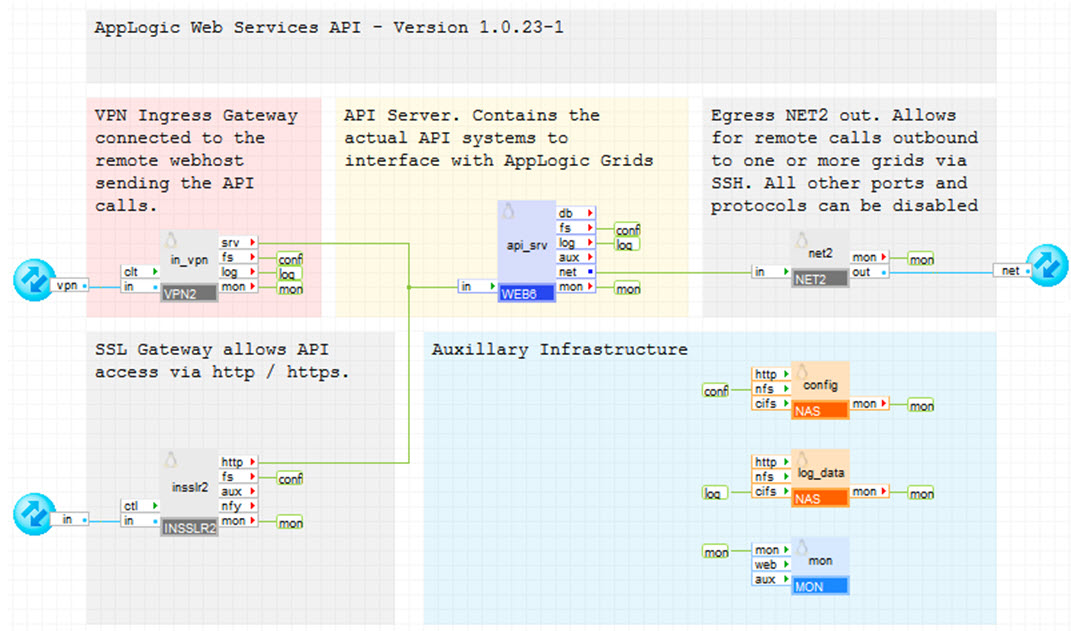
CA AppLogic Web Services 'WS_API' application infrastructure is show below:
It has the following components:
This section describes how to configure the WS_API application to start in one of the three different modes of operation.
To configure the WS_API application
app provision WS_API ws_api_instance --skipstart
vol manage ws_api_instance:conf
cd /mnt/vol/data
ls vdcs.conf
This file consists of information necessary to access the grids that will be managed through the REST API.
vi vdcs.conf
vdcs
   {
   vdc controller_name : host = controller_ip or FQDN
      {
      location  = "city, state, country"
      latitude  = latitude
      longitude = longitude
      }

#  vdc controller_name : host = controller_ip or FQDN
#     {
#     location  = "city, state, country"
#     latitude  = latitude
#     longitude = longitude
#     }
   }
To generate the key pair:
ssh-keygen -t dsa -f /mnt/vol/data/gridkey
When prompted to enter a password press enter. DO NOT ENTER A PASSWORD.
chmod 600 /mnt/vol/data/gridkey*
chown 99:99 /mnt/vol/data/gridkey*
cat /mnt/vol/data/gridkey.pub
user create api@domain.com pwd=- sshkey="ssh-dsa AAA.................xyz"
The user is created.
grid modify_acl local:user:api@domain.com=grid_administrator
Note: Other access levels can be used (see RBAC guide for more info) but be aware this will limit the commands the ws_api can run.
The application boundary can now be configured to work in either one of the three operating modes.
The WS_API application provides a web service interface to one or multiple grids through a Representational State Transfer (REST) based service. The HTTPS access method enables secure HTTP based REST API calls.
To configure the application in HTTPS mode
Note: If opts is left blank then, a generic SSL certificate is generated on application start. The http_mode and the allowed_hosts property settings can be left set to their default values. For example,
app config ws_api_instance iface.in=usr-ip iface.net=net-ip dns1=dns1 dns2=dns2 opts=ssl_country=Country,ssl_state=State,ssl_local=City,ssl_org_name=Organization,ssl_org_unit=Unit,ssl_common_name=Common Name,ssl_email_address=company@domain.com,ssl_export_pass=Passkey
The first time the application is started, a PEM formatted client key consisting of the client certificate and private key named api_client.pem and a PKCS12 formatted equivalent key for browsers named api_client.p14 is created in the /mnt/config/ssl_keys/keys/ directory of the conf volume. The api_client.p14 key file can be used for any browser based API access and the api_client.pem key for any non-browser based API access.
To generate any additional client certificates
The WS_API application provides a web service interface to one or multiple grids through a Representational State Transfer (REST) based service. The HTTP access method enables simple HTTP based REST API calls.
Note: This mode should be used with extreme caution. There is no security check involved in this mode and anybody can create an API request without any authentication. Also, all the traffic between the client and the ws_api_instance application is in plaintext.
To configure the application in HTTP mode, set the http_mode property to http along with setting the mandatory properties to appropriate value. For example,
app config ws_api_instance iface.in=usr-ip iface.net=net-ip dns1=dns1 dns2=dns2 http_mode=http
The application may now be started using the app start command or by using the "Start Application" button in the GUI.
The WS_API application provides a web service interface to one or multiple grids through a Representational State Transfer (REST) based service. The VPN access method enables HTTP requests to be sent through a secure VPN tunnel.
To configure the application in VPN mode
For example:
app config ws_api_instance iface.in=usr-ip iface.vpn=vpn-ip iface.net=net-ip dns1=dns1 dns2=dns2 vpn_standby=0 in_standby=1
After the application starts, the VPN server appliance generates necessary server certificates and key files if these files are not already present.
[ws_api_instance:main.in_vpn appliance]# ./security.sh generate_client
Generated client SSL cerfiticate and key file.
==============================================
These files, with CA certificate file, should be copied to VPN server into
/client/ subdirectory of data volume or fs-mounted volume.
Path to client files (client.a1c65e2bae3d0b57) should be specified in auth_path property.
Location of files:
client certificate: /mnt/data/server/client.a1c65e2bae3d0b57.crt
client key file: /mnt/data/server/client.a1c65e2bae3d0b57.key
CA certificate file located at /mnt/data/server/ca.crt
The client certificate (for example, client.xxxxxxxxxxxxxxxx.crt) and key file (for example, client.xxxxxxxxxxxxxxxx.key) are generated in the client sub-directory and the CA certificate (ca.crt) is generated in server sub-directory of the conf volume.
Open source and third-party software used
The following open source third-party software is installed on the code volume.
|
Software |
Version |
Modified |
License |
Notes |
|
JSON |
2.15 |
No |
Artistic |
N/A |
|
IPC-Run |
0.80 |
No |
GPLv2 |
N/A |
|
XML-Simple |
2.18 |
No |
Artistic |
N/A |
|
Sort-Naturally |
1.02 |
No |
Artistic |
N/A |
|
Copyright © 2013 CA Technologies.
All rights reserved.
|
|