

Latest Version: 5.1.3-3
This application is fully featured, scalable, structured wiki, based on TWiki 5.1.3. This version of TWiki is distributed under GPLv2. The scalable infrastructure is built using CA AppLogic ® and CA AppLogic ®'s catalog appliances.
TWiki is a flexible, powerful, and easy to use enterprise collaboration platform and knowledge management system. It is a Structured Wiki, typically used to run a project development space, a document management system, a knowledge base, or any other groupware tool, on an intonate or on the internet. Web content can be created collaboratively by using only a browser.
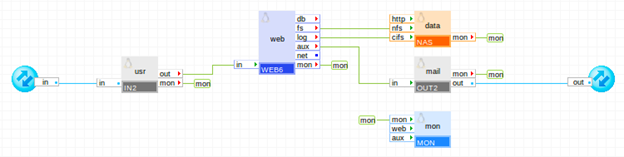
The TWiki application is packaged as an appliance. All required configuration is exposed on the boundary of the application, so that the application can be configured as a single appliance (using the Application Configuration property sheet in the editor).
Important! A valid IP addresses have to be configured for in and out terminals of TWiki application via the Interfaces tab of Application Configuration Editor from the pool of available IP addresses provided by the Grid Controller. Netmask and Gateway for mentioned above terminals will be taken automatically from the Grid Controller.
These are the only settings that you must configure in order to start a new copy of the application. Note that certain settings are automatically distributed to multiple appliances (such as the DNS servers, the admin e-mail, etc.). You don't need to understand the internal structure of the application in order to be able to configure it.
|
Property Name |
Type |
Description |
|
mail_server |
String |
Host name of the SMTP mail server through which TWiki should send e-mail notifications of bug changes. The mail server can be specified as a host name (e.g., mail.CA.com) or as an IP address (e.g., 12.34.56.78). Default: 0.0.0.0 (mail is disabled). |
|
dns1 |
IP |
IP address of the primary DNS server used for host name resolutions. This property is mandatory. |
|
dns2 |
IP |
IP address of the backup DNS server used for host name resolutions. Default: (empty; not used). |
|
allowed_hosts |
String |
List of hosts and/or subnets allowed to connect. Separate multiple entries with spaces or commas. Supported format example: 192.168.1.2 192.168.1.0/24 192.168.2.0/255.255.255.0. Default: 0.0.0.0/0 (all allowed) |
|
timezone |
String |
Specifies the time zone used in the application. If this property is empty, the timezone is not modified and left as-is. A list of supported time zones is available here. Default: empty |
|
mon_standby |
Int |
Determines whether application monitoring is disabled upon application start. If non-zero, monitoring is disabled, otherwise monitoring is enabled. The monitoring can be enabled at runtime by manually starting the mon appliance. Default: 1 (monitoring is disabled). |
|
Resource |
Minimum |
Maximum |
Default |
|
CPU |
0.35 |
44 |
1.25 |
|
Memory |
736 M |
70 GB |
1.25 GB |
|
Bandwidth |
5 Mbps |
8.5 Gbps |
900 Mbps |
The application itself uses a single volume, described below. It is part of the application and is already configured into the appliance instances. There are no volumes that need to be configured on the application boundary.
The TWiki application has the following volumes:
|
Volume |
Volume |
|
data |
Shared file system holding TWiki content, web logs and additional perl modules needed by the TWiki app. This volume is configured as the data volume of the data NAS appliance |
|
mon |
Monitoring data volume. This volume is configured as the data volume of the mon monitoring appliance |
Users of the TWiki application can access it at the usr input (defined by the usr_ip address).
This application is a fully featured, scalable, structured wiki, based on TWiki 5.1.3. This version of TWiki is distributed under GPLv2. The scalable infrastructure is built using CA AppLogic and CA AppLogic catalog appliances.
To start using the application
$TWiki::cfg{Password} = '...';
(Optional) Once you are done configuring your TWiki, it is recommended to restrict access to the configure section. To do this, have a look at the twiki/.htconf file on the data volume, it has a commented section that limits access to the configure section only to localhost. Feel free to uncomment that and edit it to suit your needs.
|
Copyright © 2013 CA Technologies.
All rights reserved.
|
|