

Latest Version: 5.2.0-19
The application infrastructure is shown below:
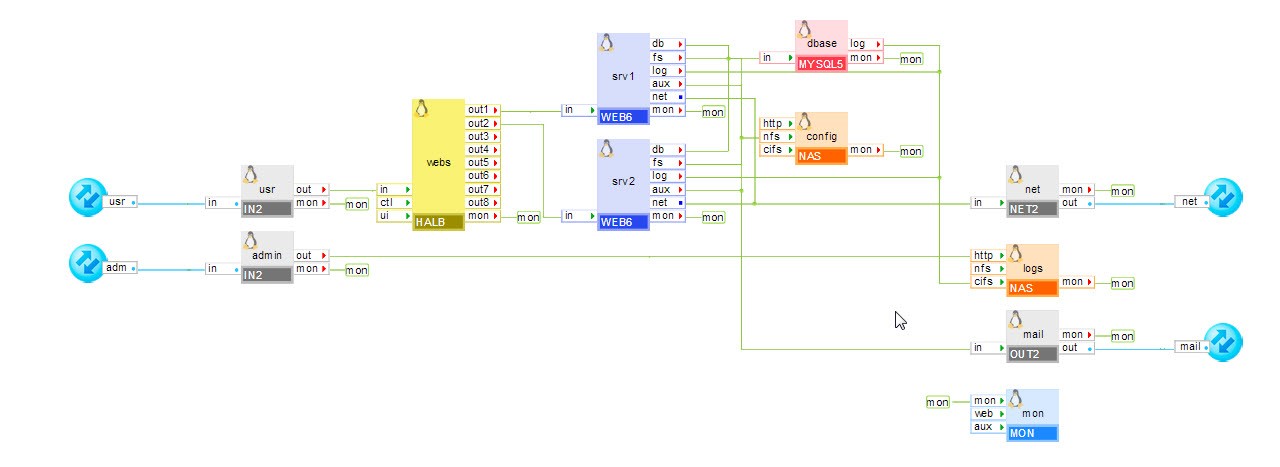
This application is a fully featured, scalable, CRM implementation. The application functionality is provided by SugarCRM Sugar Community Edition 5.2.0. This version of SugarCRM is licensed under GPLv3. The scalable infrastructure is built using CA AppLogic and CA AppLogic catalog appliances.
Sugar Open Source enables sales, marketing, and support organizations to manage their customer interactions more efficiently and profitably and is intended for both large and small companies.
For administration and user guides see the SugarCRM website.
The SugarCRM application is packaged as an appliance. All required configuration is exposed on the boundary of the application, so that the application can be configured as a single appliance (using the Application Configuration property sheet in the editor).
Note: A valid IP addresses have to be configured for usr, adm, net and out teminals of SugarCRM application via the Interfaces tab of Application Configuration Editor from the pool of available IP addresses provided by the Grid Controller. Netmask and Gateway for mentioned above terminals will be taken automatically from the Grid Controller.
These are the only settings that you must configure in order to start a new copy of the application. Note that certain settings are automatically distributed to multiple appliances (such as the DNS servers, the admin e-mail, etc.). You don't need to understand the internal structure of the application in order to be able to configure it
|
Property Name |
Type |
Description |
|
dns1 |
IP |
IP address of a DNS server for host name resolutions. Used to resolve the mail server name. This property is mandatory. |
|
dns2 |
IP |
IP address of a backup DNS server for host name resolutions. Used to resolve the mail server name. Default: 0.0.0.0 |
|
mail_server |
String |
Host name of the SMTP mail server through which SugarCRM should send e-mail notifications of bug changes. The mail server can be specified as a host name (e.g., mail.3tera.com) or as an IP address (e.g., 12.34.56.78). Default: 0.0.0.0 (mail is disabled). |
|
allowed_hosts |
String |
List of hosts and/or subnets allowed to connect. Separate multiple entries with spaces or commas. Supported format example: 192.168.1.2 192.168.1.0/24 192.168.2.0/255.255.255.0. Default: 0.0.0.0/0 (all allowed) |
|
denied_hosts |
String |
List of hosts and/or subnets to be denied connection. The format is the same as for allowed_hosts. Default: (empty) (none denied) |
|
admin_email |
String |
E-mail address of the application administrator. This address is used in web pages generated by the servers on error. Default: root@localhost.com |
|
usr_hostname |
String |
Host name under which the application is accessible. This is the name that users point their browsers at: http://usr_hostname/. This name should resolve to the IP address specified in usr_ip. Default: localhost |
|
admin_user |
String |
This is the user name of the administrator. This name is required in order to access the logs. Default: admin |
|
admin_password |
String |
This is the password of the administrator, required to access the logs. Default: 3tSugar Please change the admin password before running the application. |
|
timezone |
String |
Specifies the time zone used in the application. If this property is empty, the timezone is not modified and left as-is. A list of supported time zones is available here. Default: empty |
|
mon_standby |
Integer |
Determines whether application monitoring is disabled upon application start. If non-zero, monitoring is disabled, otherwise monitoring is enabled. The monitoring can be enabled at runtime by manually starting the mon appliance. Default: 1 (monitoring is disabled). |
|
Resource |
Minimum |
Maximum |
Default |
|
CPU |
0.85 |
116 |
2.15 |
|
Memory |
1.406 GB |
202 GB |
2.937 GB |
|
Bandwidth |
11 Mbps |
20.5 Gbps |
1.55 Gbps |
The application itself uses several volumes. They are part of the application and are already configured into the appliance instances. There are no volumes that need to be configured on the application boundary.
Initially the only account setup on the application is the administrator. The administrator must log in and create any needed user accounts.
|
User |
Password |
|
admin |
3tSugar |
Users of the SugarCRM application can access it at the address defined by the usr terminal address.
There are no predefined users built into the application. User accounts can be created by logging in with the Administrator account listed above.
The IT administrator of the SugarCRM application can access the logs using a browser. The logs are accessible at the address defined by the adm terminal address.
To gain access to the logs, the administrator needs to authenticate using the user name and password defined in the admin_user and admin_password properties, respectively.
If you intend to use this application in a production environment you may want to increase the size of the data volume by creating new application volume of a larger size (more users require more disk space) and copying the data volume onto it. Then simply assign the new volume to the dbase appliance and restart the app.
|
Copyright © 2013 CA Technologies.
All rights reserved.
|
|