

|
At a Glance |
|
|
Catalog |
System_ms |
|
Category |
Web Servers |
|
User volumes |
no |
|
Min. memory |
2.062 GB (x86), 6.062 GB (x64) |
|
OS |
Windows |
|
Constraints |
no |
|
Questions/Comments |
|
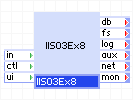
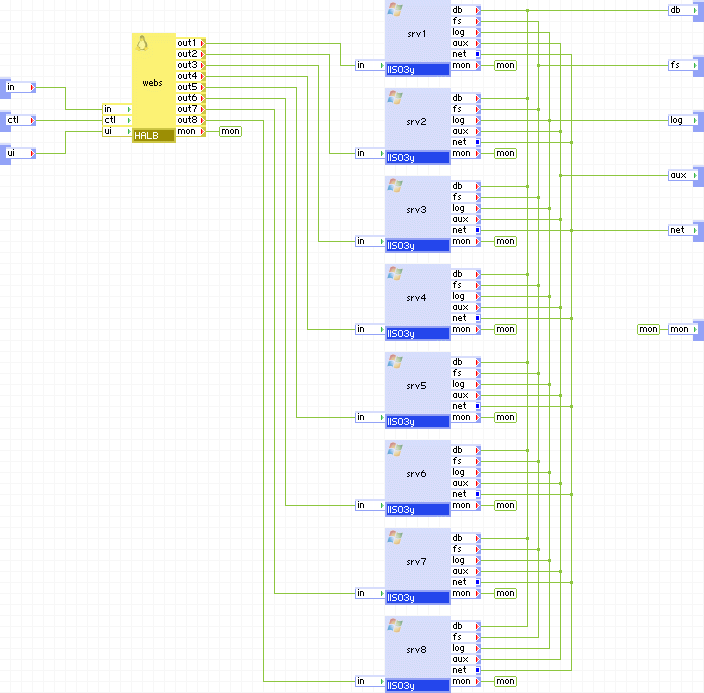
IIS03yx8 and IIS08yx8 are scalable IIS servers that consists of a single load balancer (HALB) and eight IIS servers (for example, IIS03y).
IIS03yx8 and IIS08yx8 serve static web content and execute scripts from shared file storage (using CIFS). The paths to the documents and scripts are configurable.
IIS03yx8 and IIS08yx8 have has three generic output terminals intended for accessing external services from scripts on the content volume. The db terminal is for accessing a database; the fs terminal is for accessing shared file storage (using CIFS); and the aux terminal is for sending e-mail messages to an SMTP server.
The log terminal can be used to connect IIS to a shared file system on which to store logs.
The configuration of the IIS03yx8 and IIS08yx8 servers is provided through properties. The properties are designed to cover most uses in an easily configurable way. Typically, only a few need to be set to non-default values.
If the features provided by the IIS03yx8 and IIS08yx8 appliances do not meet your needs, contact our TechnicalSupport to discuss the possible options. We may be able to extend the catalog by providing appliances that cover your needs.
Important! IIS03yx8 and IIS08yx are distributed with CA AppLogic® in the system_ms catalog. Contact your service provider to have this catalog installed on your grid. These appliances include references to /system_ms:IIS03y or /system_ms:IIS08y; see the installation reference for instructions on creating IIS03y and IIS08y from a base windows server appliance. If the system_ms catalog is installed on your grid and any one of the /system_ms:IIS03y or /system_ms:IIS08y appliances are missing, the infrastructure editor displays an error message every time an application is opened. To resolve this issue, either create all of the missing appliances or remove the unused IIS03yx4/IIS03yx8/IIS08yx4/IIS08yx8 appliances from the system_ms catalog.
|
Name |
Latest Version |
OS |
IIS |
VB |
ASP.NET |
Notes |
|
IIS03Wx8 |
1.0.6-1 |
Windows Server 2003 "Web" SP2 (x86) |
6 |
6 |
3.5 SP1 |
- |
|
IIS03Sx8 |
1.0.6-1 |
Windows Server 2003 "Standard" SP2 (x64) |
6 |
6 |
3.5 SP1 |
- |
|
IIS03Ex8 |
1.0.6-1 |
Windows Server 2003 "Enterprise" SP2 (x64) |
6 |
6 |
3.5 SP1 |
- |
|
IIS03DCx8 |
1.0.6-1 |
Windows Server 2003 "Datacenter" SP2 (x64) |
6 |
6 |
3.5 SP1 |
- |
|
IIS08Wx4 |
1.0.6-1 |
Windows Server 2008 "Web" R2 (x64) |
7.5 |
6 |
4.0 |
- |
|
IIS08Sx4 |
1.0.6-1 |
Windows Server 2008 "Standard" R2 (x64) |
7.5 |
6 |
4.0 |
- |
|
IIS08Ex4 |
1.0.6-1 |
Windows Server 2008 "Enterprise" R2 (x64) |
7.5 |
6 |
4.0 |
- |
|
IIS08DCx4 |
1.0.6-1 |
Windows Server 2008 "Datacenter" R2 (x64) |
7.5 |
6 |
4.0 |
- |
IIS03yx4
|
Resource |
Minimum |
Web (x86) Maximum |
Default |
Tested |
|
CPU |
0.9 |
32 |
2.4 |
8 |
|
Memory |
2.062 GB |
48 GB |
4.25 GB |
32 GB |
|
Bandwidth |
9 Mbps |
18 Gbps |
1.6 Gbps |
2 Gbps |
|
Resource |
Minimum |
Standard (x64) Maximum |
Enterprise (x64) Maximum |
Datacenter (x64) Maximum |
Default |
Tested |
|
CPU |
2.1 |
48 |
80 |
272 |
2.4 |
8 |
|
Memory |
6.062 GB |
288 GB |
544 GB |
544 GB |
6.25 GB |
32G |
|
Bandwidth |
9 Mbps |
18 Gbps |
18 Gbps |
18 Gbps |
1.6 Gbps |
2 Gbps |
IIS08yx4
|
Resource |
Minimum |
Web (x64) Maximum |
Standard (x64) Maximum |
Enterprise (x64) Maximum |
Datacenter (x64) Maximum |
Default |
|
CPU |
2.1 |
48 |
48 |
80 |
272 |
2.4 |
|
Memory |
6.062 GB |
288 GB |
288 GB |
544 GB |
544 GB |
6.25 GB |
|
Bandwidth |
9 Mbps |
18 Gbps |
18 Gbps |
18 Gbps |
18 Gbps |
1.6 Gbps |
|
Name |
Direction |
Protocol |
Description |
|
in |
in |
HTTP |
Serves HTTP requests coming from web clients. Serves the HTTP/1.1 and 1.0 protocols. |
|
ctl |
in |
HTTP |
Control terminal that is used for enabling/disabling the outputs and retrieving output terminal state from load-balancer. |
|
ui |
in |
HTTP |
Exposes a Web UI that contains load-balancer runtime statistics. |
|
db |
out |
Any |
Access to a database server. Usage is defined by whatever scripts reside on the content volume (if any). This terminal may be left unconnected if it is not used. |
|
fs |
out |
CIFS |
Access to a network file system for shared file storage, providing anonymous logins and a read/write share named share. Usage is defined by whatever scripts reside on the content volume (if any). Software on the content volume 'sees' the remote file system as \\fs\share in the appliance's filesystem space. This terminal must be connected. |
|
log |
out |
CIFS |
Access to a CIFS-based network file system for storing IIS logs. The connected server must allow anonymous logins and have a read-write share named share. This terminal may be left unconnected if it is not used. |
|
aux |
out |
Any |
Access to an SMTP server for sending outgoing e-mail. Usage is defined by whatever scripts reside on the content volume (if any). Note that 'IIS SMTP' is not configured on the appliance; any application that needs to send mail should simply use SMTP directly, using 'aux' as the target hostname. |
|
net |
out |
Any |
Gateway output for subnet access. |
|
mon |
out |
CCE |
Sends performance and resource usage statistics. |
|
Property name |
Type |
Description |
|
docs_dir |
String |
Root directory on the remote NAS volume where the documents to be served are located. For example, it may be mydocs. If docs_dir is set to the empty string, the root directory of the content volume is used. |
|
logs_enabled |
String |
Controls whether IIS logging is enabled. Allowed values are on and off. If set to on and the log terminal is connected, then logs will be stored on the remote NAS appliance, on the cifs share. If set to on and the log terminal is not connected, then logs will be stored on the Windows boot drive, in the default location (C:\WINDOWS\system32\LogFiles\W3SVC1\*). If this is set to off, logs are completely disabled. Default: off |
|
srv2_standby |
Integer |
Specifies whether the second IIS0Ny server is in standby mode. If non-zero, the second IIS0Ny server is in standby mode, otherwise it is not in standby mode. |
|
srv3_standby |
Integer |
Specifies whether the third IIS0Ny server is in standby mode. If non-zero, the third IIS0Ny server is in standby mode, otherwise it is not in standby mode. |
|
srv4_standby |
Integer |
Specifies whether the fourth IIS0Ny server is in standby mode. If non-zero, the fourth IIS0Ny server is in standby mode, otherwise it is not in standby mode. |
|
srv5_standby |
Integer |
Specifies whether the fourth IIS0Ny server is in standby mode. If non-zero, the fifth IIS0Ny server is in standby mode, otherwise it is not in standby mode. |
|
srv6_standby |
Integer |
Specifies whether the fourth IIS0Ny server is in standby mode. If non-zero, the sixth IIS0Ny server is in standby mode, otherwise it is not in standby mode. |
|
srv7_standby |
Integer |
Specifies whether the fourth IIS0Ny server is in standby mode. If non-zero, the seventh IIS0Ny server is in standby mode, otherwise it is not in standby mode. |
|
srv8_standby |
Integer |
Specifies whether the fourth IIS0Ny server is in standby mode. If non-zero, the eighth IIS0Ny server is in standby mode, otherwise it is not in standby mode. |
Important! All enumerated string properties are not case sensitive (lowercase). All other string properties are case sensitive.
These are additional properties that should typically not need to be configured. They can be used to tune up IIS0Nyx8 in non-standard circumstances.
|
Property name |
Type |
Description |
|
lb_mode |
String |
Specifies the mode of operation and a way to use the named session cookie for session identification. Valid values are: |
|
lb_cookie_name |
String |
The name of the cookie used to identify a session. For the passive modes ( passive and synch - see the mode property below), this is the name of the cookie used by the back-end servers connected to out1 - out8 to identify client sessions. For the insert mode, this is the name of the cookie that HALB should insert into HTTP responses to make each client 'stick' with a single server. If this property is set to the empty value, no session tracking is done and all requests are distributed in a simple round-robin fashion. Ignored for the source mode. |
|
lb_cookie_check_length |
Int |
Defines how many bytes from the value of cookie are used as unique key in passive mode of operation to match session to backend web server. Default value of 10 is usually sufficient for all common PHP and java applications. This value must always be equal or less than the length of the cookie value. |
|
lb_max_connections |
integer |
The maximum number of concurrently active connections that the load balancer handles. When this number is reached, new connections are still accepted, but their processing is delayed until another connection is closed. Upon start, load-balancer automatically determines the maximum number of connections based upon available memory, compares it to the value of this property and uses the lowest value. If this property equals 0 then the computed value is used. Note that neither the available memory nor an explicit setting of this property have a direct effect on the balancer's throughput or its maximum request rate - setting a low number (or having little memory) affects response only if the back-end servers are performing lengthy operations for each request (for example, database searches), causing many requests to remain open at the same time. |
|
lb_backup_outputs |
String |
A space or comma delimited list of outputs ( out1 - out8 ) that are considered backups. Traffic is directed to the backup servers only if all backend servers are unavailable. The purpose of these backup servers is to notify clients that something is wrong or redirect them, instead of throwing errors from unavailable backend or timing out. |
|
lb_healthcheck_url |
String |
The URL used to perform the health check of the backend web servers in http_get and http_head health check methods. May be specified as a complete URL (http://host.name/file/to/check/for.php) or as a relative path (/file/to/check/for.php). If specified as a URL, HALB uses the HTTP/1.1 protocol while performing the health checks using the hostname extracted from UR, in a "Host:" header. This allows usage of virtual hosts. If specified as a relative path, HALB uses the HTTP/1.0 protocol and checks for the document specified by this property. If this property is empty, load-balancer checks for the default root '/' using the HTTP/1.0 protocol. |
|
lb_healthcheck_agent |
String |
The string used as an agent identifier for http_get and http_head health check methods. If empty, "HALB-health-check" is used. |
|
lb_healthcheck_method |
String |
The method used for the health check of the backend web servers. |
|
lb_healthcheck_regexp |
String |
A test string used with the http_get health check mode. Short or common values (eg. "OK") will likely cause false positive matches. This string is a Perl regular expression. |
|
lb_healthcheck_interval |
Int |
Interval between health checks of the backend web servers (specified in seconds). |
|
lb_timeout |
integer |
Timeout in seconds to expire inactive sessions. If set to zero, inactive sessions do not expire. If set to a non-zero value, inactive sessions resumed after timeout seconds are considered stale, and requests bearing the 'forgotten' cookie are treated as if they have no cookie at all and are directed to a random server, using the usual round-robin method. This property is only valid for passive mode and ignored for all other modes. |
|
lb_client_timeout |
Int |
Timeout in seconds for waiting for a request from a client after establishing the connection. |
|
lb_server_timeout |
Int |
Timeout in seconds for waiting for a reply from a backend web server after establishing the connection. |
|
lb_conn_timeout |
Int |
Timeout in seconds for establishing any tcp connection. This includes the health checks. Extra attention must be paid to this setting, because if under high load the health checks time out because of unsufficiently small value, load-balancer starts to disable outputs. It is not recommended to set it lower than 20 seconds. |
|
lb_username |
String |
Username for accessing the load-balancer GUI through the ui terminal. If empty, there is no authentication. |
|
lb_password |
String |
Password for accessing the load-balancer GUI through the ui terminal. Password is ignored if username is empty. |
|
lb_ctl_port |
Int |
Port that is used to access the web service control interface through the ctl terminal. |
|
lb_ui_port |
Int |
Port that is used to access the load-balancer runtime statistics GUI through the ui terminal. |
|
index_files |
String |
Ordered, space separated list of files to use as a directory index page in case the client requests a URL that refers to a directory name. |
|
max_connections |
Integer |
Maximum number of concurrent active connections that each IIS node can handle. The actual number of concurrent connections may be limited to less than the value set for this property if there is not enough system memory. See the Memory Usage section. |
|
idle_timeout_sec |
Integer |
Timeout, in seconds, for keeping a client connection open if there is no request or response going through. Keeping this timeout short helps drop forgotten connections quickly. Default: 15 |
|
data_timeout_sec |
Integer |
Timeout, in seconds, for receiving or sending more data if a data transfer has started but is not completed. This timeout allows IIS03y to drop connections that have been forgotten while still allowing delays during the transfer. Default: 300 |
Important! All enumerated string properties are not case sensitive (lowercase). All other string properties are case sensitive.
This section provides useful information for configuring scripts that serve dynamic content.
Fixed Directory Names
On starting the HTTP server, the following directories and files are available within the filesystem space of the each IIS0Ny instance (using absolute directory names outside of these locations in any script or configuration file is not recommended):
\\fs\share - root of the shared read/write file storage provided by a NAS server connected to the fs terminal.
Access Control
Files on the content volume should have 'read' permission for Everyone, to be eligible for serving through HTTP.
To serve dynamic content from the remote file system share, each IIS0Ny interior appliance must be configured.
To configure IIS03y interior appliance
      x86: C:\Windows\Microsoft.NET\Framework\v2.0.50727\CasPol.exe -m -ag 1 -url "file:////\\fs\share\*" FullTrust -exclusive on

      or

      x64: C:\Windows\Microsoft.NET\Framework64\v2.0.50727\CasPol.exe -m -ag 1 -url "file:////\\fs\share\*" FullTrust -exclusive on
Important! Replace "file:////\\fs\share\*" with a correct path if required (repeat the command for multiple folders)
Sending E-mail
The 'IIS SMTP' system is not configured on any IIS0Ny. Do not use it for sending e-mail from this appliance. In all cases, your SMTP mailer should be set up to use aux as the hostname of the SMTP server. See the use cases for examples on how to use IIS0Ny with email.
The following is an example of the interior of IIS0Nyx8.
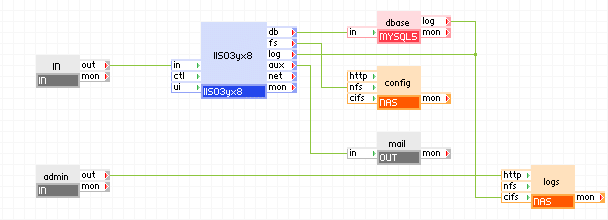
Scalable 2-tier application
Known Limitations
|
Copyright © 2012 CA.
All rights reserved.
|
|