

Version 3.5.19 - August 13, 2012
Note: This release is the official CA AppLogic® General Availability release and is available immediately to partners and customers who participate in the General Availability program. The current production release of CA AppLogic® is 3.5.19.
This section describes new features and enhancements included in CA AppLogic® 3.5.
This section contains the following topics:
Storage Area Network (SAN) Support Over NFS
Dynamic Canvas: Status and Control
Advanced Application Start/Restart Options in the User Interface
Other CA AppLogic® Enhancements
Backbone Fabric Controller (BFC) New Features
This release lets you connect your existing SAN to your CA AppLogic® grid using the IP-based Network File System (NFS) protocol. Multiple grids running within the same backbone can share a SAN. For each grid, CA AppLogic® uses a unique directory on the SAN where all of the volumes for the grid are stored.
Note: For more information about this feature, see the User Interface Reference Guide.
This feature lets you monitor component state changes within an application, and start and stop these components, all from the infrastructure editor.
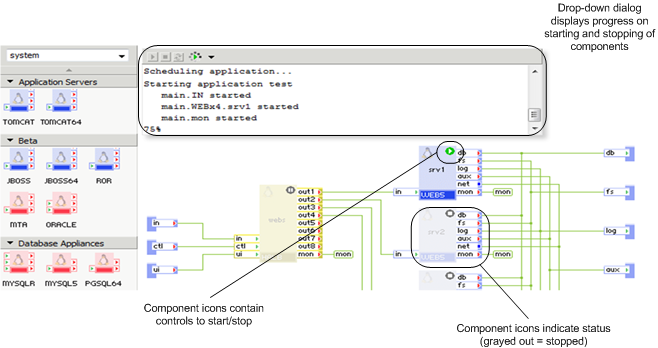
Note: For more information about this feature, see Common Operations in the Grid User Guide, and Editing Applications in the User Interface Reference Guide.
This release introduces a new method to control the consumption of resources using predefined quotas.
Note: Quotas are disabled by default and do not constrain resources for users.
Note: For more information about this feature, see Quotas in the Grid Administration Guide.
In previous CA AppLogic® releases, appliances supported no more than one external (raw) interface. As a result, they were also limited to using a single VLAN. The new Multiple External Interface (MEI) feature enables appliances to use multiple external interfaces and consequently multiple VLANs.
External interfaces are now visible on the appliance boundary, just like with regular input and output terminals. In previous releases external interfaces had no visual representation in the infrastructure editor. External interfaces are now connected to raw interfaces that are defined on the application boundary. These raw interfaces represent an application’s connections to the outside world and are now explicitly shown in the diagram, just like regular terminal connections between appliances. In addition, the new APK that is shipped with the release now automatically configures the external interfaces of an appliance.
There is a new Interfaces tab in the Application Configuration editor that shows the application’s raw interfaces and their settings. Network (VLAN) and IP addresses are the only configurable settings selected by the user for each raw interface. Netmask and gateway settings are automatically derived from the grid’s configuration, selecting settings that correspond to the chosen network and IP address. The CLI and Web services API have also been extended to allow the configuration of an application’s IP settings, such as app config and app provision.
The BFC is used to define the VLANs and IP ranges within each VLAN. These settings are propagated to the CA AppLogic® grid and are displayed on the grid’s dashboard. These are the settings that may be configured on the raw (external) interfaces exposed by an application.
With the addition of the multiple external interface feature, backwards compatibility is fully maintained for existing appliances that use the old style external interfaces. Older appliances that use a single external interface receive their network/IP configuration through properties. However, appliances that use the new style external interfaces are not compatible with older versions of CA AppLogic® that do not support the multiple external interface feature (releases prior to CA AppLogic® 3.5).
Important! The default catalog and sample applications have not been updated to support multiple external interfaces. If you want to update one of these appliances to use multiple external interfaces, manually change the appliance script and install the new APK from the CA AppLogic® 3.5 General Availability release. The catalog and sample applications will be updated to support multiple external interfaces in a future release.
Note: For more information, see Define Multiple Interfaces in the Appliance Developer Guide.
The CA AppLogic® GUI now lets you select various advanced start options when starting and restarting applications. In previous releases, there were no start/restart options available to select from the GUI, and the only way to specify options for starting applications was through the CLI or web API.
The following options are now available in the GUI:
Note: For more information, see the Command Line Shell Reference Guide and the Grid User Guide.
You can now control the volume repair speed used by the grid using the grid set command (grid set vol_repair_speed). This enables the degraded volumes within the grid to be repaired faster, which speeds up grid recovery. By default, the volume repair speed is only 10MB/sec, which can be very slow depending upon volume size.
Note: Exercise caution when changing the volume repair speed because this can impact the performance of running applications. The volume repair speed can only be changed by grid maintainers.
The new Windows Appliance Kit (APK) provides an easier installation and user-friendly interface for configuring Windows-based appliances. Support for the localized versions of the Windows OS is planned for a future release.
Note: The Appliance Developer Guide reflects the previous Windows APK. However, you can access an updated version of the affected topics from this guide for the new Windows APK.
If you participated in the beta program, review the upgrade considerations.
This release includes the 3tcollect utility. The 3tcollect utility is a command-line tool that you can execute on the Backbone Fabric Controller (BFC) or the grid controller to collect log and configuration data.
Note: For more information about this feature, see Support Utility in the Grid Administration Guide.
This release includes a hidden attribute for parameter fields to secure property values, such as passwords. Using the hidden attribute for a property hides the property value so that regular users cannot see the value.
Note: For more information about this feature, see the User Interface Reference Guide.
This release supports enhanced hardware compatibility by including the latest stable version of the Linux kernel 3.2.2, Xen 4.1.2, and also supporting ESX 4.1 update 2.
This release includes a Cloud Commons integration between the Marketplace servers and the customer grids. This integration facilitates the delivery of purchased items from the Marketplace.
This section describes enhancements to the CA AppLogic® documentation.
Note: This topic only describes general enhancements to the documentation. For details about the technical changes to the documentation, see the Documentation Changes topics at the beginning of each guide.
The previous bookshelf contained links that opened individual guides in an HTML window that only had access to that guide. If you wanted to access another guide in the bookshelf, you had to click the Back to Bookshelf link at the top of the TOC pane.
For this release, the links open an HTML window that contains all of the guides, greatly improving navigation between guides.
The previous bookshelf primarily contained links to the guides. For this release, we are introducing an End-to-End bookshelf that also contains links to articles, social forums, and videos, among other things.
We have changed the names of the bookshelf categories to reflect their content better, and we have also moved some of the guides into different categories. These categories are also included in the all-in-one HTML window.
We have created the following new guides:
This guide is comprised of the following content:
This guide contains content previously in the Backbone Fabric Controller (BFC) User Guide. We moved this content because it is not related to BFC.
This guide describes how to use the new BFC web API.
We now include a Documentation Changes topic at the beginning of each guide that lists changes related to the marquee features described in this Release Notes, and other important changes.
We now include a glossary in the Overview Guide to define some of the CA AppLogic® terms that are used throughout the documentation.
|
Copyright © 2012 CA.
All rights reserved.
|
|