The Product Backlog › User Stories › User Story Dependencies › View Dependency Flags and Tool Tips
View Dependency Flags and Tool Tips
User stories with dependency relationships have the following indicators to flag the relationship:
- The detail page for a user story displays a message indicating active dependencies.

- List pages show icons to indicate dependency relationships. You can see the dependency flags for a story from the backlog, sprint backlog, and other lists that show user stories. For example, the Flag column on the Backlog page shows icons that indicate one of the following dependency relationships:
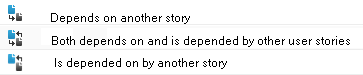
Hover over the dependency icon to open a tooltip that lists the stories in a dependency relationship with the flagged story.
Click the user story link in the tooltip, to open the User Story Detail page for the user story.
When a story dependency closes, the following indicators change:
- The message section in the user story detail page disappears. If the dependent story depends on other open stories, the message continues to display.
- The icon for the dependency relationship disappears from the Flag column in list pages such as the backlog, unless the story has additional dependencies.

