

As an administrator, you can configure CA AuthMinder for one of the following roles:
The following steps summarize the process that occurs when you configure CA AuthMinder as a RADIUS server:
The following steps summarize the process that occurs when you configure CA AuthMinder as a proxy server for a RADIUS server:
In some scenarios, you configure CA AuthMinder as a RADIUS server and as a proxy to a RADIUS server. For example, if you have recently installed CA AuthMinder. Some users were migrated to CA AuthMinder, and the remaining users are still on the existing RADIUS solution. In this case, you configure CA AuthMinder as both a RADIUS server and as a proxy to a RADIUS server. The RADIUS authentication requests from users that are migrated to CA AuthMinder are handled by CA AuthMinder. For all other users, CA AuthMinder forwards the RADIUS authentication requests to the existing RADIUS server because the users or users’ credentials are not found in the CA AuthMinder database.
This scenario explains the procedure to configure CA AuthMinder for RADIUS. The following diagram outlines the steps of this procedure:
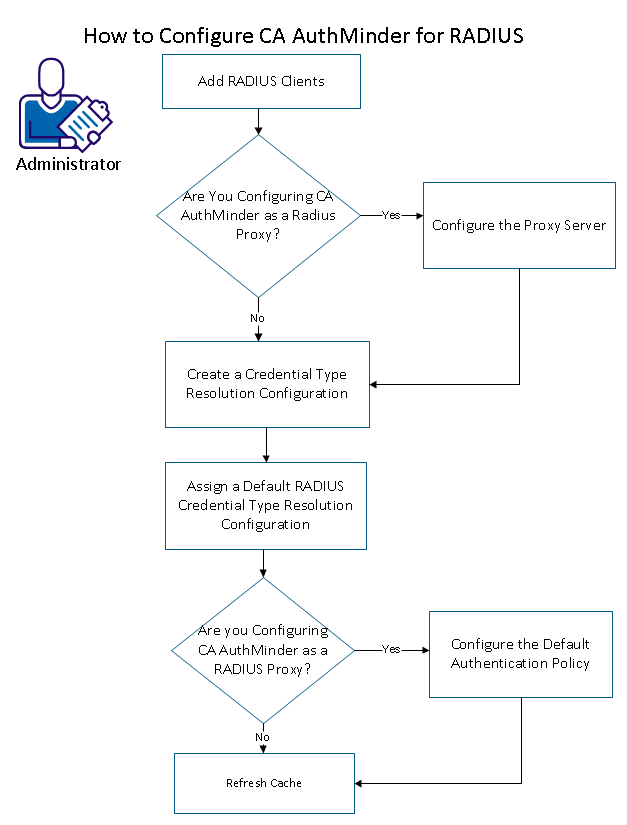
Follow these steps:
|
Copyright © 2014 CA Technologies.
All rights reserved.
|
|