

|
|
|
By default, CA ARCserve D2D On Demand uses the Hypertext Transfer Protocol (HTTP) for communication among all of its components. If you are concerned about the security of passwords that are communicated between these components you can change the protocol being used to Hypertext Transfer Protocol Secure (HTTPS). In addition, if you do not need this extra level of security, you can easily change the protocol being used back to HTTP.
Note: After you change the protocol from HTTP to HTTPS or from HTTPS to HTTP, restart the browser and reconnect to CA ARCserve D2D On Demand.
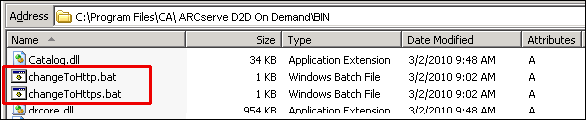
Follow these steps:
C:\Program Files\CA\ARCserve D2D On Demand\BIN
When the protocol has been successfully changed, the following message is displayed:
"Protocol has been changed to HTTPS. Use https://localhost:8014 to access CA ARCserve D2D On Demand system."
Note: When the protocol is changed to HTTPS, a warning displays in the web browser due to a self-signed security certificate and the message asks you to either ignore the warning and proceed or add that certificate to the browser to prevent that warning from coming back in future.
C:\Program Files\CA\ARCserve D2D On Demand\BIN
When the protocol has been successfully changed, the following message is displayed:
"Protocol has been changed to HTTP. Use http://localhost:8014 to access CA ARCserve D2D On Demand system."
| Copyright © 2012 CA. All rights reserved. | Tell Technical Publications how we can improve this information |