

Latest version: 2.0.2-1

|
At a Glance |
|
|
Catalog |
System |
|
Category |
Misc. Appliances |
|
User volumes |
yes |
|
Min. memory |
96M |
|
OS |
Linux |
|
Constraints |
no |
|
Questions/Comments |
|
SQUID is a caching forward or reverse proxy appliance. SQUID acts as an agent, accepting HTTP requests from clients on its in terminal and passing them to the appropriate server connected to the out terminal. It stores a copy of the returned data in a memory and in an on-disk cache. When the same data is requested multiple times, cached data is returned to the client, speeding up access and decreasing source server load.
SQUID supports two modes of operation, proxy and web-accelerator.
Proxy mode
In proxy mode, SQUID acts as a caching forward proxy and is typically installed between one or more clients and the internet. It keeps local copies of frequently requested data and returns cached content when applicable, thereby accelerating service requests and reducing upstream bandwidth.
Web accelerator mode
In web accelerator mode, SQUID acts as a caching reverse proxy and is typically installed in front of one or more web servers. All traffic targeted to the web server(s) goes through SQUID. SQUID keeps local copies of frequently requested data and returns cached content when applicable, decreasing response time and load on the backend servers.
Resources
|
Resource |
Minimum |
Maximum |
Default |
Tested |
|
CPU |
0.05 |
2 |
0.2 |
2 |
|
Memory |
96 MB |
4 GB |
256 MB |
4 GB |
|
Bandwidth |
1 Mbps |
2 Gbps |
250 Mbps |
1.5 Gbps |
Memory Requirements for SQUID
Amount of memory required by SQUID depends on the cache volume size and the number of concurrent requests. SQUID uses up to 10 Megabytes of memory for indexing 1 Gigabyte of cache storage. So using 100 Gb cache volume requires additional 1 Gb of memory. Also some amount of memory is used to serve each connection. SQUID uses up to 20 Megabytes of memory to serve 1000 concurrent connections. So if 5000 concurrent connections are expected then SQUID memory should be increased by 100 Mb.
Important! If not enough memory is available, SQUID may malfunction.
Terminals
|
name |
dir |
prot. |
description |
|
in |
in |
HTTP |
Accepts incoming requests. |
|
out |
out |
HTTP |
Sends traffic out to the destination servers and receives the responses. |
|
log |
out |
CIFS |
Access to a CIFS-based network file system for storing logs. The connected server must allow anonymous logins and have a read-write share named share. This terminal may be left unconnected if it is not used. |
|
mon |
out |
CCE |
Sends performance and resource usage statistics. This terminal may be left unconnected if not used. |
User Volumes
|
name |
description |
|
cache |
Volume for cache files storage. This volume is mandatory. The minimum size of cache volume is 100M. |
Notes:
According to squid guides about 25% of the cache volume are used for storing index, so the cache volume should be 25% larger. Example: If cache should store 900 Mb objects then the cache volume should have size of 1200 Mb ( 75% = 900 Mb for storing cached objects and 25% = 300 Mb for index files).
General Properties
|
name |
type |
description |
|
mode |
String |
Mode of operation. Valid values are proxy or web_accelerator. |
|
listen_port |
Int |
Port to accept requests from internal clients in proxy mode or from external web site users in web_accelerator mode. |
|
hostname |
String |
Hostname to use in error messages. |
|
connect_timeout |
Int |
The timeout in seconds during which SQUID waits for the TCP connect to the requested server. If the timeout is exceeded, SQUID responds with the error message "Connection timed out" to the client. |
Logging Properties
|
name |
type |
description |
|
log_enable |
String |
Enable or disable the access log. |
|
log_filename |
String |
Filename for the access log, relative to the file system accessed through the log terminal. Filename can include a path, for example, a value of access.log causes the log file to be /mnt/log/access.log, while a value of /proxy_logs/squid1_access.log causes the log file to be /mnt/log/proxy_logs/squid1_access.log. |
|
log_format |
String |
Format of the access log. |
Custom Counters
The SQUID appliance reports the following custom counters through the mon terminal.
|
SNMP counter name |
Counter name |
Description |
|
SQUID-MIB::cacheSysVMsize |
SysVMsize |
Memory cache size in KB. |
|
SQUID-MIB::cacheSysStorage |
SysStorage |
Disk cache size in KB. |
|
SQUID-MIB::cacheUptime |
Uptime |
SQUID uptime in timeticks (1/100 of second). |
|
SQUID-MIB::cacheSysPageFaults |
SysPageFaults |
Page faults with physical I/O. |
|
SQUID-MIB::cacheSysNumReads |
SysNumReads |
HTTP I/O number of reads. |
|
SQUID-MIB::cacheMemUsage |
MemUsage |
Total memory used by SQUID in KB. |
|
SQUID-MIB::cacheCpuTime |
CpuTime |
Amount of cpu seconds consumed. |
|
SQUID-MIB::cacheCpuUsage |
CpuUsage |
The percentage use of the CPU. |
|
SQUID-MIB::cacheMaxResSize |
MaxResSize |
Maximum Resident Size in KB. |
|
SQUID-MIB::cacheNumObjCount |
NumObjCount |
Number of objects stored in the cache. |
|
SQUID-MIB::cacheCurrentUnlinkRequests |
CurrentUnlinkRequests |
Requests given to unlinkd. |
|
SQUID-MIB::cacheCurrentUnusedFDescrCnt |
CurrentUnusedFDescrCnt |
Available number of file descriptors. |
|
SQUID-MIB::cacheCurrentResFileDescrCnt |
CurrentResFileDescrCnt |
Reserved number of file descriptors. |
|
SQUID-MIB::cacheCurrentFileDescrCnt |
CurrentFileDescrCnt |
Number of file descriptors in use. |
|
SQUID-MIB::cacheCurrentFileDescrMax |
CurrentFileDescrMax |
Highest number of file descriptors in use. |
|
SQUID-MIB::cacheProtoClientHttpRequests |
ProtoClientHttpRequests |
Number of HTTP requests received. |
|
SQUID-MIB::cacheHttpHits |
HttpHits |
Number of cache HTTP Hits. |
|
SQUID-MIB::cacheHttpErrors |
HttpErrors |
Number of cache HTTP Errors. |
|
SQUID-MIB::cacheHttpInKb |
HttpInKb |
HTTP traffic received, in kilobytes. |
|
SQUID-MIB::cacheHttpOutKb |
HttpOutKb |
HTTP traffic sent, in kilobytes. |
|
SQUID-MIB::cacheServerRequests |
ServerRequests |
Number of requests from the client for the cache server. |
|
SQUID-MIB::cacheServerErrors |
ServerErrors |
All errors for the cache server from client requests |
|
SQUID-MIB::cacheServerInKb |
ServerInKb |
Incoming traffic from servers, in kilobytes. |
|
SQUID-MIB::cacheServerOutKb |
ServerOutKb |
Outgoing traffic to servers, in kilobytes. |
|
SQUID-MIB::cacheClients |
Clients |
Number of clients accessing cache |
|
SQUID-MIB::cacheHttpAllSvcTime.1 |
HttpAllSvcTime1 |
CPU time spent for processing HTTP requests (for the last minute), in seconds. |
|
SQUID-MIB::cacheHttpAllSvcTime.5 |
HttpAllSvcTime5 |
CPU time spent for processing HTTP requests (for the last 5 minutes), in seconds. |
|
SQUID-MIB::cacheHttpAllSvcTime.60 |
HttpAllSvcTime60 |
CPU time spent for processing HTTP requests (for the last 60 minutes), in seconds. |
|
SQUID-MIB::cacheHttpMissSvcTime.1 |
HttpMissSvcTime1 |
CPU time spent for processing cache misses (for the last minute), in seconds. |
|
SQUID-MIB::cacheHttpMissSvcTime.5 |
HttpMissSvcTime5 |
CPU time spent for processing cache misses (for the last 5 minutes), in seconds. |
|
SQUID-MIB::cacheHttpMissSvcTime.60 |
HttpMissSvcTime60 |
CPU time spent for processing cache misses (for the last 60 minutes), in seconds. |
|
SQUID-MIB::cacheHttpNmSvcTime.1 |
HttpNmSvcTime1 |
CPU time spent for processing cache hits (content not-modified) (for the last minute), in seconds. |
|
SQUID-MIB::cacheHttpNmSvcTime.5 |
HttpNmSvcTime5 |
CPU time spent for processing cache hits (content not-modified) (for the last 5 minutes), in seconds. |
|
SQUID-MIB::cacheHttpNmSvcTime.60 |
HttpNmSvcTime60 |
CPU time spent for processing cache hits (content not-modified) (for the last 60 minutes), in seconds. |
|
SQUID-MIB::cacheHttpHitSvcTime.1 |
HttpHitSvcTime1 |
CPU time spent for processing cache hits (for the last minute), in seconds. |
|
SQUID-MIB::cacheHttpHitSvcTime.5 |
HttpHitSvcTime5 |
CPU time spent for processing cache hits (for the last 5 minutes), in seconds. |
|
SQUID-MIB::cacheHttpHitSvcTime.60 |
HttpHitSvcTime60 |
CPU time spent for processing cache hits (for the last 60 minutes), in seconds. |
|
SQUID-MIB::cacheDnsSvcTime.1 |
DnsSvcTime1 |
CPU time spent for processing DNS requests (for the last minute), in seconds. |
|
SQUID-MIB::cacheDnsSvcTime.5 |
DnsSvcTime5 |
CPU time spent for processing DNS requests (for the last 5 minutes), in seconds. |
|
SQUID-MIB::cacheDnsSvcTime.60 |
DnsSvcTime60 |
CPU time spent for processing DNS requests (for the last 5 minutes), in seconds. |
|
SQUID-MIB::cacheRequestHitRatio.1 |
RequestHitRatio1 |
Request Hit Ratios (for the last minute), in percents, on the 0-100 scale. |
|
SQUID-MIB::cacheRequestHitRatio.5 |
RequestHitRatio5 |
Request Hit Ratios (for a 5 minutes), in percents, on the 0-100 scale. |
|
SQUID-MIB::cacheRequestHitRatio.60 |
RequestHitRatio60 |
Request Hit Ratios (for the last 60 minutes), in percents, on the 0-100 scale. |
|
SQUID-MIB::cacheRequestByteRatio.1 |
RequestByteRatio1 |
Byte Hit Ratios (for the last minute), in percents, on the 0-100 scale. |
|
SQUID-MIB::cacheRequestByteRatio.5 |
RequestByteRatio5 |
Byte Hit Ratios (for the last 5 minutes, in percents, on the 0-100 scale.) |
|
SQUID-MIB::cacheRequestByteRatio.60 |
RequestByteRatio60 |
Byte Hit Ratios (for the last 60 minutes), in percents, on the 0-100 scale. |
|
SQUID-MIB::cacheHttpNhSvcTime.1 |
HttpNhSvcTime1 |
CPU time spent for processing cache hits (content refresh) (for the last minute), in seconds. |
|
SQUID-MIB::cacheHttpNhSvcTime.5 |
HttpNhSvcTime5 |
CPU time spent for processing cache hits (content refresh) (for the last 5 minutes), in seconds. |
|
SQUID-MIB::cacheHttpNhSvcTime.60 |
HttpNhSvcTime60 |
CPU time spent for processing cache hits (content refresh) (for the last 60 minutes), in seconds. |
|
SQUID-MIB::cacheIpEntries |
IpEntries |
IP Cache Entries. |
|
SQUID-MIB::cacheIpRequests |
IpRequests |
Number of IP Cache requests. |
|
SQUID-MIB::cacheIpHits |
IpHits |
Number of IP Cache hits. |
|
SQUID-MIB::cacheIpPendingHits |
IpPendingHits |
Number of IP Cache pending hits. |
|
SQUID-MIB::cacheIpNegativeHits |
IpNegativeHits |
Number of IP Cache negative hits. |
|
SQUID-MIB::cacheIpMisses |
IpMisses |
Number of IP Cache misses. |
|
SQUID-MIB::cacheBlockingGetHostByName |
BlockingGetHostByName |
Number of blocking gethostbyname requests. |
|
SQUID-MIB::cacheAttemptReleaseLckEntries |
AttemptReleaseLckEntries |
Number of attempts to release locked IP Cache entries. |
|
SQUID-MIB::cacheFqdnEntries |
FqdnEntries |
FQDN Cache entries. |
|
SQUID-MIB::cacheFqdnRequests |
FqdnRequests |
Number of FQDN Cache requests. |
|
SQUID-MIB::cacheFqdnHits |
FqdnHits |
Number of FQDN Cache hits. |
|
SQUID-MIB::cacheFqdnPendingHits |
FqdnPendingHits |
Number of FQDN Cache pending hits. |
|
SQUID-MIB::cacheFqdnNegativeHits |
FqdnNegativeHits |
Number of FQDN Cache negative hits. |
|
SQUID-MIB::cacheFqdnMisses |
FqdnMisses |
Number of FQDN Cache misses. |
|
SQUID-MIB::cacheBlockingGetHostByAddr |
BlockingGetHostByAddr |
Number of blocking gethostbyaddr requests. |
|
SQUID-MIB::cacheDnsRequests |
DnsRequests |
Number of external dnsserver requests. |
|
SQUID-MIB::cacheDnsReplies |
DnsReplies |
Number of external dnsserver replies. |
|
SQUID-MIB::cacheDnsNumberServers |
DnsNumberServers |
Number of external dnsserver processes. |
|
SQUID-MIB::cachePeerRtt |
PeerRtt |
Last known round-trip time to the peer (in ms). |
Error Messages
In case of appliance startup failure, the following errors may be logged to the system log:
|
Error message |
Description |
|
Cache volume is not accessible. |
Appliance cannot access the cache volume, possibly because of file system corruption. |
|
Access log is enabled, but log terminal is not connected. |
log terminal is not connected, but log_enable is set to yes. |
|
Failed to run squid. |
Appliance cannot start. Possible reason is an error in the user-defined configuration. |
The table below contains benchmark results, specified in requests per second (rps), obtained with logging disabled. SQUID performance may degrade when logging is enabled. Benchmarks were generated using the Apache Benchmark utility which ships with the Apache web server version 2.0 and 2.2. More information about Apache Benchmark is available on the Apache website. Benchmark tests were performed using the following settings: bw=500M mem=2G cpu=2.
Cache HIT
|
concurrency |
rps |
|
1 client concurrency |
1500-1800 rps |
|
10 client concurrency |
5800-6200 rps |
|
100 clients concurrency |
7400-7800 rps |
|
500 clients concurrency |
5300-5500 rps |
|
1000 clients concurrency |
5300-5500 rps |
Cache MISS
|
concurrency |
rps |
|
1 client concurrency |
700-800 rps |
|
10 client concurrency |
2000-2200 rps |
|
100 clients concurrency |
1900-2100 rps |
|
500 clients concurrency |
1800-2000 rps |
|
1000 clients concurrency |
1600-1800rps |
Web Accelerator Mode
SQUID is used to reduce load on an AppServer by serving all static documents. Note: that if java applications set the Expires: HTTP header for generated documents, SQUID serves them during their lifetime.
Appliances in use:
Example property configuration:
|
Property name |
Value |
Notes |
|
mode |
web_accelerator |
SQUID operates in web accelerator mode, acting as a caching reverse proxy |
|
listen_port |
80 |
Default port for HTTP requests. |
|
hostname |
www.host.com |
Hostname used in error messages |
Web Accelerator Mode: Application with Many Web Servers
SQUID is used to accelerate many web servers. In this example, a URLSW appliance distributes requests to different web servers by url. Appliances in use:
Example property configuration for SQUID:
|
Property name |
Value |
Notes |
|
mode |
web_accelerator |
SQUID operates in web accelerator mode, acting as a caching reverse proxy |
|
listen_port |
80 |
Default port for HTTP requests. |
|
hostname |
www.host1.com |
Hostname used in error messages |
Switch Configuration:
|
Property name |
Value |
Notes |
|
out1_type |
hostname |
|
|
out1_value |
host1.com |
Requests for host1.com are served by server1 |
|
out2_type |
hostname |
|
|
out2_value |
host2.com |
Requests for host2.com are served by server2 |
|
out3_type |
hostname |
|
|
out3_value |
host3.com |
Requests for host3.com are served by server3 |
|
out4_type |
hostname |
|
|
out4_value |
host4.com |
Requests for host4.com are served by server4 |
Proxy Mode
For content processing tasks SQUID can speed-up fetching duplicate requests, reducing load on target web servers and bandwidth usage. In this example, if some content from the internet, such as a web page, pdf document or picture, was already requested by crawler1, other crawlers receive cached results for the same content.
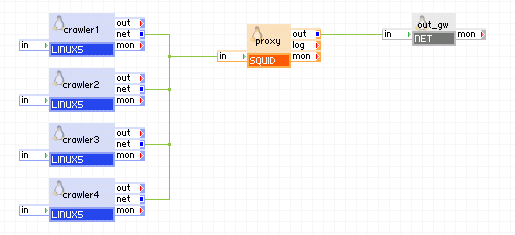
Appliances in use:
Example property configuration:
|
Property name |
Value |
Notes |
|
mode |
proxy |
SQUID operates in proxy mode, acting as a caching forward proxy |
|
listen_port |
3128 |
Port on which SQUID listens for HTTP requests. |
|
hostname |
proxy.enterprise.local |
Hostname used in error messages |
Open source and 3rd party software used inside of the appliance
SQUID uses the following 3rd party open source packages in addition to the 3rd party open source packages used by its base class LUX5.
|
Software |
Version |
Modified |
License |
Notes |
|
net-snmp |
5.3.2.2-9.el5_5.1 |
No |
BSD |
N/A |
|
net-snmp-libs |
5.3.2.2-9.el5_5.1 |
No |
BSD |
N/A |
|
net-snmp-utils |
5.3.2.2-9.el5_5.1 |
No |
BSD |
N/A |
|
samba-client |
3.0.33-3.29.el5_5.1 |
No |
GPLv2 |
N/A |
|
samba-common |
3.0.33-3.29.el5_5.1 |
No |
GPLv2 |
N/A |
|
libsmbclient |
3.0.33-3.29.el5_5.1 |
No |
GPLv2 |
N/A |
|
squid |
3.1.8-1.el5 |
No |
GPLv2 |
N/A |
|
lm_sensors |
2.10.7-9.el5 |
No |
GPLv2 |
N/A |
|
dmidecode |
2.10-3.el5 |
No |
GPLv2 |
N/A |
|
perl-DBI |
1.52-2.el5 |
No |
GPLv2 |
N/A |
|
Copyright © 2011 CA.
All rights reserved.
|
|