

|
At a Glance |
|
|
Catalog |
System |
|
Category |
Misc |
|
User volumes |
yes |
|
Min. memory |
96 MB |
|
OS |
Linux |
|
Constraints |
no |
MTA is a fast and secure mail appliance, based on Postfix MTA Server.
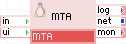
MTA has three generic output terminals intended for accessing external mail relays, remote storage and monitoring services. The net terminal is used to send e-mail messages to other MXes or to a Smart SMTP host. The log terminal can be used to connect MTA to a shared file system on which MTA can store its logs. The fs terminal is for accessing shared file storage (using NFS). The mon terminal is used for monitoring and statistics.
The configuration of MTA is provided through properties. The properties are designed to cover most uses in an easily configurable way. Typically, only a few need to be set to non-default values.
If the features provided by the MTA appliance do not meet your needs, contact our TechnicalSupport to discuss the possible options. We may be able to extend the catalog by providing appliances that cover your needs.
|
Name |
Latest Version |
OS |
Postfix |
Notes |
|
MTA |
1.0.1-1 |
CentOS 5.5 |
2.3.3-2.1 |
|
Resources
|
Resource |
Minimum |
Maximum |
Default |
Tested |
|
CPU |
0.05 |
4 |
0.05 |
|
|
Memory |
96 MB |
2 GB |
128 MB |
|
|
Bandwidth |
1 Mbps |
2 Gbps |
100 Mbps |
|
Terminals
|
Name |
Direction |
Protocol |
Description |
|
in |
in |
Any |
Serves SMTP/SMTPS. Also, serves HTTP requests to the Mail Queue Monitoring management service. Serves the HTTP/1.1 and 1.0 protocols. |
|
log |
out |
CIFS |
Access to a CIFS-based network file system for storing all logs. The connected server must allow anonymous logins and have a read/write share named share. This terminal may be left unconnected if it is not used. |
|
fs |
out |
NFS |
Provides for an NFS mount as an alternative location to the local key volume for storing keys. If both the local key volume and an fs terminal connection are supplied, the appliance fails to start. This terminal may be left unconnected. |
|
net |
out |
Any |
Gateway output for subnet access. |
|
mon |
out |
CCE |
Sends performance and resource usage statistics. |
Volumes
|
Volume |
Description |
|
data |
A read/write volume for the storage of the mail queue (mandatory). |
|
key |
A read-only volume for the storage of SSL keys (optional). |
Properties
|
Property Name |
Type |
Description |
|
hostname |
String |
Host name of the mail relay. Default: localhost.localdomain |
|
logs_enabled |
String |
Enables or disables logging. Valid values are yes or no. If the log terminal is not connected, and this property set to yes, MTA fails to start. Default: no |
|
maillog_filename |
String |
Filename for the mail log, relative to the file system accessible on the log terminal. For example, hub1_maillog. The name may include directory names, for example, /srv1_logs/maillog or /logs/hub1_maillog. If empty, maillog is not created. If the directories don't exist, they will be created. This property has no effect if logs_enabled is set to 'no'. Default: (empty) |
|
smtpd_trusted_networks |
String |
Local network for mail users which is open for relaying. Set to 0.0.0.0/0 to create an open relay. Default: 127.0.0.1 |
|
smart_relay |
String |
A single SMTP relay for all outgoing mail (if used). Default: (empty) |
|
cc_mta |
String |
The single SMTP host's domain for carbon copy mailing. Don't work if smart_relay is defined. Default: (empty) |
|
username |
String |
Username for accessing the MTA runtime statistics GUI through the in terminal. If empty, there is no authentication. Default: (empty) |
|
password |
String |
Password for accessing the MTA runtime statistics GUI through the in terminal. This property is ignored if username is empty. Default: (empty) |
|
ui_port |
Integer |
Port used to access the MTA runtime statistics GUI through the in terminal. Default: 80 |
|
ssl_disabled |
String |
Enable or disable SSL functionality. Valid values are yes or no. Default: yes |
|
ssl_key_file |
String |
File name, relative to the root of the key volume, of the server SSL private key that MTA should present to the client. If ssl_disabled is set to no, then a valid key must be present at the location specified by this property or MTA fails to start. Default: server.key |
|
ssl_cert_file |
String |
File name, relative to the root of the key volume, of the server certificate that MTA should present to the client. If ssl_disabled is set to no, then a valid certificate must be present at the location specified by this property or MTA fails to start. Default: server.pem |
|
timezone |
String |
Specifies the time zone used in the appliance. If this property is empty, the timezone is not modified and is left as-is. A list of supported time zones is available here. Default: (empty) |
Custom Counters
The MTA appliance reports the following custom counters through the mon terminal. These counters belong to the MTA counter group:
|
Counter Name |
Description |
|
Mqueue Messages |
Number of messages in the MTA mail queue |
|
Mqueue Kbytes |
MTA mail queue size in Kb |
|
SMTP Active Sessions |
Number of SMTP active sessions |
Error Messages
In case of appliance start failure, the following errors may be logged to the grid controller's system log:
|
Error Message |
Description |
|
Error: failed to mount key volume. |
The key volume is paramaterized but couldn't be mounted. Please make sure that the volume exists and is formatted with a supported filesystem. |
|
Error: failed to mount log share. |
The log terminal is connected and logs_enabled is yes, but a NAS cifs share could not be mounted. Please make sure that a NAS data volume exists, formatted with a supported filesystem, and that the NAS appliance is started before MTA. |
|
Error: logs are enabled but the 'log' terminal is not connected. |
Connect the log terminal to a NAS appliance cifs terminal, or disable logging. |
|
Error: failed to preconfigure the MTA |
Error in pre-configuration script - check other error messages. |
|
Error: failed to start the Postfix MTA server. Please see the /var/log/appliance/log log file in MTA for more details on the failure |
Postfix init script is failed. Possible error in configuration files. |
|
Error: failed to initialize the UI backend, please contact 3Tera support. |
Nginx init script is failed. Possible error in configuration files. |
|
Error: ui_port value must be between 1 and 65535 |
Incorrect ui_port property value. |
|
Error: couldn't find ssl keys on the key volume! |
Could not find the SSL server certificates as specified by the ssl_key_file and/or ssl_cert_file property. Either provide a valid path for certificates or disable SSL by setting ssl_disabled to yes |
|
Error: ssl_disabled=no, but ssl key files are not defined! |
Could not find the SSL server certificates as specified by the =ssl_key_file and/or ssl_cert_file property. Either provide a valid path for certificates or disable SSL by setting ssl_disabled to yes |
|
Message |
Description |
|
Data volume has less than 5% of free disk space |
The data volume on the appliance has less than 5% of free disk space. It is advised to increase the size of the volume. |
|
Data volume has less than 1% of free disk space |
The data volume on the appliance has less than 1% of free disk space. Immediate attention required; possible data loss may occur. |
To use SSL you need both the signed certificate and the private key it was encrypted with. The key and the certificate should be in PEM format and must be placed on the key volume as specified by the ssl_key_file and ssl_cert_file properties.
Generating a server certificate
First, you need a private key. You can generate one by executing:
To generate a pass protected key, use the following (To use the key with MTA you need a passwordless key, if you create a pass protected key you need to remove the password before using it in MTA)
Next you need a certificate. You have two options here - create a certificate request and have it signed by a trusted CA (for which they will charge you), or create a self-signed certificate for test purposes (in this case browsers requesting your site will issue warnings that the certificate is not signed by a trusted CA).
To generate a certificate request, execute the following:
After you send the .csr file to your trusted CA, it will give you back a signed certificate ( .crt file) which you can use.
To generate a self signed certificate, execute the following:
Using the server certificate
If your key is password-protected, you can remove the password by executing the following:
Note: The server signing key is your host's "proof of identity". It is also vulnerable, because it is not password-encrypted (so that the appliance can read it without your help). Take the necessary measures to protect the key file, when installing it on the key. Do not use the same key volume for other purposes.
Web Applications
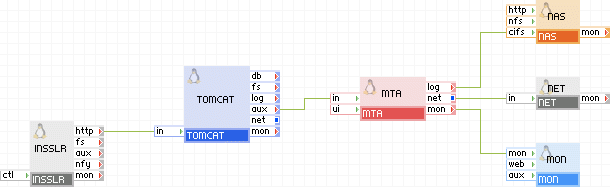
To provide mail service to your web application, connect the in terminal directly to the aux of the TOMCAT appliance.
Open source and 3rd party software used inside of the appliance
MTA uses the following 3rd party open source packages in addition to the 3rd party open source packages used by their base class LUX5.
|
Software |
Version |
Modified |
License |
Notes |
|
postfix |
2.3.3-2.1.el5_2 |
No |
IBM Public License |
N/A |
|
php-thttpd |
2.25b |
No |
BSD |
N/A |
|
cyrus-sasl |
2.1.22-5.el5_4.3 |
No |
Freely Distributable |
N/A |
|
samba-client |
3.0.33-3.29.el5_5.1 |
No |
GPLv2 |
N/A |
|
samba-common |
3.0.33-3.29.el5_5.1 |
No |
GPLv2 |
N/A |
|
Copyright © 2011 CA.
All rights reserved.
|
|