

Latest version: 2.0.1-1
|
At a Glance |
|
|
Catalog |
System |
|
Category |
Gateways |
|
User volumes |
yes |
|
Min. memory |
96M |
|
OS |
Linux |
|
Constraints |
no |
VPN is a Virtual Private Networking appliance that operates in IPv4 and IPv6 networks, designed to provide secure and reliable tunnels for inter-grid communications and remote access to applications and appliances. VPN can also operate without using VPN tunnels, in which case it functions as a combined cleartext IN/OUT gateway. VPN may also be used to seamlessly interconnect IPv4 and IPv6 CA 3Tera AppLogic grids. VPN is based on the OpenVPN, OpenSSH and Racoon open source software packages.
VPN has three basic modes of operation: Server, client, and both.
VPN supports IPSec, shared secrets files, SSL certificates and ssh key files for authentication and encryption. A regular OpenVPN/OpenSSH client may be used on a remote workstation to connect to VPN, which in turn provides secure access to the internal components of an application running on CA 3Tera AppLogic. The VPN appliance supports the generation of shared secrets files, SSL certificates and ssh keys.
To remotely access an CA 3Tera AppLogic application over a secure VPN tunnel using VPN, the OpenVPN client-side software, or OpenSSH may be used on the client's machine (or some other compatible software).
Resources
|
Resource |
Minimum |
Maximum |
Default |
|
CPU |
0.1 |
16 |
0.2 |
|
Memory |
96 MB |
32 GB |
96 MB |
|
Bandwidth |
1 Mbps |
2 Gbps |
250 Mbps |
Terminals
|
name |
dir |
protocol |
description |
|
clt |
in |
Any |
Common input for all incoming traffic to be directed through the external interface when VPN is operating as a client. If VPN is configured to establish a tunnel on the external interface, packets sent to clt are directed to an established tunnel, or dropped, if the tunnel is not up. |
|
srv |
out |
Any |
Common output for all outgoing traffic that is received through the external interface when VPN is operating as a server. All traffic is filtered using the tcp_ports, udp_ports, ssh_ports and aux_protocols properties prior to be sent through the srv. |
|
fs |
out |
NFS |
Access to a network file system for shared file storage, providing read/write file access over NFS. This volume is mounted as /mnt/fs in the appliance's filesystem space and is used for storage of encryption keys and certificates. The connected server must have a read/write share named /mnt/data. Neither the data volume nor the NFS-mounted volume is required if VPN operates in cleartext mode. This terminal may be left unconnected if it is not used. |
|
log |
out |
CIFS |
Access to a CIFS-based network file system for storing access and error logs. The connected server must allow anonymous logins and have a read/write share named share. This terminal may be left unconnected if it is not used. |
|
mon |
out |
CCE |
Used to send performance and resource usage statistics. May be left disconnected if not used. |
Properties
General properties
|
Property name |
Type |
Description |
|
ip_addr |
ip_owned |
Defines the IPv4 address of the external interface of the gateway. This property is mandatory if VPN operates in IPv4-only mode. |
|
netmask |
IP address |
Defines the IPv4 network mask of the external interface. This property is mandatory if VPN operates in IPv4-only mode. |
|
gateway |
IP address |
Defines the default IPv4 network gateway (router) for the external interface. If left empty, only hosts on the same subnet as ip_addr/netmask will be accessible. Default: empty |
|
ipv6_addr |
string |
Defines the IPv6 address of the external interface of the gateway. The IPv6 address is specified in standard address notation of eight groups of four hexadecimal digits. One or any number of consecutive groups of 0 value may be replaced with two colons (::). The format is address/netmask, ex. fc00:1234:5678::12/64. This property is mandatory if VPN operates in IPv6-only mode. |
|
ipv6_gateway |
string |
Defines the default IPv6 network gateway (router) for the external interface. If left empty, only hosts on the same subnet as ipv6_addr will be accessible. Default: empty |
|
dns1 |
IP address |
Defines the primary DNS server to which VPN will forward DNS requests. If left empty, VPN will use the root DNS servers. Default: empty |
|
dns2 |
IP address |
Defines the backup DNS server to which VPN will forward DNS requests if the primary is not available. If left empty, VPN will not use a backup DNS server. Default: empty |
Important! At least one pair of addresses (IPv4 or IPv6) must be defined.
VPN properties
|
Property name |
Type |
Description |
|
mode |
String |
Mode of operation. Possible values are: |
|
tunnel |
String |
Type of the tunnel to establish. Possible values are: |
|
auth_path |
String |
Authentication information for the tunnel. For the shared secret mode of operation, this is a relative path to the shared secrets file on the data volume (ex. "secret.key" for a "client/secret.key" file). For the certificate mode, this is a relative path, including the file name without extension, to the certificate/key file pair. For example, if the certificate files client1-2009.crt and client1-2009.key are located in the /client subdirectory of the data volume, client1-2009 must be specified here. If the tunnel is cleartext, this property is ignored. If the tunnel is ssh key, this property indicates the path, including filename, to the ssh public (for VPN server) or private (for VPN client) key file (for example, /1/ssh.key for a /client/1/ssh.key public key file).. |
|
log_level |
String |
VPN logging level. Possible values are: |
Server properties
|
allowed_hosts |
String |
List of hosts and/or subnets allowed to connect. Separate multiple entries with spaces or commas. Supported format example: 192.168.1.2 192.168.1.0/24 192.168.2.0/255.255.255.0 fc00:1234::12/64. |
|
tcp_ports |
String |
Port numbers or port ranges to allow on the srv terminal. Accepts a string of comma or space-separated values. Port ranges must be specified as lower_port:higher_port with colon or dash as a separator (for example, 80,81,82:85 86-90). A special value of 0 means that all tcp ports are accepted. |
|
udp_ports |
String |
Same as tcp_ports, but for UDP protocol. |
|
aux_protocols |
String |
A string of comma or space-separated additional IP Protocol numbers to allow (for example, 6 for TCP, 47 for GRE). Separate protocols may be specified by their names (ex. 'gre' instead of '47'). See http://www.iana.org/assignments/protocol-numbers for assignment. |
Client properties
|
remote_host |
String |
Defines the remote host to forward all traffic to. This can be the DNS name of the host or its IPv4 or IPv6 address in "dots" notation. This property is mandatory. |
|
dns_poll |
Integer |
The poll interval, in seconds, that VPN will use when verifying the mapping of the DNS name of remote_host to IP address (used only if remote_host is specified as a DNS name). Set to 0 to disable polling and not try to detect changes. |
|
ssh_ports |
String |
A client-side property for SSH key mode, that specifies what tcp ports to forward to the VPN server. Port ranges are not supported, ports may be divided by spaces or commas. |
Volumes
|
Name |
Description |
|
data |
A read/write data volume (placeholder) containing config files and certificate files. This volume Is not required if the fs terminal is connected. If fs is connected, and a data volume is supplied, VPN fails to start and logs an error message. All files that are necessary for VPN server operation are stored in the /server/ subdirectory of the data storage. All files that are necessary for VPN client operation, are stored in the /client/ subdirectory. |
Custom Counters
The VPN appliance reports the following custom counters through the mon terminal.
|
Counter name |
Description |
|
server_bytes_in |
Total bytes received by VPN. |
|
server_bytes_out |
Total bytes sent by VPN. |
|
client_bytes_in |
Total bytes received from client tunnels. |
|
client_bytes_out |
Total bytes sent to client tunnels. |
|
clients |
Number of clients connected to VPN. |
Performance
Two test applications were residing on the same CA 3Tera AppLogic grid. 100mbit bandwidth was assigned to both VPN appliances (client and server), and to server and client appliances. Multiple object, each 1Mbyte in size, were fetched, 10 objects in parallel, for 60 seconds.
|
Mode |
Bandwidth, Mbit/second |
Object size |
Requests/second |
Transfer rate, MBytes/second |
|
Certificate |
100 |
1MB |
12.5667 |
12.56 |
|
Shared secret |
100 |
1MB |
12.5166 |
12.51 |
|
SSH key |
100 |
1MB |
12.7667 |
12.76 |
|
Cleartext |
100 |
1MB |
13.0329 |
13.03 |
Error Messages
In case of appliance startup failure, the following errors may be logged to the system log:
|
Error message |
Description |
|
Failed to mount the data volume |
VPN failed to mount the data volume. Verify that the volume is formatted and available. |
|
Failed to generate server_key |
VPN failed to generate shared secrets file. Probably the data volume is too small, or mounted read-only. |
|
Failed to launch OpenVPN server |
VPN failed to launch OpenVPN server. Contact CA Technologies support. |
|
Failed to generate certificates. |
VPN failed to create Certification Authority and generate necessary certificated for certificate server mode of operation. Probably the data volume is too small, or mounted read-only. |
|
Failed to generate DH file. |
VPN failed to generate Diffie-Hellman key file. Probably the data volume is too small, or mounted read-only. |
|
Secrets file client_auth does not exist |
File client_auth, specified in the auth property, does not exist. Verify the path and name of the file. |
|
Remote server address is empty for |
Remote VPN server address is empty for tunnel X. |
|
Failed to launch OpenVPN for clientX tunnel |
VPN failed to launch OpenVPN software for client tunnel X. Probably some properties or key files are invalid. |
|
Certificate file client_auth.crt does not exist |
VPN failed to locate a certificate file. Invalid path or file name specified in auth property for the certificate client mode of operation. |
|
Key file client_auth.key does not exist |
VPN failed to locate a key file. Invalid path or file name specified in auth property for the certificate client mode of operation. |
|
Certification Authority certificate ca_cert is missing |
VPN failed to locate Certification Authority certificate. It should be located in /CA/ca.crt file on the data volume. |
Types of Tunnels
Cleartext
This mode supports a single server - multiple clients scenario, allowing access to the VPN server from multiple locations. In this mode VPN tunnels are not established, and a data store is not required (neither a data volume nor a NAS appliance connected to the fs terminal). This mode operates in IPv4 and IPv6.
On the server VPN appliance, traffic received on the external interface is filtered through the tcp_ports, udp_ports, aux_protocols properties and forwarded to the srv interface.
On the client VPN appliance, all traffic received on the clt interface is forwarded to the remote VPN server, specified in the remote_host property.
Properties that must be configured on the server side: ip_addr, netmask, gateway, mode, tunnel, allowed_hosts, tcp_ports, udp_ports, aux_protocols.
Properties that must be configured on the client side: ip_addr, netmask, gateway, mode, tunnel, remote_host.
Server-side property remote_host must be configured with client's address if IPv6 mode is in use.
Certificate
This mode supports a single server - multiple clients scenario, allowing access to the VPN server from multiple locations. A data store is required (either a data volume or a NAS appliance connected to the fs terminal). This mode operates in both IPv4 and IPv6.
Upon start, the server appliance generates necessary certificates and key files if these files are not already present. These files may be re-generated with the security.sh script, located in the /appliance/ directory. Prior to configuring any VPN clients, certificates must be generated for them. A user may login into the running VPN server appliance and generate a client key pair as follows:
grid> comp login VPN-1:main.VPN
CentOS release 5 (Final)

[VPN-1:main.VPN ~]# /appliance/security.sh generate_client
Generated client SSL certificate and key file.
==============================================
These files, with CA certificate file, should be copied to VPN server into
/client/ subdirectory of data volume or fs-mounted volume.
Path to client files (client.829de5afcac564b3) should be specified in auth_path property.
Location of files:
client certificate: /mnt/fs/server/client.829de5afcac564b3.crt
client key file: /mnt/fs/server/client.829de5afcac564b3.key
CA certificate file located at /mnt/fs/server/ca.crt
The client certificate and key file must be copied to the client VPN appliance to the /client/ subdirectory of the data store, and the auth_path set to the appropriate value, client.829de5afcac564b3 in this case. The CA Technologies certificate from the VPN server (/mnt/fs/server/ca.crt) must be copied to the /client/ subdirectory on the client appliance too, and named "ca.crt". Every client VPN appliance should have it's own certificate.
On the server VPN appliance, traffic received on the external interface is decrypted, filtered through the tcp_ports, udp_ports, aux_protocols properties and forwarded to the srv interface.
On the client VPN appliance, all traffic received on the clt interface is encrypted and forwarded to the remote VPN server, specified in the remote_host property.
Properties that must be configured on the server side: ip_addr, netmask, gateway (or corresponding IPv6 properties), mode, tunnel, allowed_hosts, tcp_ports, udp_ports, aux_protocols.
Properties that must be configured on the client side: ip_addr, netmask, gateway (or corresponding IPv6 properties), mode, tunnel, remote_host, auth_path.
Shared Secrets File
This mode supports only the single server - single client scenario, allowing access to the VPN server from only single client at one time. A data store is required (either a data volume or a NAS appliance connected to the fs terminal). This mode operates in both IPv4 and IPv6.
Upon the start, the server appliance generates a shared secrets file /server/secret.key, if this file is not already present. This file may be re-generated with the security.sh script, located in the /appliance/ directory. Prior to configuring any VPN clients, this shared secrets file must be copied to it's data store into the /client/ subdirectory. Te generate a new shared secrets file, a user may login into the running VPN server appliance and issue the following command:
[VPN-1:main.VPN server]# /appliance/security.sh generate_secret
Generated OpenVPN shared secrets file.
======================================
This file should be copied to VPN server into /server/ subdirectory of data volume or fs-mounted volume,
and to the VPN client into /client/ subdirectory of data volume or fs-mounted volume.
Path to it should be specified in auth_path property of the VPN client.
Location of file: /mnt/fs/server/secret.key
A freshly-generated secrets file overwrites the old one, if it existed. This shared secrets file /mnt/fs/server/secret.key must be copied to the client VPN appliance into /client/ subdirectory of the data store, and auth_path property set to the correct value, secret.key in this case. Multiple client VPN appliances may be configured, but only one can be connected at any time.
On the server VPN appliance, traffic received on the external interface is decrypted, filtered through the tcp_ports, udp_ports, aux_protocols properties and forwarded to the srv interface.
On the client VPN appliance, all traffic received on the clt interface is encrypted and forwarded to the remote VPN server, specified in the remote_host property.
Properties that must be configured on the server side: ip_addr, netmask, gateway (or corresponding IPv6 properties), mode, tunnel, allowed_hosts, tcp_ports, udp_ports, aux_protocols.
Properties that must be configured on the client side: ip_addr, netmask, gateway (or corresponding IPv6 properties), mode, tunnel, remote_host, auth_path.
Ssh Key
This mode supports a single server - multiple clients scenario, allowing access to the vpn server from multiple locations. A data store is required (either a data volume or a NAS appliance connected to the fs terminal). Only tcp traffic may be tunnelled through the ssh tunnel, so only tcp_ports property is used on the server side. Port ranges are not supported - every ports that should be forwarded must be specified explicitly in ssh_ports client-side property. This mode operates in both IPv4 and IPv6.
vpn server generates the default ssh keypair upon start; default keys are located at: server key (public key): server/ssh-server.pub client key (private key): server/ssh-client.key Additional keys may be generated manually using the security.sh script:
[VPN-1:main.VPN ~]# /appliance/security.sh generate_ssh
Generated SSH keypair.
======================
Public key should be copied to VPN server into /server/ subdirectory of data volume or fs-mounted volume.
Private key should be copied to VPN client into /client/ subdirectory of data volume or fs-mounted volume.
Path to key files should be specified in auth_path property on both VPN client and server.
Location of files:
Public key: /mnt/fs/server/ssh.11179ebbfa3f6852.pub
Private key: /mnt/fs/server/ssh.11179ebbfa3f6852.key
The public key should be copied to the VPN server into the /server/ subdirectory; the private key should be copied to the client into the /client/ subdirectory. The auth_path property should be set on both client and server. If auth_path is empty on the server, the default SSH key is used.
On the server VPN appliance, traffic received on the external interface is decrypted, filtered through the ssh_ports property and forwarded to the srv interface. Only tcp port forwarding is supported. The auth_path property defines the public SSH key to use. When the appliance is working in both client and server mode, both public and private keys should be named the same, and located in /server/ and /client/ subdirectories. The ssh_ports property should be configured on both server and client in the same way.
On the client VPN appliance, all traffic received on the clt interface is encrypted and forwarded to the remote VPN server, specified in the remote_host property.
Properties that must be configured on the server side: ip_addr, netmask, gateway (or corresponding IPv6 properties), mode, tunnel, allowed_hosts, auth_path, tcp_ports.
Properties that must be configured on the client side: ip_addr, netmask, gateway (or corresponding IPv6 properties), mode, tunnel, remote_host, auth_path, ssh_ports.
Important! SSH server-server mode. Two VPN appliances may both be configured in both mode and connect to each other. To use this mode, appliances must be configured in a special way:
Assuming you have 2 appliances named VPN1 and VPN2: 1. create 2 sets of public/private key files (1.key/1.pub, 2.key/2.pub , using "/appliance/security.sh generate_ssh" script) 2. configure auth_path property on both appliances to "ssh.key" 3. copy 2.pub to VPN1:/mnt/data/server/ssh.key (or to ssh.key file in /server/ subdirectory of the NAS drive) (public key goes to /server/ subdirectory) 4. copy 2.key to VPN2:/mnt/data/client/ssh.key (private key goes to /client/ subdirectory) 5. copy 1.pub to VPN2:/mnt/data/server/ssh.key (public key goes to /server/ subdirectory) 6. copy 1.key to VPN1:/mnt/data/client/ssh.key (private key goes to /client/ subdirectory).
IPSec Certificate
This mode supports a single server - multiple clients scenario, allowing access to the VPN server from multiple locations. A data store is required (either a data volume or a NAS appliance connected to the fs terminal). This mode operates only in IPv4.
Upon start, the server appliance generates necessary certificates and key files if these files are not already present. These files may be re-generated with the security.sh script, located in the /appliance/ directory. Prior to configuring any VPN clients, certificates must be generated for them. A user may login into the running VPN server appliance and generate a client keypair as follows:
grid> comp login VPN-1:main.VPN
CentOS release 5 (Final)

[VPN-1:main.VPN ~]# /appliance/security.sh generate_client
Generated client SSL cerfiticate and key file.
==============================================
These files, with CA certificate file, should be copied to VPN server into
/client/ subdirectory of data volume or fs-mounted volume.
Path to client files (client.829de5afcac564b3) should be specified in auth_path property.
Location of files:
client certificate: /mnt/fs/server/client.829de5afcac564b3.crt
client key file: /mnt/fs/server/client.829de5afcac564b3.key
CA certificate file located at /mnt/fs/server/ca.crt
The client certificate and key file must be copied to the client VPN appliance to the /client/ subdirectory of the data store, and the auth_path set to the appropriate value, client.829de5afcac564b3 in this case. The CA Technologies certificate from the VPN server (/mnt/fs/server/ca.crt) must be copied to the /client/ subdirectory on the client appliance too, and named ca.crt. Every client VPN appliance should have it's own certificate.
Important! An exception exist when VPN is used in both mode. In this case all certificates, client and server ones, must be generated by the same VPN instance, and distributed together with it's ca.crt certificate to other instances.
On the server VPN appliance, traffic received on the external interface is decrypted, filtered through the tcp_ports, udp_ports, aux_protocols properties and forwarded to the srv interface.
On the client VPN appliance, all traffic received on the clt interface is encrypted and forwarded to the remote VPN server, specified in the remote_host property.
Properties that must be configured on the server side: ip_addr, netmask, gateway (or corresponding IPv6 properties), mode, tunnel, allowed_hosts, tcp_ports, udp_ports, aux_protocols.
Properties that must be configured on the client side: ip_addr, netmask, gateway (or corresponding IPv6 properties), mode, tunnel, remote_host, auth_path.
IPSec Shared Secret
This mode supports a single server - multiple clients scenario, allowing access to the VPN server from multiple locations. A data store is required (either a data volume or a NAS appliance connected to the fs terminal). This mode operates only in IPv4.
Upon the start, the server appliance extracts first line of the file specified in auth_path property and uses it as a shared key. This file must be present on both parties. Prior to configuring any VPN clients, this shared secrets file must be copied to its data store into the /client/ subdirectory.
On the server VPN appliance, traffic received on the external interface is decrypted, filtered through the tcp_ports, udp_ports, aux_protocols properties and forwarded to the srv interface.
On the client VPN appliance, all traffic received on the clt interface is encrypted and forwarded to the remote VPN server, specified in the remote_host property.
Properties that must be configured on the server side: ip_addr, netmask, gateway (or corresponding IPv6 properties), mode, tunnel, allowed_hosts, tcp_ports, udp_ports, aux_protocols.
Properties that must be configured on the client side: ip_addr, netmask, gateway (or corresponding IPv6 properties), mode, tunnel, remote_host, auth_path.
Remote Access to an External Service
The following diagram illustrates an example of how you configure remote access to an external service:
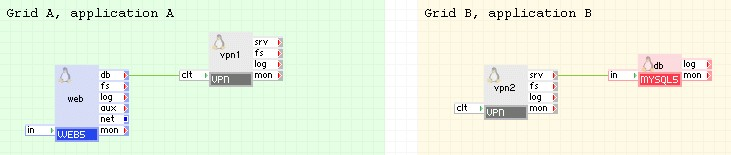
In this example a web appliance, running on Grid A, accesses a remote MySQL database running on Grid B over a secure VPN tunnel.
vpn1 on Grid A is configured to connect to the IP address assigned to vpn2 on Grid B. The srv terminal of vpn1 and the clt terminal of vpn2 are left unconnected. External interfaces of vpn1 and vpn2 are configured with appropriate routable IP addresses.
Example property configuration:
vpn1:
|
Property name |
Value |
Notes |
|
ip_addr |
25.74.63.87 |
external IP used for vpn1 |
|
netmask |
255.255.255.0 |
netmask |
|
gateway |
25.74.63.1 |
gateway |
|
mode |
client |
Client mode of operation |
|
tunnel |
ipsec certificate |
Traffic is encrypted using IPSec |
|
auth_path |
client-7575 |
Name of the certificate/key files pair |
|
remote_host |
12.12.12.12 |
external IP assigned to the external interface of vpn2 |
vpn2:
|
Property name |
Value |
Notes |
|
ip_addr |
12.12.12.12 |
external IP used for vpn2 |
|
netmask |
255.255.255.0 |
netmask |
|
gateway |
12.12.12.1 |
gateway |
|
mode |
server |
Server mode of operation |
|
tunnel |
ipsec certificate |
Traffic is encrypted using IPSec |
|
allowed_hosts |
25.74.63.87 |
only allow connections from vpn1 |
|
tcp_ports |
3306 |
Default port for MySQL Server |
Remote Access to Internal CA 3Tera AppLogic Appliances
The following diagram illustrates an example of how you configure remote access to internal CA 3Tera AppLogic appliances:
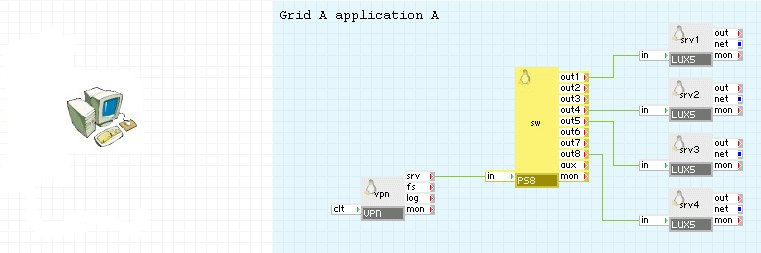
In this example, a user from his/her PC needs to access several different appliances through a secure VPN connection using the OpenVPN client. OpenVPN is used to connect to the IP address assigned to vpn. Vpn establishes a VPN tunnel with the user's PC and forwards all incoming traffic to the sw port switch, which is configured to distribute traffic to four different appliances within the application.
OpenVPN must be installed on the user's PC prior to accessing an CA 3Tera AppLogic application that uses the VPN appliance as described in this example. The steps below describe how this application is configured and what a user must do to access the application over a secure VPN tunnel:
vpn:
|
Property name |
Value |
Notes |
|
ip_addr |
28.36.85.21 |
IP address assigned to the VPN appliance |
|
mode |
server |
Server mode of operation |
|
tunnel |
shared secret |
Using shared secrets file |
|
allowed_hosts |
26.42.56.72 |
IP address of client PC |
|
tcp_ports |
0 |
All ports are allowed |
|
udp_ports |
0 |
All ports are allowed |
3. Assign the desired protocols and ports that need to be forwarded through the sw appliance. In this case 4 ports (122,422,522,822) are forwarded to the ssh ports of the appliances connected to sw:
|
Property name |
Value |
Notes |
|
out1_protocol |
tcp |
TCP protocol |
|
out1_in_port |
122 |
Incoming port 122 |
|
out1_out_port |
22 |
Outgoing port 22 |
|
out4_protocol |
tcp |
TCP protocol |
|
out4_in_port |
422 |
Incoming port 422 |
|
out4_out_port |
22 |
Outgoing port 22 |
|
out5_protocol |
tcp |
TCP protocol |
|
out5_in_port |
522 |
Incoming port 522 |
|
out5_out_port |
22 |
Outgoing port 22 |
|
out8_protocol |
tcp |
TCP protocol |
|
out8_in_port |
822 |
Incoming port 822 |
|
out8_out_port |
22 |
Outgoing port 22 |
4. Start the application. After the application is started, extract the shared secrets file from the vpn appliance:
grid> comp ssh APPLICATION:main.VPN
vpn> cat /mnt/data/server/secret.key
#
# 2048 bit OpenVPN static key
#
-----BEGIN OpenVPN Static key V1-----
431e845f2ca67f2a31649b20e3ba3291
...
fe991cdbfe82525a9367b9afbfd0f922
-----END OpenVPN Static key V1-----
5. Paste the contents of secret.key above into a new file on the user's PC and save the file. This is a shared secrets file that is used for authentication.
6. Prepare a client OpenVPN configuration file. Copy the following lines into a new file on the user's PC (a different file from step 5):
dev tun
proto udp
resolv-retry infinite
persist-key
persist-tun
cipher AES-128-CBC
comp-lzo
keepalive 10 120
remote 11.22.33.44 1194
secret "C:\\Program Files\\OpenVPN\\sample-config\\secret.key"
nobind
ifconfig 169.254.215.101 169.254.215.102
IP addresses in the ifconfig line may be any, as long as they are: a) from the 169.254.0.0/16 network block b) in the same /30 subnet c) are not first or last addresses in the /30 subnet. B and C are the limitations of the OpenVPN client running on Windows platform.
7. Replace the remote IP address with the IP address that is assigned to the vpn appliance. Replace the path to the shared secrets file in the secret line with the path to the key file created in step 5. If you are using a Microsoft Windows operating system on the user PC where OpenVPN was installed, enclose all lines in quotes and replace every slash with a double-slash.
8. Launch the OpenVPN client:
c:\program files\OpenVPN\bin\openvpn.exe --config "c:\client.ovpn"
Note: Replace "c:\client.ovpn" with the path to the configuration file created in step 6.
9. After few seconds, you will see the following message from OpenVPN:
Wed Jul 01 09:41:12 2009 Peer Connection Initiated with XX.XX.XX.XX:1194
Wed Jul 01 09:41:12 2009 Initialization Sequence Completed
Now you can access the appliances of the CA 3Tera AppLogic application using the IP address defined in the configuration file (169.254.215.102 in this case). Port 169.254.215.102:122 is forwarded by sw to port 22 of the srv1 appliance, likewise port 169.254.215.102:422 is forwarded to the srv4 appliance, and so on. For example, execute
ssh -p 122 root@169.254.215.102
to access the first appliance.
Providing Secure VPN Tunnels for MySQL Replication
The following diagram illustrates an example of how you can provide secure VPN tunnels for MySQL replication:
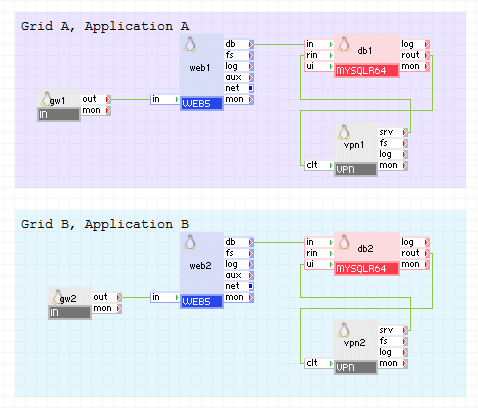
In this example two applications are running on different grids, Grid A and Grid B, where both applications use the same MySQL database which is replicated through a secure VPN tunnel.
vpn1 and vpn2 are configured with routable IP address on their external interfaces. vpn1 is configured to establish a tunnel to vpn2, and vice versa.
db1 from Grid A sends traffic to vpn1 for replication purposes, where it is encrypted and transmitted to vpn2 which decrypts the traffic and sends it to the rin terminal of db2 on Grid B. Likewise, replication from db2 on Grid B to db1 on the Grid A behaves in the same manner.
vpn1:
|
Property name |
Value |
Notes |
|
ip_addr |
82.56.42.25 |
Address assigned to the external interface. |
|
mode |
both |
Server mode of operation. |
|
tunnel |
ssh key |
Using SSH key files. |
|
auth_path |
"/keys/vpn21.ssh.key" |
Path to the SSH key file. |
|
remote_host |
92.72.57.95 |
Address assigned to the external interface of vpn2. |
|
tcp_ports |
3306,22 |
Default port for MySQL Server and SSH. |
|
ssh_ports |
3306,22 |
Default port for MySQL Server and SSH. |
vpn2:
|
Property name |
Value |
Notes |
|
ip_addr |
92.72.57.95 |
Address assigned to the external interface. |
|
mode |
both |
Server mode of operation. |
|
tunnel |
ssh key |
Using SSH key files. |
|
auth_path |
"/keys/vpn21.ssh.key" |
Path to the SSH key file. |
|
remote_host |
82.56.42.25 |
Address assigned to the external interface of vpn1. |
|
tcp_ports |
3306,22 |
Default port for MySQL Server and SSH. |
|
ssh_ports |
3306,22 |
Default port for MySQL Server and SSH. |
Alternatively, the IPSec shared secret mode may be used:
vpn1:
|
Property name |
Value |
Notes |
|
ip_addr |
82.56.42.25 |
Address assigned to the external interface. |
|
mode |
both |
Act as a server and client, allow two-way replication. |
|
tunnel |
ipsec shared secret |
Encrypting traffic with IPSec. |
|
auth_path |
"/keys/ipsec.key" |
Path to the ipsec shared secret file. |
|
remote_host |
92.72.57.95 |
Address assigned to the external interface of vpn2. |
|
tcp_ports |
3306,22 |
Default port for MySQL Server and SSH. |
vpn2:
|
Property name |
Value |
Notes |
|
ip_addr |
92.72.57.95 |
Address assigned to the external interface. |
|
mode |
both |
Act as a server and client, allow two-way replication. |
|
tunnel |
ipsec shared secret |
Encrypting traffic with IPSec. |
|
auth_path |
"/keys/server/ipsec.key" |
Path to the ipsec shared secret file.. |
|
remote_host |
82.56.42.25 |
Address assigned to the external interface of vpn1. |
|
tcp_ports |
3306,22 |
Default port for MySQL Server and SSH. |
Providing Secure IPv6 VPN Tunnels for MySQL Replication
The following diagram illustrates an example of how you can provide secure IPv6 VPN tunnels for MySQL replication:
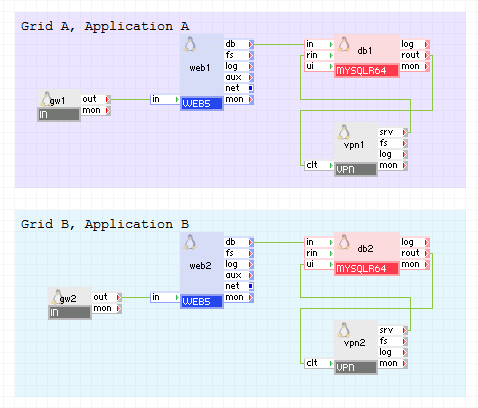
Here we use the same two applications from the previous example, but running on the IPv6 network.
vpn1 and vpn2 are configured with routable IP address on their external interfaces. vpn1 is configured to establish a tunnel to vpn2, and vice versa.
db1 from Grid A sends traffic to vpn1 for replication purposes, where it is encrypted and transmitted to vpn2 which decrypts the traffic and sends it to the rin terminal of db2 on Grid B. Likewise, replication from db2 on Grid B to db1 on the Grid A behaves in the same manner.
vpn1:
|
Property name |
Value |
Notes |
|
ipv6_addr |
fc00:1111:1111::10/64 |
Address assigned to the external interface. |
|
ipv6_gateway |
fc00:1111:1111::99 |
Gateway address. |
|
mode |
both |
Act as a server and client, allow two-way replication. |
|
tunnel |
ssh key |
Using SSH key files. |
|
auth_path |
"/keys/vpn21.ssh.key" |
Path to the SSH key file. |
|
remote_host |
fc00:1111:2222::10 |
Address assigned to the external interface of vpn2. |
|
tcp_ports |
3306,22 |
Default port for MySQL Server and SSH. |
|
ssh_ports |
3306,22 |
Default port for MySQL Server and SSH. |
vpn2:
|
Property name |
Value |
Notes |
|
ipv6_addr |
fc00:1111:2222::10/64 |
Address assigned to the external interface. |
|
ipv6_gateway |
fc00:1111:2222::99 |
Gateway address. |
|
mode |
both |
Act as a server and client, allow two-way replication. |
|
tunnel |
ssh key |
Using ssh key files. |
|
auth_path |
"/keys/vpn21.ssh.key" |
Path to the ssh key file. |
|
remote_host |
fc00:1111:1111::10 |
Address assigned to the external interface of vpn1. |
|
tcp_ports |
3306,22 |
Default port for MySQL Server and SSH. |
|
ssh_ports |
3306,22 |
Default port for MySQL Server and SSH. |
OpenVPN must be used on the client's machine to access a secure VPN tunnel exposed by the VPN appliance.
3rd party open source software used inside of the appliance
VPN uses the following 3rd party open source packages in addition to the 3rd party open source packages used by its base class LUX5.
|
Software |
Version |
Modified |
License |
Notes |
|
IPsec-Tools |
0.6.5-13.el5_3.1 |
No |
BSD |
homepage |
|
iptables |
1.3.5-5.3.el5_4.1 |
No |
GPLv2 |
N/A |
|
iptables-ipv6 |
1.3.5-5.3.el5_4.1 |
No |
GPLv2 |
N/A |
|
LZO |
2.03 |
No |
GPLv2 |
homepage |
|
OpenVPN |
2.1.4 |
No |
GPLv2 |
homepage |
|
samba-client |
3.0.33-3.15.el5_4 |
No |
GPLv2 |
N/A |
|
samba-common |
3.0.33-3.15.el5_4 |
No |
GPLv2 |
N/A |
|
iproute2 |
2.6.29-1 |
No |
GPLv2 |
homepage |
|
autossh |
1.4b |
No |
BSD |
homepage |
|
Copyright © 2011 CA.
All rights reserved.
|
|