

Latest version: 2.0.2-1
|
At a Glance |
|
|
Catalog |
System |
|
Category |
Gateways |
|
User volumes |
yes |
|
Min. memory |
160M |
|
OS |
Linux |
|
Constraints |
no |
The INSSLR appliance is a layer-7 gateway for secure HTTP requests. It converts the requests to unencoded HTTP requests. This can be used whenever it is necessary to support secure HTTP on the client's side, but the back-end processing infrastructure does not or cannot support SSL, including:
If configured, INSSLR also supports client certificate authentication. In the case of SSL mutual authentication, both the client and server exchange their certificates and corresponding public keys. The client may contact the certificate authority (CA Technologies) which issued the server's certificate and confirm the certificate is authentic before proceeding. The server may do likewise.
In its default configuration INSSLR acts as a layer-7 gateway for secure HTTP requests, also providing firewalled entry point for network traffic into an CA 3Tera AppLogic application, which can be configured with an Internet-accessible static IP address.
When configured, two INSSLR appliances can be used in failover mode to provide a redundant service. In this case, INSSLR IP address (configured via ip_addr) is running on only one of the nodes and is automatically transferred to the other INSSLR appliance in case of failure. At any given moment, only one of the INSSLR appliance is active. When running in failover mode INSSLR can be configured to run in several modes:
When running in redundant mode, INSSLR provides an interface on its ctl terminal for:
INSSLR constantly monitors the health state of the backend appliance connected to its http terminal. The health state checks conducted by INSSLR may include a simple TCP connect check or a more complex HTTP request (specified on INSSLR's boundary). In the case of a failure of the connected appliance, INSSLR reports an error to the grid dashboard or, if in redundant mode and configured to do so, it does a failover to the backup INSSLR appliance.
To support applications that need to appear at a single IP address for more than one service, INSSLR can be configured to direct non-HTTP traffic transparently to a separate output terminal. For such connections, the appliance acts as a layer-3 firewall/NAT router.
Resources
|
Resource |
Minimum |
Maximum |
Default |
|
CPU |
0.05 |
4 |
0.05 |
|
Memory |
160M |
2G |
160 M |
|
Bandwidth |
1 Mbps |
2 Gbps |
200 Mbps |
The default memory for the CA 3Tera AppLogic 2.7 release was changed to 128MB. The minimum memory remains 64MB.
Notes
The amount of memory given to INSSLR does not affect its throughput. Use more memory only to support more concurrent requests where the back-end servers may hold the requests for excessively long periods of time.
Terminals
|
name |
dir |
prot. |
description |
|
ctl |
in |
HTTP |
Receive notifications that forces the appliance to become primary/backup. This terminal accepts connections only if fover_mode is not none. A valid http request looks like /?action=<active|passive|kill|status>. active/passive makes the appliance become active or passive. Note: That this action may not succeed (if the other node is not active and failover cant be completed) and no error is returned. It is up to the calling application to check the status of the appliance by making a /?action=status request. status returns the current state of the appliance (active/passive). kill does a forced shutdown of the appliance which makes the other node takeover (if it is running). |
|
http |
out |
HTTP |
HTTPS and/or HTTP requests received on the configured external IP address are directed to the output http as plain HTTP requests on the standard HTTP port 80. In addition to the client-supplied HTTP headers, the forwarded requests also contain the following informational headers: X-Forwarded-For: the remote client's IP address. This should be used by the server-side CGI scripts in place of the remote IP address. X-Forwarded-Proto: https This header is present if the client has connected over HTTPS. It is up to the back-end application to use this header to distinguish between HTTP and HTTPS connections. |
|
fs |
out |
NFS |
Provides for an nfs mount as an alternative location to the local key volume for storing keys. If both the local key volume and an fs terminal connection are supplied, the appliance fails to start. This terminal may be left unconnected. |
|
aux |
out |
Any |
Output for other protocols, if configured - see the l3_accept_* properties. |
|
nfy |
out |
HTTP |
Sends notifications whenever a failover occurs. See also fover_nfy_prefix. This terminal may be left unconnected. |
|
mon |
out |
CCE |
Sends performance and resource usage statistics. |
Properties
|
name |
type |
description |
|
ip_addr |
ip_owned |
external IP address of the gateway. This property has no default value and must be set. Default: (empty) |
|
netmask |
IP addr |
Netmask. This property has no default value and must be set. Default: (empty) |
|
gateway |
IP addr |
Default gateway for outgoing traffic. Default: (empty) |
|
l7_accept |
enum |
This specifies what kinds of HTTP traffic to accept for forwarding to the http terminal. Valid values: https, http, both , none. If set to none all traffic is redirected only according to the l3_accept_* properties. |
|
l3_accept_proto |
enum |
Specifies which protocols should be forwarded to the aux terminal. Valid values: none, tcp, udp, raw, all. |
|
l3_accept_port |
string |
A comma (or space) separated list of protocols to accept and route at the protocol specified by l3_accept_proto to the aux terminal; Protocols in the list may be specified either as port numbers or as standard protocol names (for example, ftp, smtp and so on. when specifying tcp/udp ports or gre, tcp, and so on. when using raw protocols). Port ranges can also be specified (1024:10000, 0:1024). If left empty all ports of the specified protocol are forwarded. |
|
allowed_hosts |
String |
List of hosts and/or subnets allowed to connect. Separate multiple entries with spaces or commas. Supported format example: 192.168.1.2 192.168.1.0/24 192.168.2.0/255.255.255.0. Default: 0.0.0.0/0 (all allowed) |
|
key_on_fs |
string |
Indicates whether keys are stored on an nfs mount through the fs terminal (on) or on the local key volume (off). Valid values: on and off. Default: off. |
|
cert_file |
string |
File name (relative to the data volume root) of the server certificate that this gateway instance should present to the client. Note: A valid certificate must be present on the configured data volume (see Volumes below) at the location specified by this property if you set l7_accept to https or both, otherwise INSSLR fails to start. |
|
unsafe_ssl |
string |
Enable the use of unsafe ssl ciphers for compatibility with legacy browsers. The default value of disabled disables SSLv2 ciphers as well as some other SSLv3 and TLSv1 ciphers that are not considered secure. It is recommended to leave this property set to disabled unless you need to support https sessions for legacy browsers which only work with SSLv2. When set to enabled, all SSL ciphers available on the system (including SSLv2) may be used for https sessions. |
|
keepalive |
int |
Specify the maximum keepalive time between INSSLR and the client (specified in seconds). Default: 15. |
|
timeout |
int |
Specifies how many seconds INSSLR waits for output from the backend server. If the backend server does not send output for timeout seconds, the connection is closed. |
|
max_request_size |
int |
Maximum size (in MB) of the client request. Increase if your application needs to handle large client uploads. Default: 10. |
|
adv_config |
string |
Add raw configuration to be inserted in nginx conf inside location blocks for both http and https listeners (whichever is enabled). For example, to add custom headers, set adv_config to proxy_set_header myport $proxy_port;. This adds a myport: 80 to the request sent to the backend server. adv_config may be set to any valid statement for a location block (refer to nginx documentation for more details). You can add multiple configuration lines separated by ;. If set, this property must have a valid nginx syntax (that is end with ;) or the appliance fails to start. Default: (empty) |
|
client_cert |
string |
Enables client certificate authentication. Valid values: on, ask and off. If set to on, client certificate authentication is forced and only clients with valid certificates can make a successful request to INSSLR. When set to ask, clients are asked to present certificates, but the connection is established even if a valid certificate is not presented. Default: off. |
|
client_depth |
int |
The depth of verification to pursue in a chained client certificate. This property has no affect if client_cert is not set. Valid values: 1-9. Default: 1 |
|
ca_list_client |
string |
A file containing a sequence of CA Technologies certificates in PEM format. The names of the listed CA Technologies certificates are sent to the client on connection. This informs the client which client certificate it should send. The same list is used for verifying the client certificate. The file name is relative to the root of the mounted key volume or the root of the nfs mount made via the fs terminal and may contain a path, for example path/to/keys/ca_list_client.pem. Default: ca_list_client.pem. |
|
cert_revocation_list |
string |
A file containing the certificate revocations list (CRL) as generated by CA. This list identifies client certificates revoked by CA. It is searched for every client certificate presented to INSSLR and, if the certificate is found to be revoked, INSSLR issues an "SSL certificate error" response to the client. Like ca_list_client the file name is relative to the root of the mounted key volume or the root of the nfs mount made via the fs terminal and may contain a path (For example, path/to/keys/ca_list_client.pem. Default: "".) |
|
name |
type |
description |
|
healthcheck_method |
String |
The method used for the health check of the backend web servers. |
|
healthcheck_url |
String |
The URL used to perform the health check of the backend web servers in http_get and http_head health check methods. May be specified as a complete URL (http://host.name/file/to/check/for.php) or as a relative path (/file/to/check/for.php). If specified as an URL, INSSLR uses the HTTP/1.1 protocol while performing the health checks using the hostname extracted from UR, in a Host: header. This allows usage of virtual hosts. If specified as a relative path, INSSLR uses the HTTP/1.0 protocol and checks for the document specified by this property. |
|
healthcheck_agent |
String |
The string used as an agent identifier for http_get and http_head health check methods. |
|
healthcheck_regexp |
String |
A test string used with the http_head and http_get health check mode. Short or common values (eg. OK) will likely cause false positive matches. This string is a Perl regular expression, more details about Perl regular expressions are available here. |
|
healthcheck_interval |
Int |
Interval between health checks of the backend web servers (specified in seconds). |
|
healthcheck_timeout |
Int |
The maximum time in seconds that a healthcheck can take. If the timeout is exceeded the check is considered as failed and it is terminated (a new check is started). Default: 10. |
|
healthcheck_alert |
Int |
Number of subsequent healthcheck failures before INSSLR starts dumping errors on the grid dashboard. If set to 0 no errors are reported to the dashboard (but healthchecks are still enabled). Do not set too low to avoid false positives when starting/stopping your application. See also fover_on_healthcheck if you are running INSSLR in redundant mode and you want to take switch to the backup node in case of failure of the backend server. Default: 3. |
|
fover_mode |
String |
Failover mode. Possible values are none (no failover), symmetric and asymmetric. |
|
fover_local_ip |
IP addr |
Local IP address to be used in failover mode for communicating with the other INSSLR appliance. This can be any available IP, including any reserved private address (as defined by rfc1918). This address is used only for monitoring the status of the other INSLLR appliance. This should be set to the same IP as the fover_remote_ip property on the other INSSLR appliance. Leave this empty if you have set fover_mode to none. |
|
fover_remote_ip |
IP addr |
Remote IP address of the other INSSLR appliance used in failover mode. Important! This should be set to the same IP as the fover_local_ip property on the other INSSLR appliance. Leave this empty if you have set fover_mode to none. |
|
fover_netmask |
IP addr |
Netmask for fover_local_ip. |
|
fover_nfy_prefix |
String |
Url prefix that is requested whenever a failover occurs. The requested URL is http://nfy/fover_nfy_prefixfover_mode=fover_mode&state=<start|stop>&ip_addr=ip_addr&fover_local_ip=fover_local_ip&fover_remote_ip=fover_remote_ip&fover_netmask=fover_netmask and goes through the nfy terminal. |
|
fover_on_healthcheck |
Int |
Specify if INSSLR should do a failover to the backup node if a health check on the http terminal fails. If set to non-zero value, INSSLR does a failover after this many subsequent health check failures. Don't set too low to avoid false positives when starting/stopping your application. See also healthcheck_alert if you only need notifications for the failures. Default: 0 (disable). |
Volumes
|
name |
description |
|
key |
A read-only data volume (placeholder) containing, as a minimum, the SSL server signing key. The file should be in PEM format. Unless the cert_file property is modified to specify a different name, the certificate should be located in the root directory of the key volume, named server.pem. |
Error Messages
In case of appliance startup failure, the following errors may be logged to the system log:
|
Error message |
Description |
|
Error: Could not find the SSL server certificate [cert_file] |
Could not find the SSL server certificate as specified by the cert_file property. Either provide a valid certificate path or disable secure HTTP requests by setting l7_accept to http or none |
|
Error: The RSA private key is pass protected |
The SSL server certificate is password-protected, you need a certificate that is not password-protected. |
|
Error: Invalid value [client_cert] for client_cert |
Valid values are on, off, and ask. |
|
Error: Invalid value [client_depth] for client_depth |
Valid values are 1-9. |
|
Error: Could not find the CA Technologies client list [ca_list_client] |
Could not find the CA Technologies client list. Either provide a CA Technologies client list or disable client certificates by setting client_cert to off. |
|
Error: You specified raw l3 proto but did not specify proto number (l3_accept_port) |
When setting l3_accept_proto to raw, l3_accept_port property is mendatory. |
|
Error: Invalid value for property [property]: [value] |
The value for the property is not valid. |
|
Error: Minimum required memory when running in redundant mode is 100MB |
When running is redundant mode (fover_mode is not none), the minimum required memory is 100MB. |
|
Error: Failover on healthcheck is enabled, but the appliance does not run in redundant mode |
Failover on healthcheck is enabled (fover_on_healthcheck > 0), but the appliance does not run in redundant mode (fover_mode is none). |
|
Error: healthcheck_url must be set when healthcheck_method is http_get or http_head |
Property healthcheck_url should not be empty when healthcheck_method is http_get or http_head. |
|
Error: healthcheck_regexp must be set when healthcheck_method is http_get or http_head |
Property healthcheck_regexp should not be empty when healthcheck_method is http_get or http_head. |
|
Error: Failover on healthcheck is enabled, but healthcheck is disabled |
Failover on healthcheck is enabled (fover_on_healthcheck > 0), but healthcheck is not enabled (healthcheck_method is off). |
|
Error: Invalid value [healthcheck_method] for healthcheck_method |
Valid values are off, tcp_connect, http_get, http_head. |
|
Error: Firewall configuration failed |
Failed to start firewall, check l3_accept_proto, l3_accept_port, l3_accept_proto, allowed_hosts, l7_accept values. |
|
Error: Failed to configure Nginx |
Failed to configure nginx service, check adv_config property if you use it. |
|
Error: Healthcheck failed to start |
Failed to start healthcheck, check healthcheck_ properties. |
|
Error in health check URL: [url] |
The specified healthcheck_url is not valid. |
|
Error: Heartbeat failed to start |
Failed to start heartbeat service. |
Performance
Application Failover
INSSLR detects the failure of the other INSSLR in about 10 seconds. It takes an additional 10 seconds to failover to the other application. The total time from when the application failure first occurs to when the other application takes over the traffic is about 20 seconds.
Request Rate
INSSLR routes no less than 3000 transactions (request/response pairs) per second, subject to document size and network bandwidth available.
Data Throughput
INSSLR routes no less than 7 MBytes/second, subject to document size and network bandwidth available
Concurrent Connections
With its default memory INSSLR supports no less than 500 concurrently pending requests. (A pending request being an open TCP connection from the client, on which there is one or more un-completed HTTP request in progress). Maximum amount of concurrent connections depends of available free memory. Each 16 MB additional memory increases the number of concurrent http transactions by 500. For example, if you run in redundant mode and you want to be able to serve 2000 concurrent connections, you need 100M + 3*= 148M (minimum memory when running in redundant mode is 100M).
When running in redundant mode (fover_mode is not none), INSSLR triggers notifications whenever it becomes active/passive. This is done on startup of the active node or whenever a failover occurs (each node send a notification that it became active/passive).
INSSLR send two notifications:
http://nfy/fover_nfy_prefixfover_mode=fover_mode&state=<start|stop>&ip_addr=ip_addr&fover_local_ip=fover_local_ip&fover_remote_ip=fover_remote_ip&fover_netmask=fover_netmask
You can use the fover_nfy_prefix to change the location of the remote script that is called or/and add additional parameters. Examples for fover_nfy_prefix values: /path/to/script.php?, /path/to/script.php?username=user&password=pass&.
Important!
The timeout for the http request is 5 seconds so that the failover is not slowed.
INSSLR does a basic check on its http terminal. Errors are reported to grid dashboard (at maximum rate 1 per 10 minutes). If INSSLR is running in redundant mode and fover_on_healthcheck is set to non-zero value, INSSLR tries to do a failover to its backup appliance after fover_on_healthcheck number of subsequent health check failures. The failover may not succeed if the backup INSSLR appliance is not running or not configured properly.
Important! Setting fover_on_healthcheck to 1 makes INSSLR failover on each failed healthcheck, which may not be always desired. Using a higher value helps avoid false positives (like when stopping the application).
To use SSL you need both the signed certificate and the private key it was encrypted with. The key and the certificate should be in PEM format and put in a single file specified by the cert_file property.
Generate Server Certificates
CA 3Tera AppLogic lets you generate server certificates.
To generate server certificates
openssl genrsa -out privkey.pem 2048
To generate a pass protected key, use the following (To use the key with INSSLR you need a passwordless key, if you create a pass protected key you need to remove the password before using it in INSSLR)
openssl genrsa -des3 -out privkey.pem 2048
To generate a certificate request, execute the following:
openssl req -new -key privkey.pem -out server.csr
After you send the .csr file to your trusted certificate authority, it will give you back a signed certificate ( .crt file) which you can use.
openssl req -new -x509 -key privkey.pem -out server.crt -days 1095
Using Server Certificates
You can now put the certificate and the key in a file and use it in INSSLR:
cat privkey.pem server.crt > server.pem
If your key is password-protected, you can remove the password by executing the following:
openssl rsa -in key_with_pass.pem -out privkey.pem
Using Existing apache+mod_ssl Server Certificates
If you have an existing certificate that you use in Apache, you can use it in INSSLR too. Help ensure the key is not password-protected (see above) and put the private key and the certificate in one file in that order.
Example:
cat privkey.pem server.csr > server.pem
If you are using a chained certificate, you should also include the intermediate certificate provided by the issuer. Put the private key, the certificate and the intermediate certificate in one file in that order.
Example:
cat privkey.pem server.csr sf_issuing.crt > server.pem
Important! The server signing key is your website's proof of identity. It is also vulnerable, because it is not password-encrypted (so that the appliance can read it without your assistance). Take the necessary measures to protect the key file, when installing it on the data volume. Do not use the same data volume for other purposes and don't make it visible to a web server, for example, to host Web-accessible data (HTML pages, scripts and such).
The following example outlines how to create your own CA Technologies and use it to sign your own certificates using OpenSSL. This was tested using OpenSSL 0.9.8b, the same version as is installed in INSSLR.
Create a Certificate Authority
If you already have your own certificate authority used to create self signed server certificate, you can skip this step and use that certificate authority. When creating the instruments of the trusted authority for your application, it is important that the environment be secure.
To create a certificate authority
mkdir CA
mkdir CA/private
openssl genrsa -des3 -out CA/private/CA_key.pem 2048
openssl req -new -key CA/private/CA_key.pem -x509 -days 365 -out CA/CA_cert.pem
Important! The private key for the certificate authority is the basis of trust for the application, so do not misplace it or provide it to other parties.
Create Client Certificates Signed by the Certificate Authority
CA 3Tera AppLogic lets you create client certificates that are signed by the certificate authority.
To create client certificates signed by the certificate authority
openssl genrsa -out clientA_privkey.pem 2048
openssl req -new -key clientA_privkey.pem -out clientA_request.csr
openssl x509 -req -days 365 -in clientA_request.csr -CA CA/CA_cert.pem -CAkey CA/private/CA_key.pem -CAcreateserial -out clientA.cer
Be aware of the following:
openssl genrsa -out clientB_privkey.pem 2048
openssl req -new -key clientB_privkey.pem -out clientB_request.csr
openssl x509 -req -days 365 -in clientB_request.csr -CA CA/CA_cert.pem -CAkey CA/private/CA_key.pem -CAserial CA/CA_cert.srl -out clientB.cer
cat clientA_privkey.pem clientA.cer > clientA.pem
openssl pkcs12 -export -in clientA.cer -inkey clientA_privkey.pem -out clientA.p12
Revoke Client Certificates Signed by the CA
To revoke a client certificate issued by the CA:
Where an example "openssl.conf" is shown below and the "crl_reason" parameter is one of: unspecified, keyCompromise, CACompromise, affiliationChanged, superseded, cessationOfOperation, certificateHold or removeFromCRL. The matching of reason is case insensitive.
To re-generate the certificate revocation list (CRL):
In this example "crl.pem" is the file that should be provided to INSSLR as the "cert_revocation_list" property.
An sample config file used for the above examples is:
      ####################################################################
      [ ca ]
      default_ca      = CA_default            # The default ca section

      ####################################################################
      [ CA_default ]

      dir             = ./CA                  # Where everything is kept
      certs           = $dir/certs            # Where the issued certs are kept
      crl_dir         = $dir/crl              # Where the issued crl are kept
      database        = $dir/index.txt        # database index file.
      #unique_subject = no                    # Set to 'no' to allow creation of
                                        # several ctificates with same subject.
      new_certs_dir   = $dir/newcerts         # default place for new certs.

      certificate     = $dir/cacert.pem       # The CA certificate
      serial          = $dir/serial           # The current serial number
      crlnumber       = $dir/crlnumber        # the current crl number
                                        # must be commented out to leave a V1 CRL
      crl             = $dir/crl.pem          # The current CRL
      private_key     = $dir/private/cakey.pem# The private key
      RANDFILE        = $dir/private/.rand    # private random number file

      default_days    = 365                   # how long to certify for
      default_crl_days= 30                    # how long before next CRL
      default_md      = sha1                  # which md to use.
      preserve        = no                    # keep passed DN ordering

      policy          = policy_anything

      [ policy_anything ]
      countryName             = optional
      stateOrProvinceName     = optional
      localityName            = optional
      organizationName        = optional
      organizationalUnitName  = optional
      commonName              = supplied
      emailAddress            = optional
Create the Certificate Authority List Files Used by INSSLR
CA 3Tera AppLogic lets you create certificate authority list files that are used by INSSLR.
To create the file identified by the ca_list_client property
cat CA/private/CA_key.pem CA/CA_cert.pem > ca_list_client.pem
openssl s_client -host IP-address -port 443 -showcerts -ssl3 -cert clientA.cer -key clientA_privkey.pem -state
If a client connects to INSSLR using HTTPS, and if it presents a client certificate, INSSLR adds the following headers to the request it issues to the backend server:
It is the application's responsibility to make use of these headers or not. INSSLR simply passes this information without verifying it in any way (except for signature and encryption correctness).
Web Applications
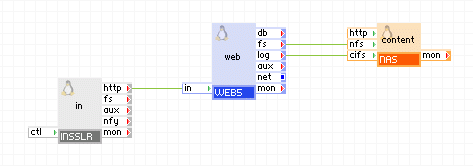
To provide http(s) access to your application, connect the http terminal directly to the WEB appliance.
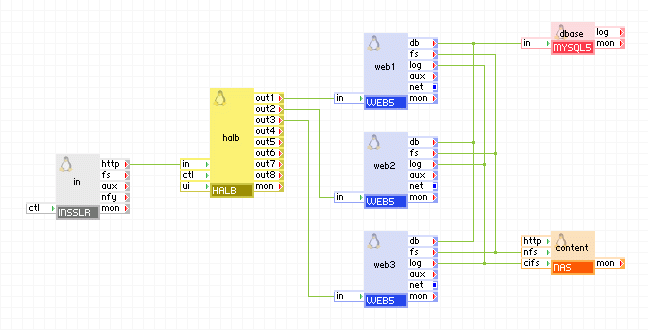
If you need a scalable web application hook the http terminal to a HALB appliance.
Configuration for Web Applications
The configuration examples list only properties set to non-default values and lack the network configuration (ip_addr, netmask, gateway).
|
Property |
Value |
Notes |
|
l7_accept |
http/https/both |
Specifies what l7 protocol is used. Note: if https or both is specified, the key volume should contain the SSL certificate as specified by the cert_file property |
Web Applications with Additional Services
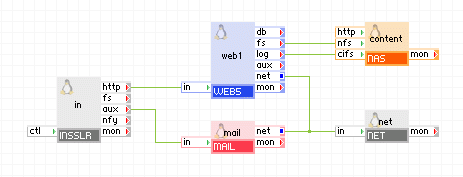
If you have more services than just http in your application, you can use INSSLR to pass http traffic to its http terminal and use the aux terminal for other services.
|
Property |
Value |
Notes |
|
l7_accept |
http/https/both |
Specifies what l7 protocol is used. NOTE: if https or both is specified, the key volume should contain the ssl certificate as specified by the cert_file property |
|
l3_accept_proto |
tcp |
Redirect tcp ports 25,110,143 to aux terminal. |
|
l3_accept_port |
25,110,143 |
Redirect tcp ports 25,110,143 to aux terminal. |
Web Applications with More than One Additional Services
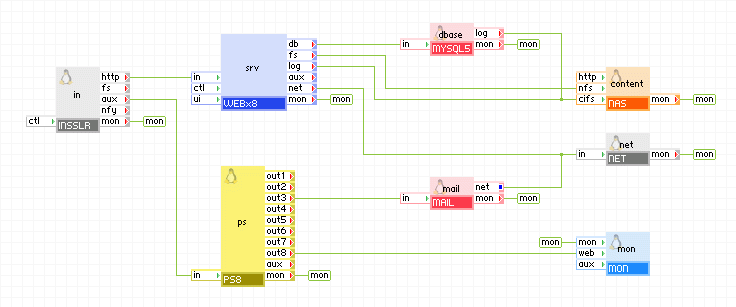
If you have multiple tcp/udp services and http, you can use INSSLR to pass http traffic to its http terminal and use the aux to feed the rest of the traffic to PS8, which feeds the desired traffic to the back end servers.
|
Property |
Value |
Notes |
|
l7_accept |
http/https/both |
Specifies what l7 protocol is used. Note: if https or both is specified, the key volume should contain the ssl certificate as specified by the cert_file property |
|
l3_accept_proto |
all |
Redirect to aux terminal all IP (except icmp) traffic that is not passed to the http terminal. |
Redundant Web Applications
If you need to provide a redundant web application, you can copy the application and use INSSLR to provide failover capabilities for the external IP address.
Backup Web application
If you only want a backup application that will notify users for the downtime, you can use INSSLR to build a backup application that requires a minimum resources.
Appliances in use:
INSSLR on primary application:
|
Property |
Value |
Notes |
|
ip_addr |
1.2.3.4 |
Public IP address of the application, must be the same for the primary and backup application. |
|
netmask |
255.255.255.0 |
Netmask for the public IP address of the application, must be the same for the primary and backup application. |
|
gateway |
1.2.3.254 |
Gateway for the public IP address of the application, must be the same for the primary and backup application. |
|
fover_mode |
asymmetric |
Run in asymmetric mode as we want to use the backup application only when the primary is down. |
|
fover_local_ip |
192.168.100.1 |
Private IP address to be used for communication between INSSLR appliances in the two applications. The local IP address is lower than the remote so this appliance will be primary and will be as long as it is running |
|
fover_remote_ip |
192.168.100.2 |
Remote IP address to be used for communication between INSSLR appliances in the two applications. |
|
fover_netmask |
255.255.255.0 |
Netmask for fover_local_ip. |
INSSLR on backup application:
|
Property |
Value |
Notes |
|
ip_addr |
1.2.3.4 |
Public IP address of the application, must be the same for the primary and backup application. |
|
netmask |
255.255.255.0 |
Netmask for the public IP address of the application, must be the same for the primary and backup application. |
|
gateway |
1.2.3.254 |
Gateway for the public IP address of the application, must be the same for the primary and backup application. |
|
fover_mode |
asymmetric |
Run in asymmetric mode as we want to use the backup application only when the primary is down. |
|
fover_local_ip |
192.168.100.2 |
Private IP address to be used for communication between INSSLR appliances in the two applications. |
|
fover_remote_ip |
192.168.100.1 |
Remote IP address to be used for communication between INSSLR appliances in the two applications. |
|
fover_netmask |
255.255.255.0 |
Netmask for fover_local_ip. |
Redundant Web application (single application)
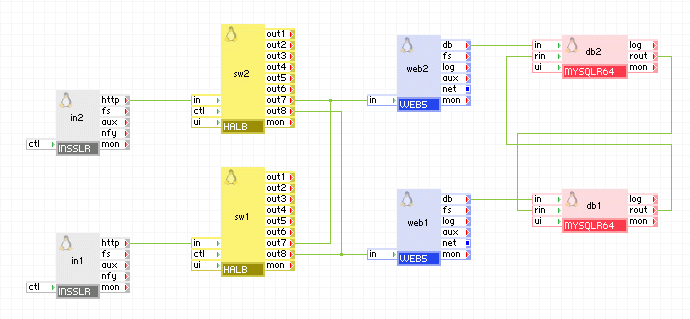
If you want to have your application run in redundant mode without creating a new application, you can simply double the appliances in it and run them in redundant mode. Because this involves using (at least) two web servers and two database appliances, in normal mode they are all used (providing scalability), but each of them is able to serve the application alone in case the other appliance fails. If you need additional scalability you can add more web and database appliances. In this example half of the appliances (in1, sw1, web1, db1) are running in one failover group and the rest (in2, sw2, web2, db2) are in another failover group so that the application can survive a server crash. This application provides redundancy at a very low cost as all of the appliances (except for one INSSLR and one HALB appliance which require very low resources) are in active state and no resources are spent for a backup application that runs only when the primary fails.
in1
|
Property |
Value |
Notes |
|
ip_addr |
1.2.3.4 |
Public IP address of the application, must be the same for the primary and backup application. |
|
netmask |
255.255.255.0 |
Netmask for the public IP address of the application, must be the same for the primary and backup application. |
|
gateway |
1.2.3.254 |
Gateway for the public IP address of the application, must be the same for the primary and backup application. |
|
fover_mode |
symmetric |
Run in symmetric mode. |
|
fover_local_ip |
192.168.100.1 |
Private IP address to be used for communication between INSSLR appliances in the two applications. |
|
fover_remote_ip |
192.168.100.2 |
Remote IP address to be used for communication between INSSLR appliances in the two applications. |
|
fover_netmask |
255.255.255.0 |
Netmask for fover_local_ip. |
in2
|
Property |
Value |
Notes |
|
ip_addr |
1.2.3.4 |
Public IP address of the application, must be the same for the primary and backup application. |
|
netmask |
255.255.255.0 |
Netmask for the public IP address of the application, must be the same for the primary and backup application. |
|
gateway |
1.2.3.254 |
Gateway for the public IP address of the application, must be the same for the primary and backup application. |
|
fover_mode |
symmetric |
Run in symmetric mode. |
|
fover_local_ip |
192.168.100.2 |
Private IP address to be used for communication between INSSLR appliances in the two applications. |
|
fover_remote_ip |
192.168.100.1 |
Remote IP address to be used for communication between INSSLR appliances in the two applications. |
|
fover_netmask |
255.255.255.0 |
Netmask for fover_local_ip. |
db1
|
Property name |
Value |
Notes |
|
auto_create |
1 |
Create the database if the volumes are empty. |
|
server_id |
1 |
Master server 1, this should be different on the remote application |
|
rpl_mode |
master_and_slave |
master and slave |
db2
|
Property name |
Value |
Notes |
|
auto_create |
1 |
Create the database if the volumes are empty. |
|
server_id |
2 |
Master server 1, this should be different on the remote application |
|
rpl_mode |
master_and_slave |
master and slave |
Redundant Web application (two identical applications)
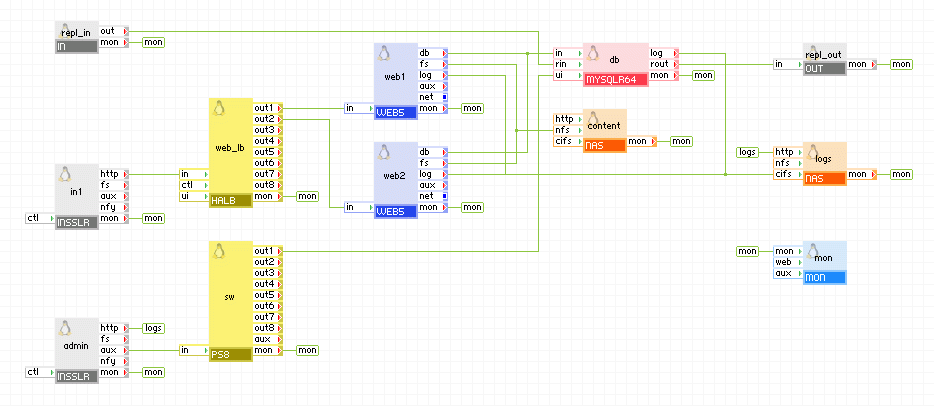
You can run two identical applications on the same grid (but on separate servers so that failure of a server can only affect one of the application), or on different grids, provided that the IP address you use is accessible from both grids. The example below shows an application that uses a database appliance which is also running in redundant mode so in case of failure of one application, the other application can take over without data loss.
Appliances in use:
Client request arrive on the in1 gateway. The gateway forwards the requests to the web_lb load balancer, which directs the request to one of the web servers web1 and web2. The web servers access the db database. The db appliance connects to the remote application (which is an identical copy, the only difference being the server_id of db and the network setup) to replicate the database. The remote application connects to the db appliance via the repl_in gateway which is configured to allow connection only from the repl_out gateway of the remote application. The db appliances in the two applications are running in master-master setup so they always have identical data.
Example property configuration (properties that are not listed should be left to their default values):
Web access to db is available using admin gateway on port 8080.
in1
|
Property |
Value |
Notes |
|
ip_addr |
1.2.3.4 |
Public IP address of the application, must be the same for both applications. |
|
netmask |
255.255.255.0 |
Netmask for the public IP address of the application, must be the same for both applications. |
|
gateway |
1.2.3.254 |
Gateway for the public IP address of the application, must be the same for both applications. |
|
fover_mode |
symmetric |
Run in symmetric mode. |
|
fover_local_ip |
192.168.100.1 |
Private IP address to be used for communication between INSSLR appliances in the two applications. Change this to 192.168.100.2 on the remote application. |
|
fover_remote_ip |
192.168.100.2 |
Remote IP address to be used for communication between INSSLR appliances in the two applications. Change this to 192.168.100.1 on the remote application. |
|
fover_netmask |
255.255.255.0 |
Netmask for fover_local_ip. |
db
|
Property name |
Value |
Notes |
|
auto_create |
1 |
Create the database if the volumes are empty. |
|
error_log_filename |
db.error |
Name of error log file that is to be stored on the logs data volume. |
|
error_log_level |
error |
Error logging level |
|
server_id |
1 |
Master server 1, this should be different on the second application |
|
rpl_mode |
master_and_slave |
master and slave |
Important! Only one of the applications is active at any time, the other one is running simply for failover and is used when the active application fails.
INSSLR supports HTTP 1.0 and HTTP 1.1, but if the client identifies itself as MSIE, HTTP 1.1 support is turned off for that connection (to avoid bugs in some versions of MSIE).
If the client is not MSIE, INSSLR supports HTTP 1.1 for the client (including the multiple requests per TCP session ability), even if the back-end server uses supports only HTTP 1.0.
INSSLR supports a single external IP and therefore only a single SSL certificate may be used.
Open source and 3rd party software used inside the appliance
INSSLR uses the following 3rd party open source packages in addition to the 3rd party open source packages used by its base class LUX5.
|
Software |
Version |
Modified |
License |
Notes |
|
PyXML |
0.8.4-4 |
No |
Fourthought |
N/A |
|
gnutls |
1.4.1-2 |
No |
LGPLv2.1 |
N/A |
|
heartbeat |
2.1.3-3 |
No |
LGPLv2.1 |
N/A |
|
heartbeat-pils |
2.1.3-3 |
No |
LGPLv2.1 |
N/A |
|
heartbeat-stonith |
2.1.3-3 |
No |
LGPLv2.1 |
N/A |
|
iptables |
1.3.5-4 |
No |
GPLv2 |
N/A |
|
libgcrypt |
1.2.3-1 |
No |
GPLv2 |
N/A |
|
libgpg-error |
1.4-2 |
No |
LGPLv2.1 |
N/A |
|
lighttpd |
1.4.18-1 |
No |
BSD |
N/A |
|
nginx |
0.7.62-1 |
Yes |
BSD |
N/A |
|
sudo |
1.6.8p12-10 |
No |
BSD |
N/A |
|
telnet |
0.17-38 |
No |
BSD |
N/A |
|
Copyright © 2011 CA.
All rights reserved.
|
|