

Report Functions › Introduction to the Print File Function › Displaying the Report Formats
Displaying the Report Formats
The report formats are shown on the Display Report Formats panel. To access this panel, press F17 from the device design (report layout).
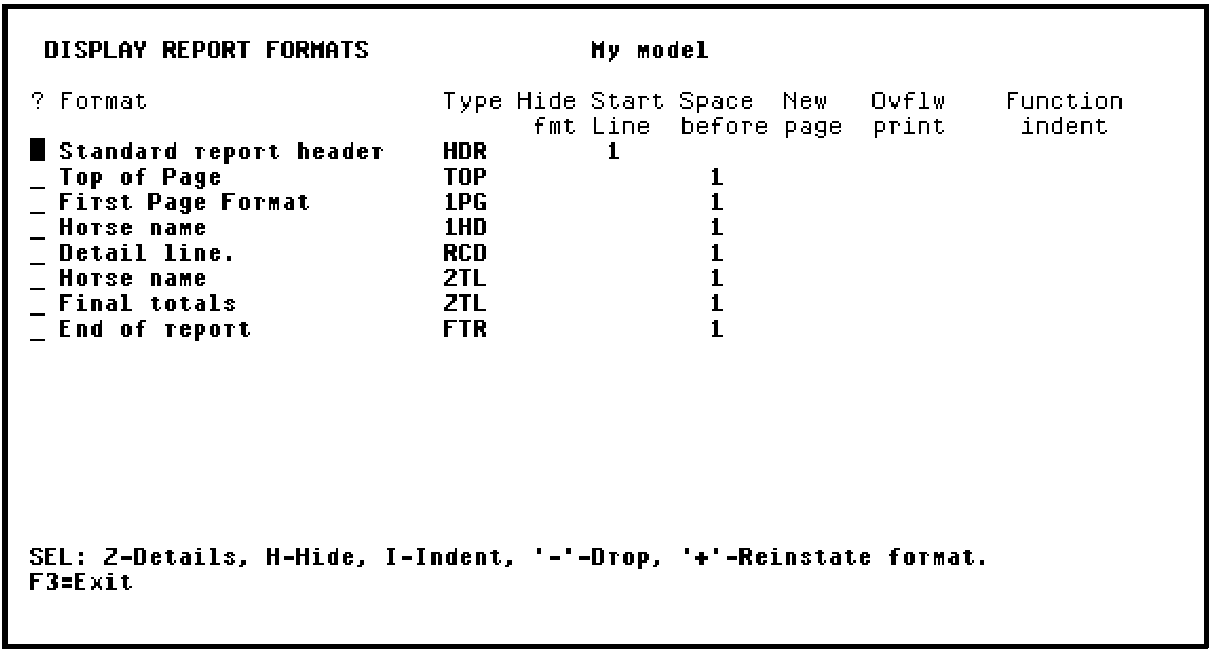
- The Top of page format (TOP) enables you to define fields to be printed at the top of each page in addition to the Standard report header (HDR). This format is empty by default.
- The First page format (1PG) can be used to add title information to the beginning of the report. This format is empty by default.
- The Level-heading format (1HD) contains fields appropriate to the key level; in this case, Horse name. By default, this format prints before the first detail within a level break.
- The Detail line format (RCD) contains the records from the access path on which the Print File function is based. By default, this format is printed for every record read. This format cannot be dropped, only hidden.
- The Level total format (2TL) contains fields appropriate to the key level. By default, this format is printed after the last detail record or subtotal within a level break.
- The Final total format (ZTL) contains totals of all previous total levels. By default, this format contains only the constant Final totals; you can add your own function fields to provide totals.
Copyright © 2014 CA Technologies.
All rights reserved.
|
|