

Initially, the report layout will look like the one shown here.
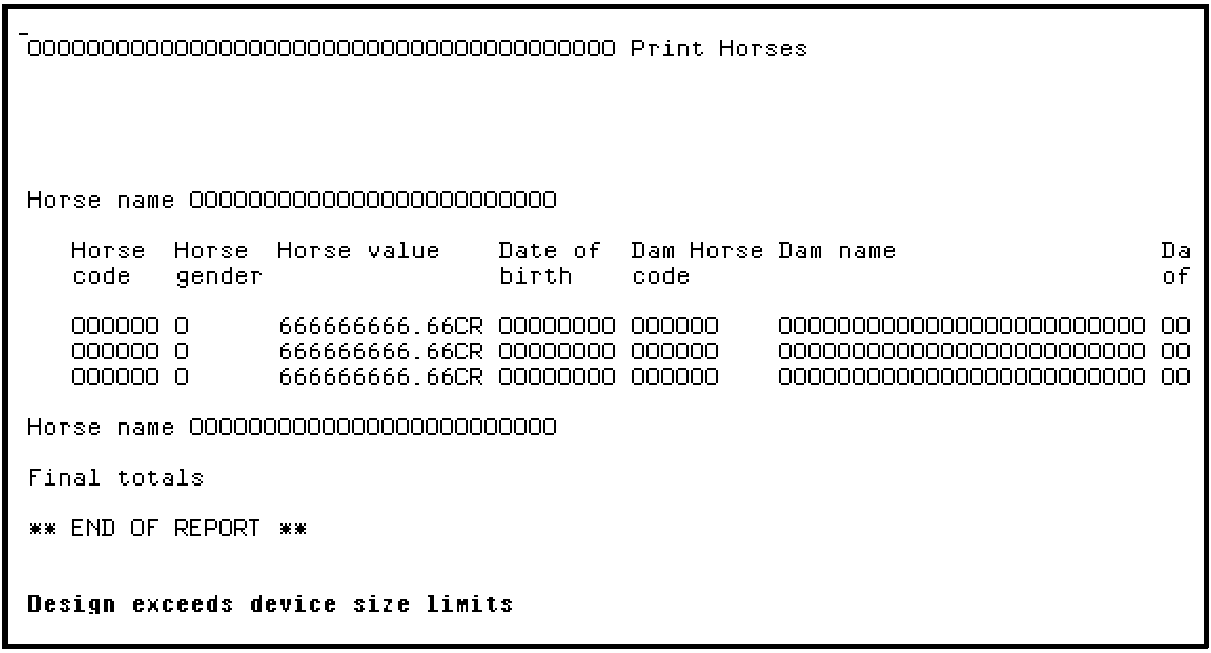
The default layout is made up of the following formats:
The page header format at the top contains a title (Print Horses) plus information such as the date and page number. The header format is repeated on each page of the printed report. An End of report format is placed at the end of the report design.
A heading format and corresponding total format is provided for each Level break. For example, for each key of the based-on access path there is a heading and total format. If the access path has a unique key, the number of level breaks is one less than the number of keys. In this case, the access path does not have a unique key. Since there is one key level, one heading format is provided that, by default, has Horse name as an output field.
The detail format contains the subfile records from the based-on access path. It is shown on the Print Horses report layout between the Horse name heading and Horse name total formats. All the fields from the access path are available in this format. The key field (Horse name) is hidden by default because it already appears on the heading format.
You can modify the report layout the same way you modified the device designs of the earlier functions. The editors for the report layout and the panel design are very similar. However, a report is by default 132 characters across and extends vertically past the bottom of the panel. You can press the Roll Up key to roll the panel by half a panel at a time.
|
Copyright © 2014 CA Technologies.
All rights reserved.
|
|