

You can also display a subset of a model object list, based on such criteria as Object name, Type, Owner, Implementation name, and the date the model objects were created or changed.
Suppose you want to view all Select Record (SELRCD) functions on your session list. To do so, press F17 to display the Subset Model Objects panel. (Press F24 to see more command keys.) Type *FUN for the Type field and type SELRCD for the Function type field.
Press Enter twice.
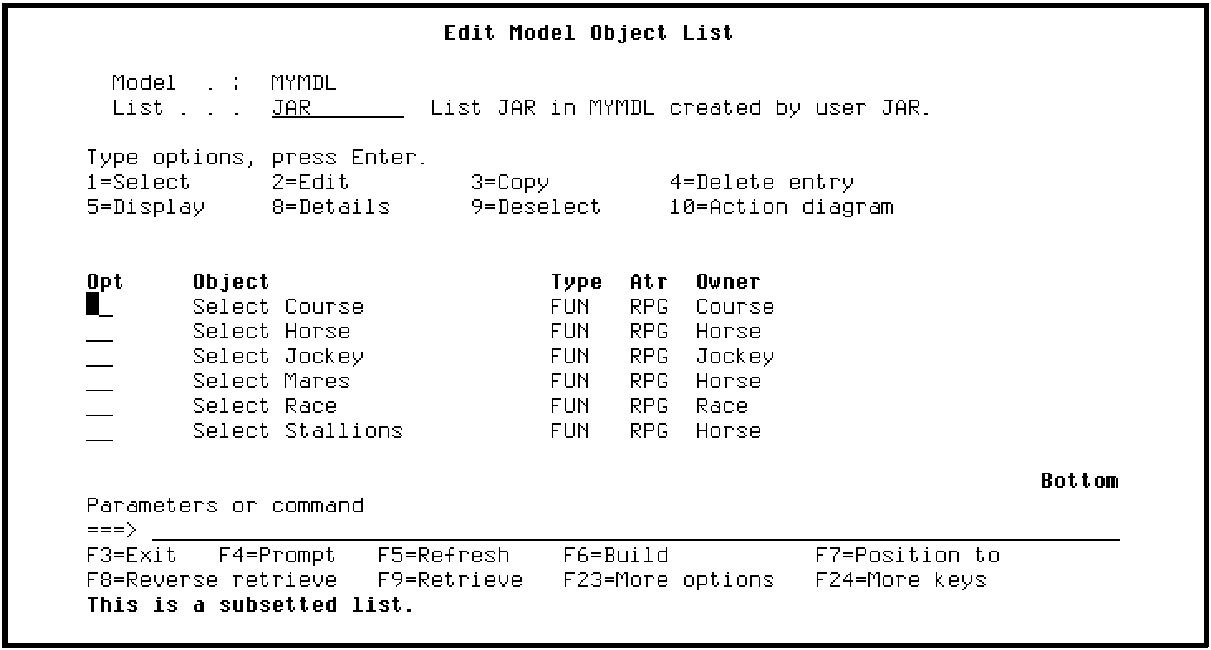
The list now displays only the model objects that meet the criteria you entered on the Subset Model Objects panel. Note the message at the bottom of the panel indicating that the list is subsetted; in other words, not all model objects in the list are displayed.
Subsetting is useful when you work with long lists or when you want to work only with specific types of model objects; for example, functions or access paths. Spend time experimenting with this feature.
|
Copyright © 2014 CA Technologies.
All rights reserved.
|
|