

You are now ready to specify the message parameters. There are two ways of specifying function parameters. The simplest is to name the individual fields that are to be passed as parameters (*FIELD). In this case, you will define two fields as parameters: Date of birth and Dam Date of birth.
Note: The fields on this panel will be discussed in more detail in the Function Parameters topic later in this chapter.
Type the message function parameters.
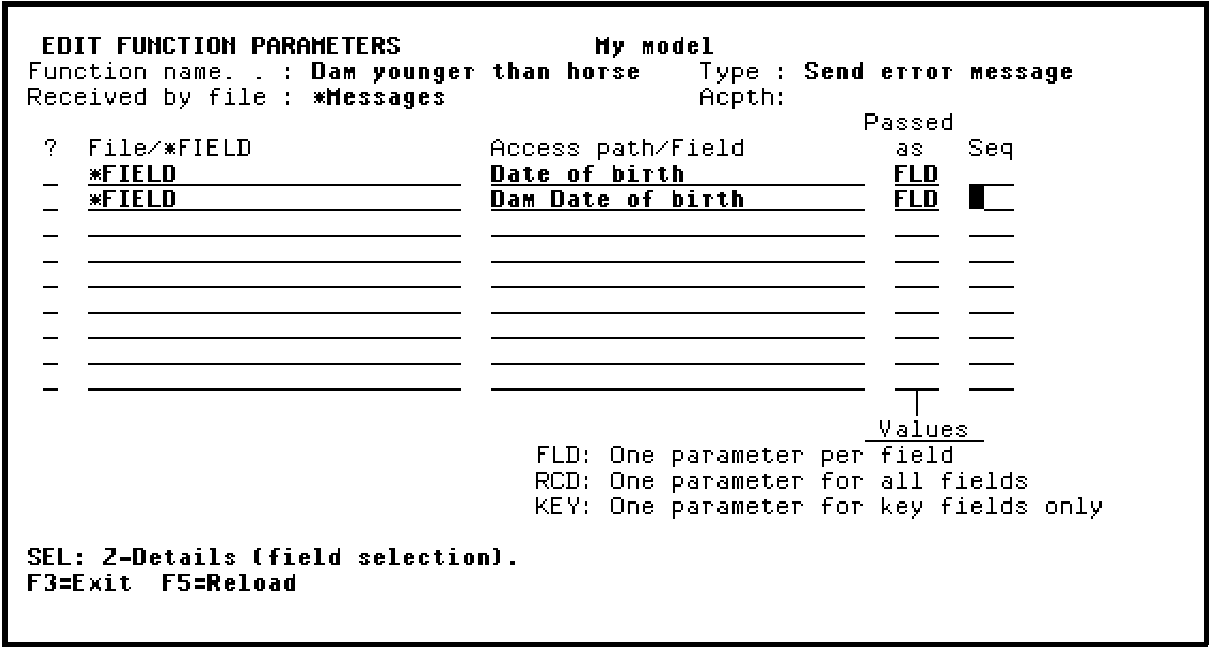
Press Enter. Your selection of input function parameters is now confirmed.
Note: You can view the details of parameter usage by typing Z against a parameter and pressing Enter. By default, the parameter usage will be input. If you display the details, be sure to press F3 to return to the Edit Function Parameters panel before you continue with the tutorial.
Press F3 to return to the Edit Message Functions panel.
|
Copyright © 2014 CA Technologies.
All rights reserved.
|
|