

Managing Model Objects › Impact Analysis › Public Change to Access Path
Public Change to Access Path
Suppose you intend to add or remove a relation for Access Path using the Edit Access Path Relations panel.CA 2E considers this to be a public change. As a result CA 2E :
- Expands usages of Access Path until the first external function on any given sequence of usages is encountered as it did for the private change. However, for a public change the level at which each using object occurs is significant.
- Sets the Required action indicator to EDT in the All Objects list for all using objects that occur at level 1 to indicate that they require editing as a result of the change. Specifically:
- Public change to Access Path is a private change to EDTFIL and it needs to be edited (Required Action=EDT).
- Public change to Access Path is a public change to RTVOBJ, because it is used for a parameter definition, and it needs to be edited (Required Action=EDT).
These are shown in the diagram by the letters EDT and the small box containing a 1.
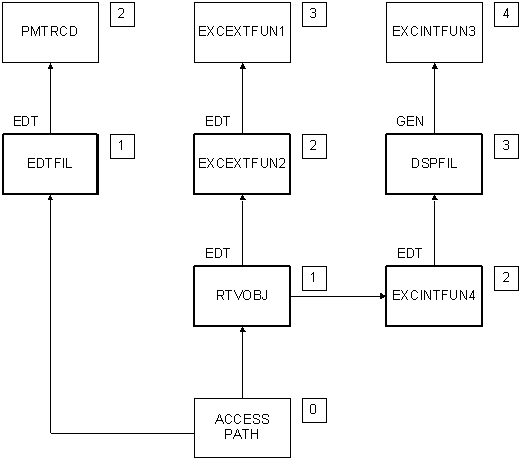
- Checks the model objects at level 2. The result depends on the way in which the level 1 object uses Access Path. In this example the RTVOBJ function uses Access Path as the based on access path and for parameter definition. Specifically:
- Public change to RTVOBJ is a private change to EXCEXTFUN 2; it needs to be edited to accommodate the change to RTVOBJ's parameters (Required Action = EDT).
- Public change to RTVOBJ is a private change to EXCINTFUN 4 and it needs to be edited (Required Action = EDT).
These are shown in the diagram by the letters EDT and the small box containing a 2.
- Repeats the process for the model objects at level 3. The private change to EXCINTFUN 4 is a private change to the external DSPFIL function and it needs to be generated (Required Action = GEN).
- Repeats this process for each usage level until an external function is encountered.
When you perform the required actions (EDT or GEN), CA 2E automatically resets the Required action indicator as follows:
- For GEN, when an access path or external function is successfully regenerated,CA 2E automatically resets it to blank.
- For EDT, if the object is an access path or external function, after editing it is reset to GEN. For all other model objects, it is set to blank.
After you perform the necessary editing, component change processing is invoked again to ensure that the change is reflected in regenerated and newly created using objects. As a result, it is recommended that you edit the model object at level 1 first and then proceed upward to edit model objects at continually higher usage levels. This prevents a model object from being flagged EDT more than once. At the end of the process, all objects that require regeneration will be flagged GEN.
For more information on how CA 2E distributes the impact of a change throughout the model, see the appendix titled "Change Control Facilities Reference Tables" in this guide.
Copyright © 2014 CA.
All rights reserved.
|
|