

This existing panel displays when you take option Z (Details) against a function. For a Service Program, this screen contains certain Service Program-specific fields, subfile options, and function keys, as you can see in the following example:
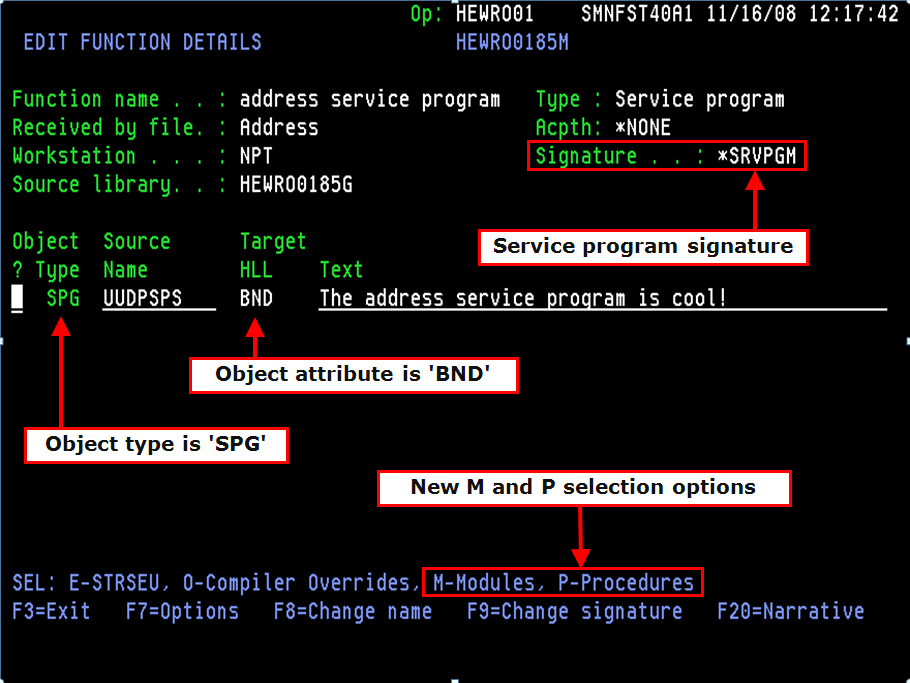
The Signature field displays the current signature for the Service Program. It can take the following values:
Note: The signature is determined at generation time (or in the case of *GEN, at compile-time).
You can take option M (Modules), to display the list of modules currently bound into the Service Program (and to add more modules if you authority).
You can also take option P (Procedures) against the Service Program, to display the list of procedures which will be exported from the *SRVPGM object (and, if you have sufficient authority, to reorder that list).
Use function key F9 to make the Signature field input-capable
There is one function option for a Service Program function - Add to Binding Directory. This determines whether or not this service program should automatically be added to the model's default binding directory. Whether set to Y or N, all constituent modules will be removed from the default binding directory when the service program is created.
Setting this to N can be useful where you create multiple service programs that contain one or more of the same modules, which therefore export the same procedures, since this would give rise to errors when subsequently compiling programs.
|
Copyright © 2014 CA.
All rights reserved.
|
|