

The Service Program Modules panel is called when option M is taken from the EDIT FUNCTION DETAILS panel (above).
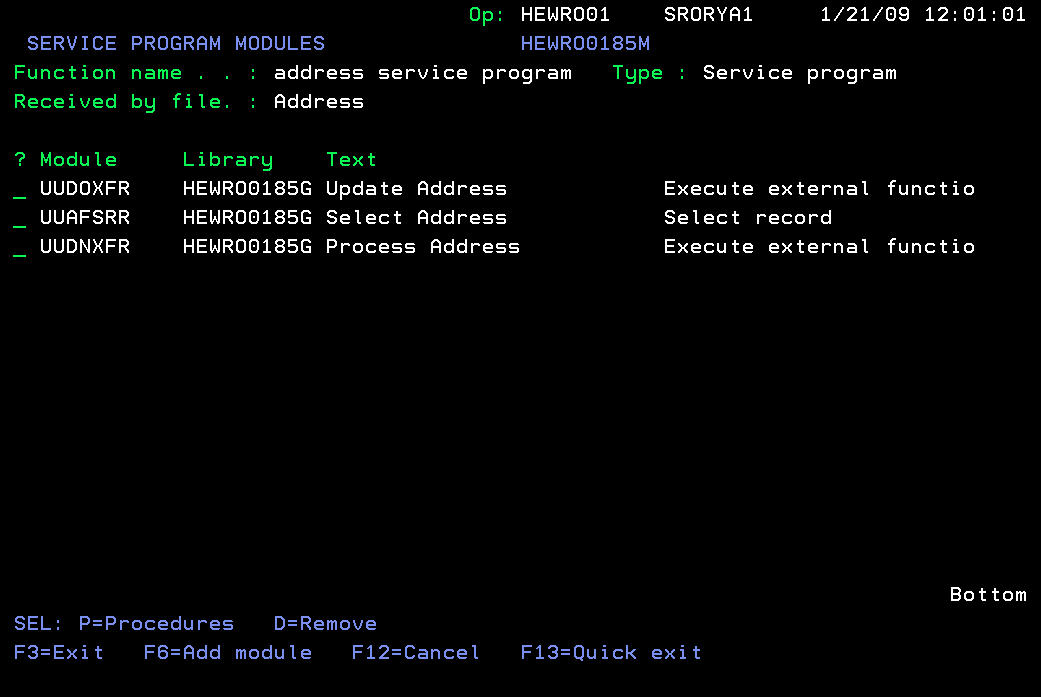
From this screen, you can see which modules are currently bound into the Service Program. This list may include both 2E modules and external (non-2E) modules.
You can also press F6 to go to the SELECT MODULE screen
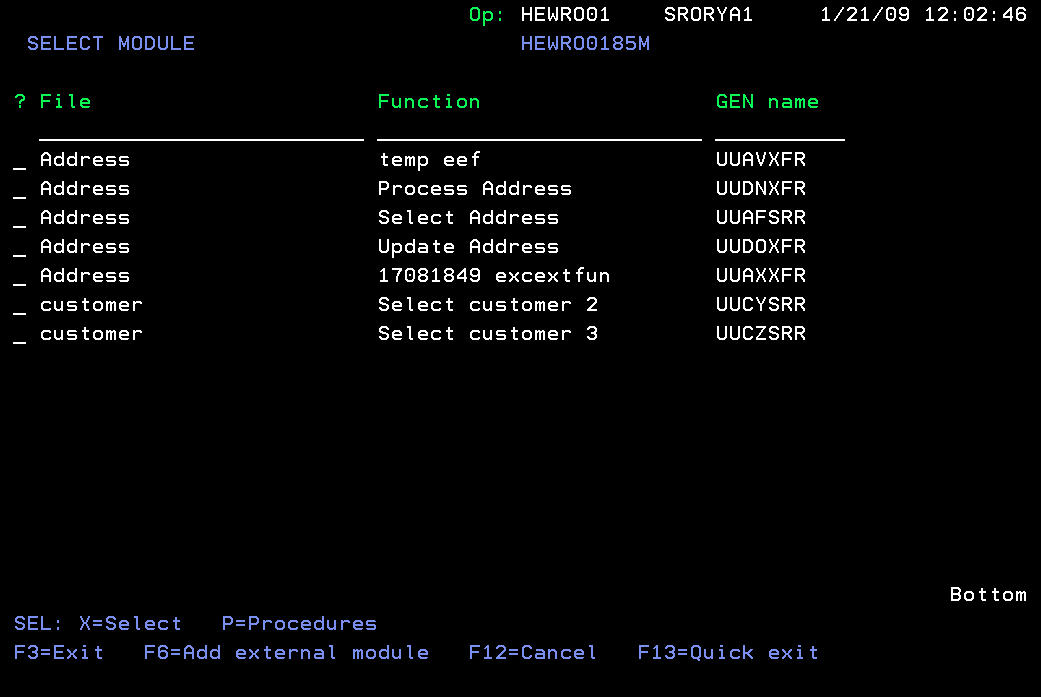
You can select one or more modules to bind into the Service Program, by using subfile option X (displayed) or 1 (not displayed, but active anyway). This automatically makes all the procedures from the module exported from the Service Program. Alternatively, you can take option P against a module and select which procedures they would like to export from the Service Program.
You can also press F6 to display the SELECT EXTERNAL MODULE screen
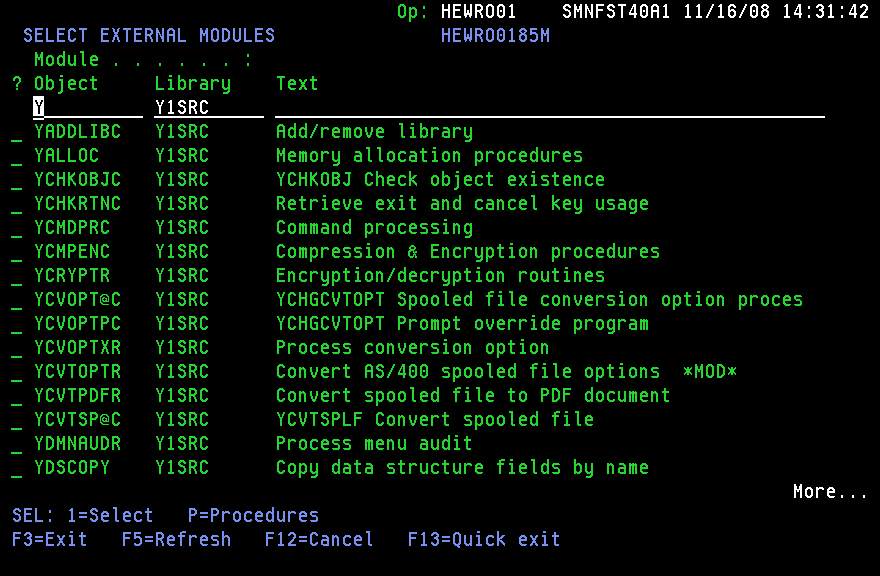
You can select one or more external (non-2E) modules to bind into the Service Program. The initial screen is displayed empty, and you can specify subfile control criteria so sub-select the modules to display. As with the SELECT MODULE screen, option P is available to sub-select procedures from within the module to export from the Service Program.
The Service Program Exports panel is displayed when option P is taken from the EDIT FUNCTION DETAILS panel:
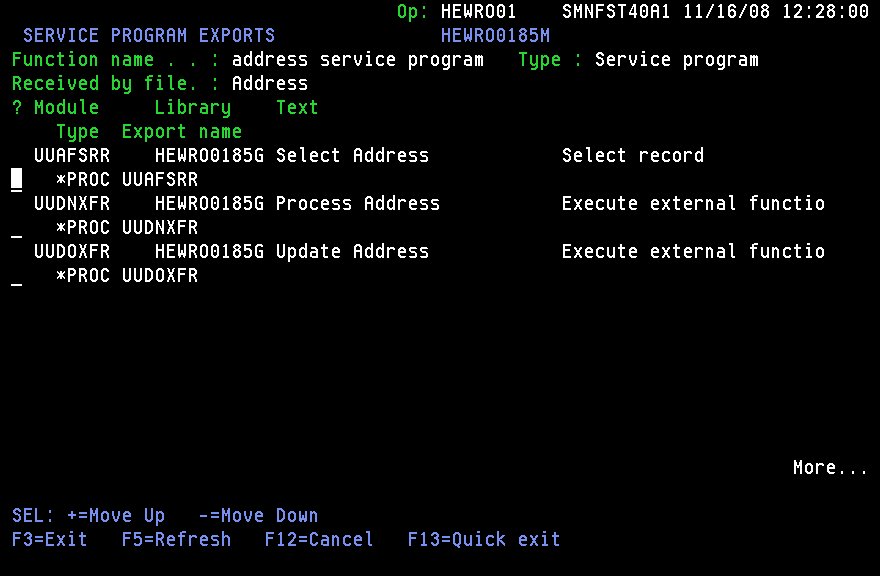
This allows you to display the list of procedures which are exported from the *SRVPGM object, and if necessary, re-order them.
Note: Although this is only a requirement where, due to modules being removed and added, the list may have changed-typically, once a Service Program has been generated and compiled into a *SRVPGM object, this list would never be changed).
When option G or J is taken against a Service Program, the generation program creates/updates the source member (in file QSRVSRC) in the 2E model generation library (*GENLIB). This source member contains both the export list associated with the *SRVPGM object, as well as several compile preprocessor directives which will be used by the CA 2E Toolkit to actually create the *SRVPGM object. These include the following (in order):
An example of an Service Program source member is as follows:
/*Y: CRTSRVPGM SRVPGM(HEWRO0185G/UUDPSPS) +                          */
/*Y: MODULE(HEWRO0185G/UUAFSRR HEWRO0185G/UUDOXFR) +                 */
/*Y: EXPORT(*SRCFILE) SRCFILE(HEWRO0185G/QSRVSRC) OPTION(*DUPVAR +   */
/*Y: *DUPPROC *NOWARN) BNDDIR(QC2LE YBNDDIR) TEXT('The address +     */
/*Y: service program is cool!')                                      */
/*Y: ADDBNDDIRE BNDDIR(HEWRO0185G/YBNDDIR) OBJ((HEWRO0185G/UUDPSPS + */
/*Y:  *SRVPGM)) POSITION(*FIRST)                                     */
/*Y: RMVBNDDIRE BNDDIR(HEWRO0185G/YBNDDIR) OBJ((*LIBL/UUAFSRR +      */
/*Y: *MODULE))                                                       */
/*Y: RMVBNDDIRE BNDDIR(HEWRO0185G/YBNDDIR) OBJ((*LIBL/UUDOXFR +      */
/*Y: *MODULE))                                                       */
STRPGMEXP PGMLVL(*CURRENT) SIGNATURE(*GEN)
             EXPORT     SYMBOL('UUAFSRR')
             EXPORT     SYMBOL('UUDOXFR')
ENDPGMEXP
Processing this source member results in the UUDPSPS service program being created in library HEWRO0185G and being added to the top of the YBNDDIR binding directory, with *MODULE objects UUAFSRR and UUDOXFR being removed from the same binding directory.
Note: The shipped defaults for the CRTSRVPGM, ADDBNDDIRE, and RMVBNDDIRE commands can be customized by doing the following:
*CRTSRVPGM EXC Y2U1033 Y2USRMSG
|
Copyright © 2014 CA.
All rights reserved.
|
|