Modifying Function Parameters › Defining Function Parameters › Defining the Parameter’s Usage and Role
Defining the Parameter’s Usage and Role
After you specify the parameter, you can define the parameter’s usage and role on the Edit Function Parameter Details panel.
The following situations with the functions EXCEXTFUN and EXCUSRPGM apply to this panel:
- When the function is not EXCEXTFUN or EXCUSRPGM, or when the function is EXCEXTFUN or EXCUSRPGM but parameter is not passed as an array, RCD (ARRAY) or KEY (ARRAY), then Number of Elements is not available.
- When the function is not EXCEXTFUN or EXCUSRPGM, the Passed as field cannot have values of KEY (ARRAY) or RCD (ARRAY).
- When the function is EXCEXTFUN or EXCUSRPGM and the parameter is not passed as an array, then the Passed as field cannot have values of KEY (ARRAY) or RCD (ARRAY).
- When function is EXCEXTFUN or EXCUSRPGM, parameter is passed as an array(A=’Y’), and the Edit Function Parameters panel indicates Passed=RCD, then the Passed as field is RCD (ARRAY).
- When function is EXCEXTFUN or EXCUSRPGM, parameter is passed as an array(A=’Y’), and the Edit Function Parameters panel indicates Passed=KEY, then the Passed as field is KEY (ARRAY).
- When function is EXCEXTFUN or EXCUSRPGM and parameter is passed as an array (RCD or KEY), then the Number of elements displays the number of elements, as defined on the array being passed. You can view and modify the array’s definition in the *Arrays file.
To define the parameter’s usage and role
- Zoom into the parameter, type Z next to the selected parameter, and then press Enter.
The Edit Function Parameter Details panel appears:
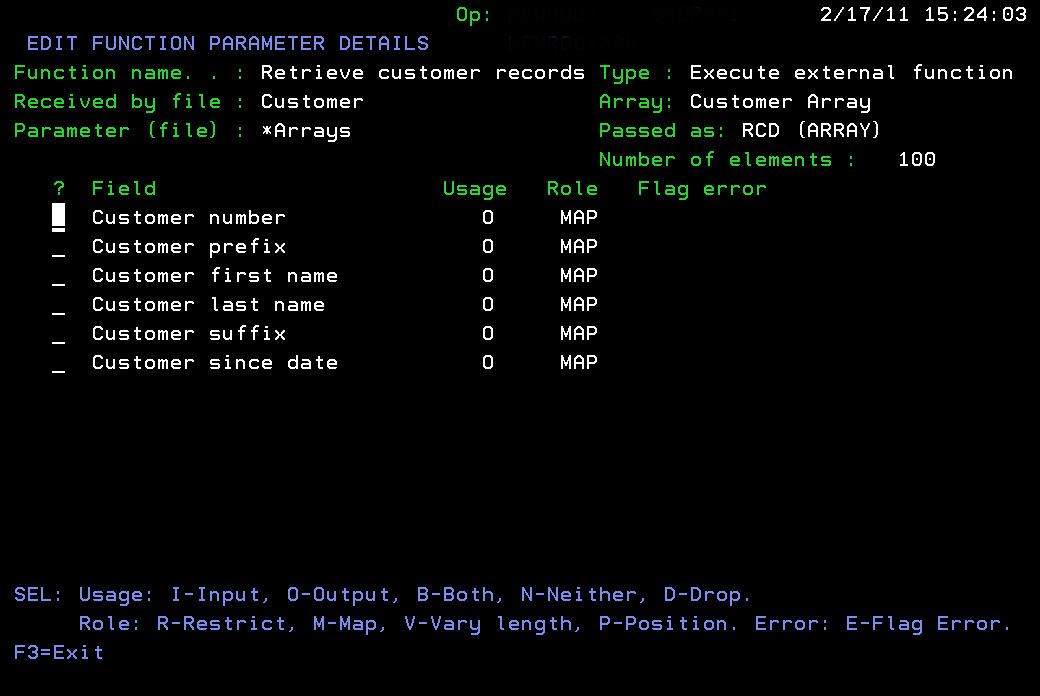
Notes:
- If you entered a file, access path, or an array, those fields are listed on this panel. If the function has more than eight parameters, a parameter selection field displays in the header.
- When Passed as=RCD (ARRAY) or =KEY (ARRAY), Number of elements displays the Number of elements, as defined in the array being passed.
- Enter the selected usage type in the Usage column, next to the parameter you are defining. The options are:
- I (Input)
- O (Output)
- B (Both)
- N (Neither)
- D (Drop)
- Enter the selected type of role in the Role column, next to the parameter you are defining. The options are:
- R (Restrict)
- M (Map)
- V (Vary length)
- P (Position)

