

In the event of a complete loss of the Audit data set, it should be reformatted with TMSFORMT. CA 1 should then be reinitialized using TMSINIT on all CPUs. For complete instructions, see the procedure on Formatting the Audit Data Set.
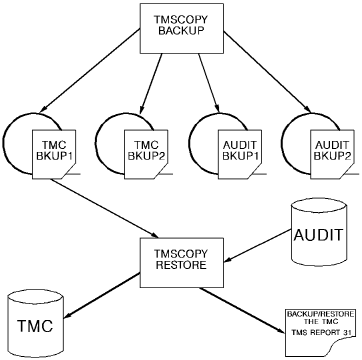
The TMC is restored by reallocating the TMC, if necessary, and using the latest TMC backup tape. The Audit data set is then used as a transaction file to post all entries which were made since the last backup, as illustrated in the figure below. Only Audit record types 0, 1, and 2 are used in a restore.
Note: For information on TMC/Audit and Disaster Recovery, see the Administration Guide.
If no current or alternate backup tape is available, see Restoring the TMC with a Noncurrent Backup.
The following diagram illustrates Restoring the TMC:
Important! A DASD RESTORE of the device holding the TMC effectively destroys the TMC itself unless followed immediately by a TMSCOPY RESTORE of the TMC. The TMC should be allocated as unmovable: DSORG=PSU. PSU should prevent the TMC and Audit from being moved during a DEFRAG operation. If disk volumes containing the TMC or Audit are reorganized or compressed, the TMC or Audit files must be excluded. The TMC and Audit files should also be excluded from Archive lists.
***DO NOT RUN OTHER TAPE JOBS DURING THE TMSCOPY RESTORE***
Various console messages may be issued during TMSCOPY BACKUP or RESTORE processing. These messages are documented in the Messages Reference Guide.
|
Copyright © 2013 CA Technologies.
All rights reserved.
|
|