

Using the Vault Management System (VMS) › VMS Features › Extensive Reporting
Extensive Reporting
Three reports with site-specified sorting can be generated by three CA Earl steps:
- Picking List for Vault - Describes the volumes you will remove from the library and the off-site vaults.
- Distribution List for Vault - Shows the placement of tapes into a new location or the library.
- Inventory List for Vault - Describes the current location of each tape under VMS control, including (blank)LIB and LIBR.
Reports are also provided regarding the vault pattern used and any exceptions or errors encountered during processing:
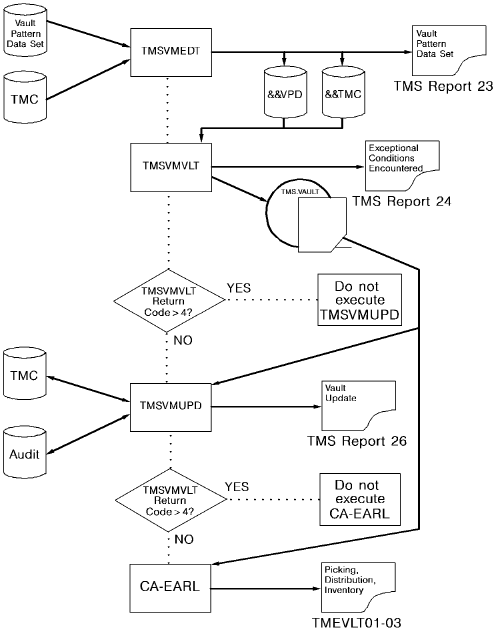
- Vault Pattern Data Set - Lists the VPD read by TMSVMEDT and provides a cross reference showing the pattern number assigned and the options requested for each.
- Exceptional Conditions Encountered During Processing - Lists exceptions detected by TMSVMVLT to inform you of any problems or possible errors with the processing.
- TMS Vault Update Listing - Shows each TMC record updated by TMSVMUPD.
The following diagram provides an illustration of a VMS Program Execution:
Copyright © 2013 CA Technologies.
All rights reserved.
|
|