The Common page appears in the right pane.
The Content Update tabs appear on the right side of the page.
The Update Scheduler tab determines how frequently polling occurs. The initial poll takes place at system startup and subsequent polls occur as specified on this tab.
Recommendation: Establish a balance between polling too often (for example, every 5 minutes) and not often enough (for example, every 72 hours). The objective is to ensure that every computer can easily access Content Updates and that there is time to distribute the updates across the enterprise.
For example the timing of polls should be similar to the following example:
- For tier 2 Redistribution Server(s) that poll the CA Content Update Server, set the time to 00:00. Repeat the poll on an hourly basis.
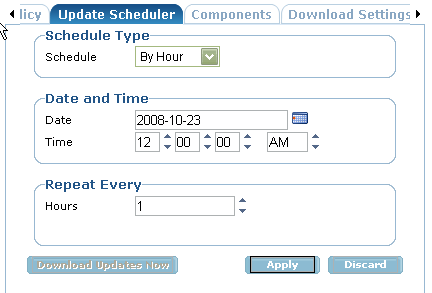
- For tier 3 high risk machines, set the time counter to 00:15 to pull their updates from tier 2 Redistribution Servers. This should allow adequate time for the tier 2 servers to download and make the updates available.
- For tier 4 machines, set the time counter to 00:30 to pull updates form tier 2 Redistribution Servers.
- For tier 5 client machines, set the time counter to 00:45 to pull updates from tier 4 machines.
The Components tab lists the individual components to download and make available. The list includes updates for the scanning engine and base products.
- Components
Specifies the individual components to download, including updates for the scanning engine and base products.
Note: When selecting components, make sure to select the components for the next lowest tier of machines. For example, if you are creating a Content Update policy for a Tier 4 regional Redistribution Server, you must choose the components for the Tier 5 laptops, desk tops and CA TM clients. Otherwise, the tier 5 machines that pull updates from this server will not receive the correct update components and will be out of date.
- Download Settings
Specifies the servers from where updates are retrieved. Up to six servers can be specified.
In a small organization, your Download Setting might consist of a single Redistribution Server followed by the CA Content Update Server.
In a tiered implementation, you will most likely have multiple Redistribution Servers in the Download Settings. For example, a high availability policy for a CA TM client machine in large organization might look similar to this:
- A regional or local Redistribution Server as the first server to contact for updates
- A 2nd regional or local Redistribution Server
- A remote Redistribution Server located at corporate headquarters
- The CA Content Update Server at etrustdownloads
The URL for the CA Content Update Server is http://etrustdownloads.ca.com:80 (port 80).
The Assign Branches dialog appears.
The policy is assigned to the specified branches.