

In order for generated clients to find a CA Gen .NET Server, the clients need to know the host and port number of IIS where the servers are executing. Clients can retrieve this information from either the Server Manager Properties or from the COMMCFG files.
The Server Manager Properties dialog allows you to specify this .NET Remoting-specific information. The values that are entered in the fields tend to be server dependent. Therefore, the MSI file created by CA Gen will contain server-specific information.
To open the Server Manager Properties dialog, select the Cooperative Packaging or the Cooperative Generation dialog. Then either double-click the desired Server Manager, or select the Server Manager and select Properties from the Detail menu. The Server Manager Properties dialog opens.
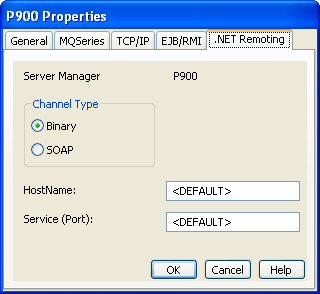
Enter the appropriate values as follows:
|
Copyright © 2014 CA.
All rights reserved.
|
|