

During assembly, the files that make up a CA Gen .NET Application are placed into an MSI file. Later, the MSI file is invoked and installed using standard Windows tools. The following diagram shows how this is accomplished.
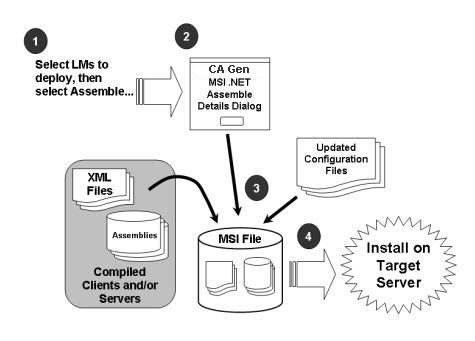
Once the Cascade Library and Load Modules to be assembled into an MSI file have been selected, select Action, Assemble or click the Assemble toolbar icon to open the MSI .NET Assemble Details dialog.
Note: You must not select the DDL module.
If an ASP.NET Web Client has been selected for assembly, you can specify the client's properties.
For a detailed explanation of this dialog, see MSI Assembling in the Build Tool Guide.
Upon completion, the CA Gen–generated .NET Application is ready for installation on the target system. If necessary, copy the MSI file to the target system.
|
Copyright © 2014 CA.
All rights reserved.
|
|