

The Installation Guide has been restructured and describes the following methods of installing your product:
The CA XCOM Data Transport for z/OS v12.0 CICS Interface LOAD library is now shipped as a PDS/E. This library now aligns with the CA XCOM Data Transport base product LOAD library. The CA XCOM CICS Interface LOAD library was formerly a PDS.
The SSL configuration files are unloaded in ZFS format to the user specified USS file system. References to the data set DD name CBXGHFS become CBXGZFS.
The format of the CICS load library is in PDS/E format to align with the CA XCOM Data Transport load library. CICS load library was formally PDS.
The SSL configuration files are unloaded in ZFS format to the user specified HFS file system. References to the data set DD name CBXGHFS becomes CBXGZFS.
CA XCOM Data Transport runs reentrant and reusable. All user exits can be assembled and linked as reentrant and reusable so that the exits can be called from CA XCOM Data Transport. Sample JCL member CAI.CBXGJCL(ASM#TBLS) reflects this change by changing default assemble and link options to be reentrant and reusable.
Certain features of CA XCOM Data Transport require APF authorization. For this reason, all CA XCOM Data Transport server regions must run APF authorized. For XCOMJOB, APF authorization is optional if no features are used which require it. This is also true for user programs which call XCOMJOB as an API interface to CA XCOM Data Transport functions.
The features of CA XCOM Data Transport requiring APF authorization are:
Any programs that call XCOMJOB as an API and use one or more of the above-listed features, linking with link-edit parameter AC(1) is a must.
If XCOMJOB is run in a non-APF Authorized environment, and one of the features are used which require APF authorization, the job terminates with a message appropriate to the function which requires APF authorization.
Note: Including the CA XCOM Data Transport load libraries in the LPA implies APF Authorization.
TYPE=HISTORY requests now allow more refinement criteria for selection of inactive and/or completed transfers. This allows a user to select transfers for reporting based on particular status groups within the inactive and completed categories.
The status group criteria for inactive transfers are:
Held – The select transfers that are currently held.
Suspended – The select transfers that are currently suspended.
The status group criteria for completed transfers are:
Successful – The select transfers that completed successfully.
File Error – Select transfers that terminated due to a file error.
Network Error – Select transfers that terminated due to a network error.
Logic Error – The select transfers that terminated due to a logic error.
Terminated – The select transfers that terminated for any other reason.
For batch history requests, new SYSIN01 parameters have been added to allow for selection of transfers that are based on status.
Specifies a subtype of completed transfer requests to report on. Any combination of the following values can be specified.
S - Report on completed transfers which completed successfully.
F - Report on completed transfers which terminated as a result of a file error.
L - Report on completed transfers which terminated as a result of a logic error.
N - Report on completed transfers which terminated as a result of a network error.
T - Report on completed transfers which terminated for other conditions.
Note: If this parameter is not specified, all completed transfers can be reported on when OTYPE=C or OTYPE=ALL is specified.
Specifies a subtype of inactive transfer requests to report on. Any combination of the following values can be specified.
H - Report on inactive transfers which are in a HELD status.
S - Report on inactive transfers which are in a SUSPENDED status.
Note: If this parameter is not specified, all inactive transfers can be reported on when OTYPE=I or OTYPE=ALL is specified.
TYPE=HISTORY requests now allow the capability to report only transfers that executed within a specified date/time range. That is, the transfer started at or after the specified start time and completed at or before the specified end time. The report only includes transfers that have completed (not in active or inactive status).
For batch history requests, a new SYSIN01 parameter has been added to specify how date and time range is used for selecting transfers.
OINCLUDE indicates how transfers are selected to meet the date and time range criteria.
The selected transfers that are or were active within the date and time range criteria.
The selected transfers that started and ended within the date and time range criteria.
Only the transfers that started in the specified time range are reported.
Only the transfers that completed in the specified time range are reported.
Default: Active
TYPE=HISTORY requests now allow the capability to report only transfers that are scheduled over a specified PlexQ group.
For batch history requests, a new SYSIN01 parameter has been added to specify a filter for the name of the PLEXQ Group used to schedule transfers.
Limits the history request to only those locally initiated file transfers which were scheduled using the named PLEXQ Group.
A one to eight character PLEXQ Group name that is used to limit the history request to only those locally initiated file transfers scheduled using the specified PLEXQ Group.
Default: None
Note: The wildcard character, *, can be used for this parameter only when specified as the last character.
The File Transfer Display Select ISPF panel has been updated to allow selection of status groups and specification of which transfers to include.
-------------------------------------------------------------------------
13/07/24                 CA XCOM Release v12.0 SP00                     VUOLO01
13.205                   File Transfer Display Select                  08:37:47
--------------------------------------------------------------------------
COMMAND ===>

 Local System Identification
   Server: 141.202.65.31                             Port: 9833  Protocol: TCP

   Select Transfers ===>   Inactive          Active        Completed
                         ==>  Held                       ==>  Successful
                         ==>  Suspended                  ==>  File Error
                                                         ==>  Network Error
                                                         ==>  Logic Error
                                                         ==>  Terminated

   History Location ===> X Queue               X Database

Limit display to transfers for the following:
  History System ID ===>               | History System Name ===>
 Requesting User ID ===> VUOLO01       |      Request Number ===>
        Transfer ID ===>               |        Last Message ===>
    Local or Remote ===>       (L/R)   |           File Type ===>     (J/R/F)
      Transfer Type ===>       (S/R)   |  Origin PLEXQ Group ===>

   Remote System:
      ID ===>
  TCP/IP ===>      (Y/N)

Include Transfers ==> E           (A/E/S/C)
Range Start Date ===> 20140103    (YYYYMMDD)  Time ===> 080000      (HHMMSS)
Range End Date =====> 20140103    (YYYYMMDD)  Time ===> 170000      (HHMMSS)
Range File Size ====>             (Min.)           ===>             (Max.)

Maximum Entries ===>             (NNNN)

Jobname ===>
Vol ===>
Case Sensitive ===> N           (Is the search on File Case Sensitive?)
File ==>
--------------------------------------------------------------------------
PFK  1/Help   3/End               Copyright (c) 2013 CA.  All rights reserve
All shipped LOAD modules are now reentrant. This means that the product LOAD libraries can be placed in the LPA for customers who run multiple CA XCOM Data Transport for z/OS v12.0 regions within a single LPAR. This reduces the storage that is required for individual server regions by using a single LPA-resident copy of executable modules.
The RRDS record has been increased in size to 8080 bytes from 3030 in release 11.6. This increase allows CA XCOM Data Transport to support more parameters for new features. A new RRDS VSAM Data Set must be created before using version 12.0. Version 12.0 cannot support any existing RRDS created by a previous release of CA XCOM Data Transport.
The history record has been increased in size to 8080 bytes from 3030 in release 11.6. This increase allows CA XCOM Data Transport to support storing more information for new or existing features. If you are using a VSAM data set to record history, a conversion of the data set is required to continue to use it with version 12.
Note: The expansion of the history record size has also required an increase in the entry size in the LIST STRUCTURE used by the deprecated XCOMPLEX facility. This increase in entry size can reduce the number of entries that can concurrently be in a LIST by slightly more than one half.
The SMF record that CA XCOM Data Transport produced has been increased in size to 8248 bytes from 3198 in release 11.6. This increase is due to the increase in size of the CA XCOM Data Transport history record, which is included as part of the SMF record generated.
Modifications to the format of the VSAM history file cluster have been implemented for version 12. This can require either defining a new VSAM history file cluster or migrating an existing one. The XCOMUTIL History File utility has been modified to perform a conversion of an existing release 11.5 or 11.6 VSAM history file cluster to the new version 12 format. For more details, refer to the CA XCOM Data Transport User Guide for the description of the XCOMUTIL utility. The format changes implemented for version 12 are as follows:
To use an existing VSAM history file from the 11.5 or 11.6 releases in version 12, this migration utility must be performed to create a new format history file. Some unpredictable results can occur when using an 11.5 or 11.6 format VSAM history file with 12.
Using a VSAM History file that does not have a logical record length (LRECL) of 8080 can result in the CA XCOM Data Transport server issuing a XCOMM0478E XCOMHIST RECSIZE(xxxx) INVALID. THIS RECSIZE SHOULD BE 8080. The server can continue but history records cannot be logged.
Modifications to the format of the VSAM request queue file have been implemented for release 11.6 and version 12. In prior releases of CA XCOM Data Transport for z/OS, a new request queue file needed to be defined when installing a new release. Beginning with version 12, it can be possible to migrate an existing request queue file from a prior release of CA XCOM Data Transport for z/OS. This can allow any transfer requests that are in a request queue to be brought forward to a new release of CA XCOM Data Transport without having to reschedule them into a new request queue. The XCOMMIGR Request Queue Migration utility has been created to perform a conversion of an existing release 11.5 or 11.6 VSAM request queue file to the new version 12 format. For more details, refer to the CA XCOM Data Transport User Guide for the description of the XCOMMIGR utility. The format changes implemented for version 12 are as follows:
To use an existing VSAM request queue file from the 11.5 or 11.6 releases in version 12, this migration utility must be performed to create a new format request queue file. If a properly formatted version 12 request queue is not supplied, the CA XCOM Data Transport for z/OS server can terminate.
Using a VSAM request queue file that does not have a logical record length (LRECL) of 8080 can result in the CA XCOM Data Transport server issuing the message XCOMM0288E XCOMRRDS RECSIZE(xxxx) INVALID. THIS RECSIZE SHOULD BE 8080. The server will terminate.
The CA XCOM Data Transport servers provide updates and heartbeat calls to CA OPS/MVS. The CA XCOM server notifies CA OPS/MVS when it is STARTING, UP, STOPPING, and DOWN. Additionally, a recurring call affirming the NORMAL status of the server is also made to CA OPS/MVS every time the ERRINTV number of minutes elapses.
A new configuration parameter SSL_VERSION has been added to allow for the usage of IBM System SSL in addition to the previously provided OpenSSL. Specifying SSL_VERSION=SYSTEM causes IBM System SSL to be used, while specifying SSL_VERSION=OPEN causes OpenSSL to be used.
The SSL_VERSION can be specified in the configuration member and overridden by the XCOMJOB/XCOMXFER EXEC parameter. Using the DFLT operator command, you can dynamically modify the SSL_VERSION.
CA XCOM Data Transport support for IBM System SSL requires z/OS 1.13 or above.
During the installation of CA XCOM Data Transport, a sample System SSL configuration file that is named SYSconfigSSL.cnf is created in the sysssl directory of the USS file system. The System SSL configuration file contains parameters that System SSL uses to configure the SSL connection between CA XCOM Data Transport partners.
For more information on the parameters that can be specified in the System SSL configuration file, see How to use the System SSL Configuration Parameters in the CA XCOM Data Transport Administration Guide.
A sample certificate conversion script that is called makesysssl is provided in the sysssl directory of the USS file system. During the installation of CA XCOM Data Transport, the makesysssl script converts the sample OpenSSL certificates (PEM files) generated by the makeca, makeclient, and makeserver scripts to PKCS12 certificate files. It then imports them into a sample System SSL certificate database.
If the makeca, makeclient and makeserver scripts are run manually after installation, the makesysssl script can also be run manually to convert the generated sample certificates for use by System SSL.
The makesysssl script can also be used to convert a PEM certificate file and corresponding PEM key file to a PKCS12 certificate file. The PKCS12 certificate file can then be imported to a System SSL certificate database using the IBM gskkyman utility. This utility is described in the IBM Cryptographic Services System Secure Sockets Layer Programming guide.
For more information on the actions and options that can be specified to the makesysssl script, see Converting the Sample Certificates in the CA XCOM Data Transport Administration Guide.
The ISPF Transfer Request Detail display has been enhanced to display SSL and cipher information for the transfer. Two new fields have been added under a new SSL Details section:
SSL Version - the version of SSL used for the transfer. If System SSL was used, the value System SSL is presented. If OpenSSL was used, the value is blank.
Cipher Suite Used – the cipher or cipher suite that is used for the System SSL transfer. For the OpenSSL transfers, the value displays as *Not Available*.
SSL Details:
SSL Version:
Cipher Suite Used: *Not Available*
SSL Details:
SSL Version: SystemSSL
Cipher Suite Used: TLS_RSA_WITH_AES_256_GCM_SHA384
A new parameter GATEWAYDPATH has been added to specify the destination path that CA XCOM Gateway uses when the remote file is a CA XCOM Gateway file. CA XCOM Gateway makes the destination path available as symbolic parameter &GWDPATH for onward delivery.
GATEWAYDPATH can be specified in the destination member or in the SYSIN01. Its presence is checked for first in the SYSIN01 and then in the destination member.
Starting with CA XCOM Data Transport for z/OS v12, the values for configuration parameters SYSID and SYSNAME can be passed to partner systems as the system identification for trusted transfers.
In prior releases of CA XCOM Data Transport for z/OS, the SMFID and Job Name were passed to partner systems.
If an error is detected when processing either an EXEC or Configuration member parameter, CA XCOM Data Transport terminates with a non-zero return code.
A message indicating which parameter caused termination is displayed in the XCOMINIT log.
This applies to the Server, Admin Server, Worker Server, or running XCOMJOB.
With prior releases of CA XCOM Data Transport, the ISPF screens for operator commands maintain a session with the server during processing. Maintaining these sessions reduces the number of available sessions for the server, impacting the ability to process more transfer requests. Also, if the ISPF session was open and idle, the client side can experience a session timeout.
Beginning with CA XCOM Data Transport v12.0, the session with the server will be disconnected after the requested transfer information is returned to the client session. The client session maintains the history information for display in the panels to view detailed information for a transfer as before. This process eliminates the session timeouts on the client side and releases resources on the server.
Now, command and update requests are queued and processed upon termination of the Transfer Request Display screen using PF3. Once all commands and updates are processed, the Transfer Request Display screen is refreshed. If no commands or updates are queued, the display terminates and control is passed back to the File Transfer Display Select screen. Any messages that are issued as a result are shown in the XCOMLOG for the request. An XCOMLOG is generated for each request that is submitted.
CA XCOM Data Transport has a set of system parameters that govern its operation across all of its various interfaces. The CA XCOM Data Transport system parameters take effect as soon as CA XCOM Data Transport is started and, unless overridden, they remain in effect as long as CA XCOM Data Transport is active. These system parameters have historically been kept in the CA XCOM Data Transport Default Options Table. These parameters are now stored in a TYPE=CONFIG control library PDS member.
The TYPE=CONFIG members can be stored in either a PDS data set specified in the XCOMCNTL DD concatenation or a PDS data set specified by the CONFIGDSN symbol. A new symbol CONFIGDSN controls the search order CA XCOM Data Transport uses to load the TYPE=CONFIG member. The CONFIGDSN symbol is set at the system level and must be set using the CA XCOM Data Transport CAIRIM Initialization program (FXC0INIT).
When migrating from r11.5 or r11.6, the CA XCOM Data Transport Default Options Table can be automatically converted to a TYPE=CONFIG member. For new installations or for installations migrating from a release before r11.5, a sample TYPE=CONFIG member is provided.
See Configure the Default Options in the CA XCOM Data Transport Administration Guide for more details.
A new value for the CONFIG member “HISTORY” parameter has been added. It is now possible to specify HISTORY=VSAMREQ. This parameter setting REQUIRES a valid HISTORY data set in order for the server to start.
If the XCOMHIST data set does not have the correct characteristics during server startup, message XCOMM0682E is issued. The server terminates with a return code of 16. This function prevents the inadvertent execution of a CA XCOM Data Transport server without writing history records.
The default for this parameter continues to be HISTORY=VSAM which permits the server to run without a history data set.
The CA XCOM Data Transport feature has been enhanced to provide support for a server to maintain up to eight simultaneous PLEXQ group connections.
A new PLEXQ command has been added with three new subcommands (QUERY, JOIN, and LEAVE) to manage these connections. These subcommands can respectively display all current connections to PLEXQ groups, dynamically connect to a new PLEXQ group, and dynamically disconnect from a PLEXQ group.
Up to eight PLEXQ group connections can also be automatically established during server initialization by specifying multiple PLEXQ parameter values in the configuration member or on the EXEC PARM.
The following commands have been updated to allow for the specification of a PLEXQ group name as shown:
The new group operand is optional and can be used to route these commands to a specific PLEXQ group. If omitted, the command is routed to each PLEXQ group to which the server is connected.
The CA XCOM Data Transport feature has been enhanced to include the number of transfer restarts in the History and SMF records. This value is displayed on the ISPF Transfer Detail panel for transfers in any status (Active, Inactive, or Completed). The sample Easytrieve report for transfer detail (XCOMEHRP) also includes the restart count.
The restart count includes error retries as well as resumption of suspended or held transfers.
The CA XCOM Data Transport feature has been enhanced to include the PLEXQ Group name used (if applicable) to schedule a transfer. This value is only stored in the history record for the initiating (LOCAL) side of the transfer.
CA XCOM Data Transport now supports running servers of mixed releases in a PLEXQ group to allow for easier migration to new releases. In this manner, servers can be updated one at a time instead of having to upgrade all servers participating in the group. This also allows job requests from different releases to access the group, so upgrading of JCL to use new releases can be performed when viable.
When scheduling the requests to the PLEXQ group, a server can be selected to process the request that does not support a specific feature requested. This can happen if the request is using a newer release than the server in the PLEXQ group which is selected. In that event, the feature would be ignored but the request is still processed.
Informational and Warning messages are issued to the log files when mixed releases are detected by servers and jobs running with PLEXQ groups.
The MultiPlexQ feature facilitates release migration by allowing CA XCOM servers (v12.0 and above) to participate in more than one PLEXQ group at a time. The following diagram provides an example of such a MultiPlexQ configuration:
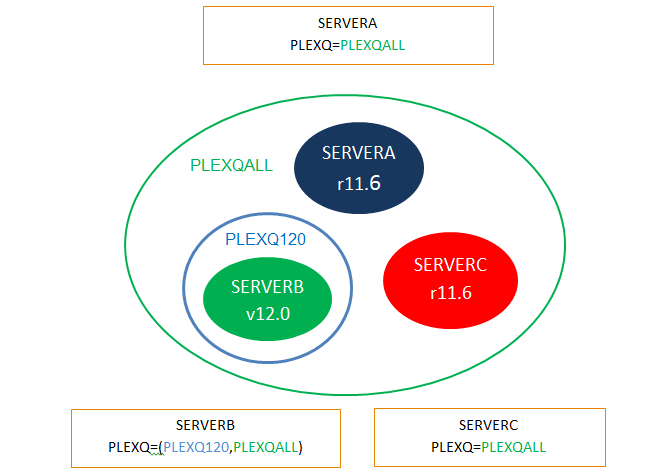
In this example, the blue circle represents a PLEXQ group (PLEXQ120) with a single v12.0 server. The green circle is a PLEXQ group (PLEXQALL) which encompasses all servers, with mixed release levels.
CA XCOM Data Transport now supports specification of STC parameters in configuration members. Currently the STC parameters can only be specified as EXEC parameters. This change allows you to change the CA XCOM Data Transport Server to which scheduled transfers, inquires, history, and recover requests are directed toward without having to modify JCL.
The configuration member can contain values for all STC parameters (STCIP, STCPORT, SECURE_SCHEDULE, STCAPPL and STCPLEXQ). A new parameter, STCPROTOCOL, has been added to specify the default protocol to use for connecting to the CA XCOM Data Transport server. These parameters can be overridden when specified in the EXEC parameter for the job.
To make the most effective use of this feature, STC parameters should not be specified as EXEC parameters. To alter the server and/or protocol to which the CA XCOM Data Transport job communicates with, simply change the configuration member values so that JCL does not have to be modified.
STCPROTOCOL specifies the started task communication protocol XCOM jobs uses when scheduling requests.
Specifies that an XCOMJOB schedules the request with the started task using SNA communications.
Specifies that the XCOMJOB schedules the request with the started task using TCP/IP communications (non-SSL).
Specifies that the XCOMJOB schedules the request with the started task using Secure Socket Layer (SSL) communications.
Specifies that the XCOMJOB schedules the request with the started task using IBM Parallel Sysplex Signaling Services. This is referred to as the PLEXQ by CA XCOM Data Transport.
Default: Determined dynamically if STCAPPL, STCIP, STCPLEXQ, or SECURE_SCHEDULE are specified as the EXEC parameters. If more than one of these parameters is specified, the value is decided based on the following order:
CA XCOM Data Transport now supports a new parameter that can be used to control which compression methods the transfers are allowed use. The negotiated substitution compression method can also now be designated by way of configuration.
The parameter which controls allowed compression methods is COMPRESS_ALLOWED. Usage of the COMPNEG parameter has been changed to allow the specification of the compression method to be substituted in the event a disallowed compression method is requested for a transfer.
|
Copyright © 2013 CA Technologies.
All rights reserved.
|
|