

CA XCOM Data Transport operation can be initiated from the z/OS console by issuing the START command. CA XCOM Data Transport can also be submitted as a TSO or batch job. We recommend operating CA XCOM Data Transport as a server (that is, by using the START command at the z/OS console).
For a complete list of CA XCOM Data Transport operator commands, see the chapter “Operation and Control” in the CA XCOM Data Transport for z/OS User Guide.
CA XCOM Data Transport for z/OS can distribute and manage locally initiated transfers among servers in a CA XCOM Data Transport PLEXQ. A PLEXQ consists of one or more CA XCOM servers. Transfers that are intended for servers in the PLEXQ can be generically scheduled to the group name used by the PLEXQ servers as defined using the PLEXQ parameter.
By using the IBM Parallel Sysplex Signaling Services, CA XCOM Data Transport manages the distribution of transfer workload among servers which are members of the same PLEXQ.
Multiple PLEXQ environments can be defined within a SYSPLEX, and each server can participate in up to eight PLEXQ groups at any given time. Such a configuration is called a MultiPlexQ.
To create a PLEXQ or MultiPlexQ environment, simply specify one to eight PLEXQ group names in the PLEXQ parameter either in the CONFIG member or as part of the EXEC PARM for each CA XCOM server which is to participate in the same PLEXQ. When specifying more than one PLEXQ group name to create a MultiPlexQ environment, the PLEXQ group names must be enclosed in parentheses and separated by commas.
NOTE: The participant members of a PLEXQ can be of different releases. However if the server selected to execute the transfer is at a lower release than the job which scheduled the request, some features that are specified may not be acknowledged.
To make a CA XCOM Data Transport server a member of a PLEXQ (see Define the CA XCOM Data Transport Server in a Standalone Environment in this chapter), configure it as follows:
To define a Server as a member of a PLEXQ
NOTE: The participant members of a PLEXQ can be of different releases. However if the server selected to execute the transfer is at a lower release than the job which scheduled the request, some features that are specified may not be acknowledged.
Transfers can be scheduled either to the PLEXQ group or directly to a server using the SNA or TCP/IP protocol. Transfers are scheduled to a PLEXQ by using the STCPLEXQ parameter in the EXEC PARM of the XCOMJOB utility program. Connections established to a PLEXQ do not use SNA or TCP/IP protocols, but rather a proprietary messaging protocol which uses SYSPLEX Signaling Services as its transport layer.
Attempts to schedule or inquire on transfers to a PLEXQ when no servers are active in the PLEXQ will be rejected.
For migration purposes, servers which are members of the same PLEXQ group can be at different CA XCOM Data Transport release levels. If the server selected to process the request does not support the feature, transfer requests specifying a feature relevant to newer releases cannot take advantage of that feature.
The MultiPlexQ feature facilitates release migration by allowing CA XCOM servers (v12.0 and above) to participate in more than one PLEXQ group at a time. The following diagram provides an example of such a MultiPlexQ configuration:
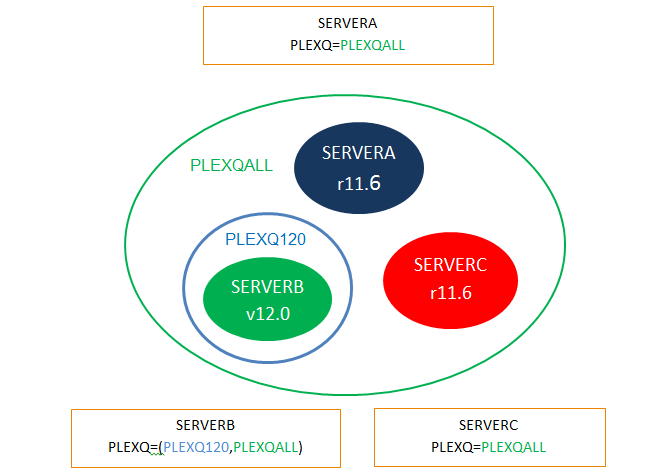
In this example, the blue circle represents a PLEXQ group (PLEXQ120) with a single v12.0 server. The green circle is a PLEXQ group (PLEXQALL) which encompasses all servers, with mixed release levels.
Parameters for transfers scheduled to a PLEXQ group member server can be taken from the Default Options for the server which ultimately receives the transfer request or from another specified Default Options configuration. Parameters specified in the SYSIN01 and destination members will override these parameters.
The following is a sample PARM statement. If it is used when sending transfers to a PLEXQ group member server, then CA XCOM Data Transport will take defaults from XCPTDFB0, which is a Default Options CONFIG member (or Table) for the target PLEXQ group server.
PARM=('TYPE=SCHEDULE,DFLTAB=XCPTDFB0,STCPLEXQ=PRODXCOM')
|
Copyright © 2013 CA Technologies.
All rights reserved.
|
|