

|
|
|
CA XCOM Gateway requires access to CA Embedded Entitlements Manager (EEM) server to authenticate users when they sign in to the CA XCOM Gateway website or attempt to access CA XCOM Gateway through FTP.
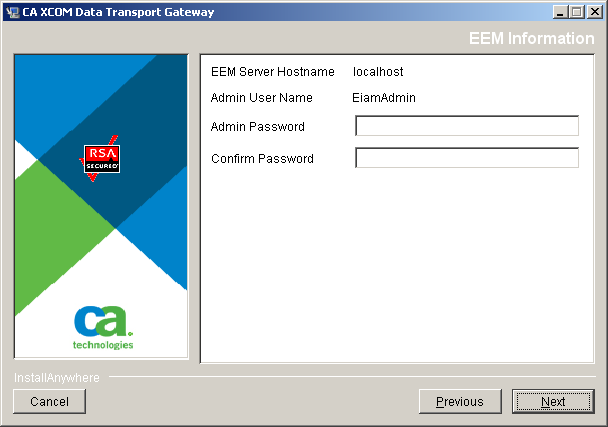
The EEM Information dialog requests information that enables CA XCOM Gateway to connect to the CA EEM server to access the directory information that it needs to authenticate users.
To specify the CA EEM information
Defines the host name (or IP address) of the machine that will be used to run the CA EEM server with which CA XCOM Gateway must communicate.
If CA EEM has been selected for installation, this field is preset to localhost and cannot be changed.
If CA EEM has not been selected for installation and if it is already installed on the local machine, you can use the default value of localhost to select this CA EEM server. Alternatively, you can specify a host name (or IP address) that refers to a different machine on which CA EEM has already been installed.
Note: The CA EEM server always uses port 5250. So you cannot specify another port.
Defines the user ID that is used to perform administrative functions on the CA EEM user interface.
The current release of CA EEM only supports an administrator user account with the user ID EiamAdmin. For this reason, the user ID field is preset to this value and cannot be changed.
If CA EEM has been selected for installation on the local machine, the EiamAdmin user ID will be used to create an administrator account for the new CA EEM server.
Provides the password associated with the CA EEM administrative user account.
If the host name refers to an existing CA EEM server (that is, CA EEM has not been selected for local installation), the current administrator password for that server must be entered.
Alternatively, if CA EEM has been selected for installation on the local machine, the specified password will be assigned to the EEM administrator account created when that component is installed. Subsequently, this password will need to be used to gain access to the CA EEM User Interface to perform administrative functions.
When CA EEM has been selected for installation on the local machine, this prompt will appear, requesting you to re-enter the password specified in the preceding password field. This is to ensure that the password has been correctly typed, so that the new EEM administrator account can be created correctly with the intended password.
Note: If the host name refers to an existing CA EEM server (that is, CA EEM has not been selected for local installation), the Confirm Password prompt will not appear.
If EEM has not been selected for installation, the installer will check that it can successfully communicate with an EEM server on the specified host machine, using the supplied administrator user ID and password.
If verification is successful, the Keystore information dialog opens.
If verification fails, an error dialog opens. Click OK on the error dialog to return to the EEM Information dialog. You can then correct the specified information.
| Copyright © 2011 CA. All rights reserved. | Tell Technical Publications how we can improve this information |