Configuring and Administering CA XCOM Gateway › Configure CA XCOM Gateway › Manage the CA XCOM Gateway File Staging Area › Display Stored Files Associated with a Specific Policy
Display Stored Files Associated with a Specific Policy
You can use the Admin page to display stored files that are associated with a policy.
To display stored files for a policy
- Log in to CA XCOM Gateway.
The Home page appears.
- Click Admin.
The Admin page appears.
- Click Process Policies.
The Process Policies page appears.
- For the appropriate policy, click Actions.
A drop-down list appears.
- Click Show Files.
The Show File by Policy page appears, listing the stored files that are associated with the selected policy.
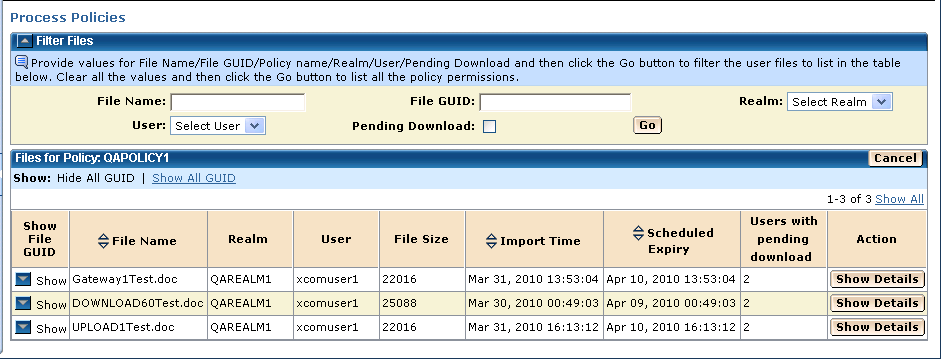
On the Show File by Policy page:
- The Users With Pending Download column indicates the number of users subscribed to the policy who have not downloaded the file.
- The Schedule Expiry column indicates the time at which the file is presently scheduled for deletion from CA XCOM Gateway.
- When there are no users with pending download, the policy’s short retention applies and is used to calculate the scheduled expiry time.
- In contrast, when there are one or more users with pending download, the policy’s long retention period applies and is used to calculate the scheduled expiry time. Subsequently, when all subscribed users have downloaded the file, the Users With Pending Download count for the file changes to zero and the scheduled expiry time is revised.

