

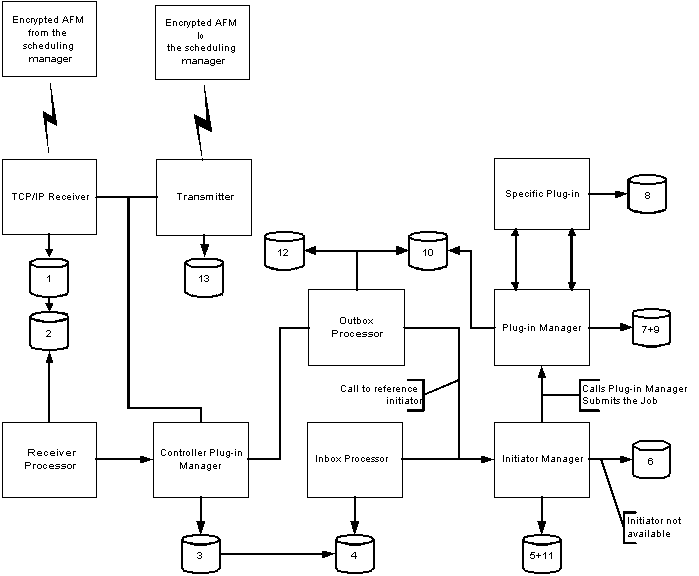
The agent logs the path of any AFM as it proceeds from the scheduling manager to the agent. The following dataflow diagram and tables describe how the agent logs the AFMs as it processes them.
The numbers in the data flow diagram refer to the step numbers given in the following table.
|
Step |
Log File |
Description |
Log Level |
|---|---|---|---|
|
1 |
receiver.log |
Record of all successfully received AFMs. |
0, 1, 2 |
|
2 |
queue_receiver.log |
Log for the queue that holds all successfully received AFMs. |
0, 1, 2 |
|
3 |
cybrmicontrollerpluginmanager.log |
Shows TCP/IP plug-in attempts to send a message to the core. |
5 |
|
4 |
queue_inbox.log |
All messages from the controller arrive here. Incoming message distributor (inbox) calls initiatormanager to process these messages. |
3 |
|
5 |
initiatormanager.log |
The initiatormanager records any exception conditions here. |
5 |
|
6 |
initiators_waiting_<Job class>.log |
If all initiators for this job class are consumed, the job is put in a queue. |
3 |
|
7 |
rmipluginmanager.log |
Logs the number of active jobs that the plug-in has. |
4 |
|
8 |
plug-in specific
|
The message is sent to a plug-in; for example, runner_os_component.log. Once you have completed the trace routine in either of the two other streams, return to the next step in this stream. |
- |
|
9 |
rmipluginmanager.log |
Shows the plug-in has attempted to send a message to the core. |
4 |
|
10 |
queue_communicator.log |
A reply is placed here. |
3 |
|
11 |
initiatormanager.log |
Shows the initiator has been released. |
5 |
|
12 |
messagedistributoroutgoing.log |
Shows the message is sent through the controller plug-in manager to the scheduling manager. |
5 |
|
13 |
transmitter.log |
Log of all sending activity and any errors discovered. |
0, 1, 2 |
|
Copyright © 2014 CA.
All rights reserved.
|
|