

Introduction › How a Scheduling Manager and Agents Communicate › Communication Configuration Example
Communication Configuration Example
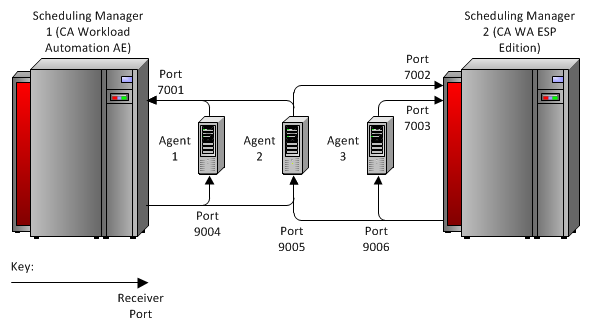
The following diagram shows some possible communication configurations between two scheduling managers and agents.
- Scheduling Manager 1 (CA Workload Automation AE) communicates with Agent 1 and Agent 2 and receives messages from both agents through port 7001. Scheduling Manager 1 sends messages to port 9004 on Agent 1 and port 9005 on Agent 2.
- Scheduling Manager 2 (CA Workload Automation ESP Edition) communicates with Agent 2 and Agent 3 and receives messages from Agent 2 through port 7002 and from Agent 3 through port 7003. Scheduling Manager 2 sends messages to port 9005 on Agent 2 and port 9006 on Agent 3.
Copyright © 2014 CA.
All rights reserved.
|
|