

Agents are the key integration components of CA's workload automation products. Agents let you automate, monitor, and manage workload on all major platforms, applications, and databases.
Example: Run Workload with Different Types of Jobs
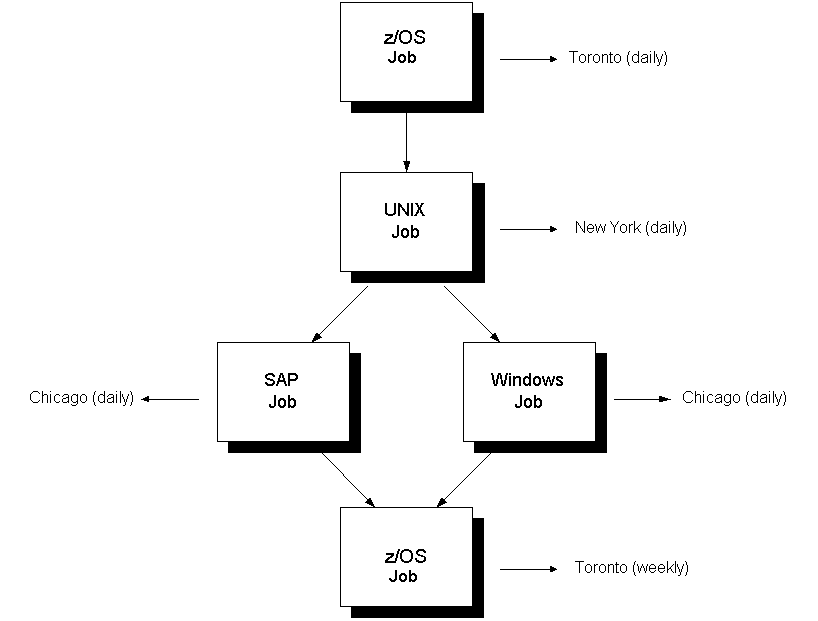
The following workload contains two z/OS jobs, a UNIX job, an SAP job, and a Windows job, running on different machines, in different locations, and at different times:
To run workload on a particular system, you need to install an agent on that system. Agents receive and respond to commands sent by the scheduling manager and transmit data and messages back to the scheduling manager.
The following table summarizes the relationship between the scheduling manager and agents:
|
Scheduling Manager |
Agent |
|---|---|
|
Is aware of the entire network |
Is aware of the local environment |
|
Sends commands and parameters to the agents |
Responds to commands and parameters sent by the server |
|
Receives data from the agents |
Transmits data to the server |
|
Makes decisions |
Takes direction from the server |
|
Schedules jobs |
Runs jobs on different platforms |
Note: For more information about a specific agent, see the documentation for your agent.
|
Copyright © 2014 CA Technologies.
All rights reserved.
|
|