

A group of jobs runs multiple times a day. The first run is at midnight. After all of the jobs have completed successfully, the next generation should run 60 minutes later. The last run each day should occur no later than 7 p.m.
To schedule a cyclic Application
if (WOB._RHH < '19' && APPL._SDATE == WOB._RDATE)
  execTrigger('%APPL._event','ADD');
The Event is scheduled at midnight each day to run the first group of jobs. Optionally, you can use time-based qualifiers for the jobs to distinguish each group of jobs for ease of monitoring.
The flow looks like this:
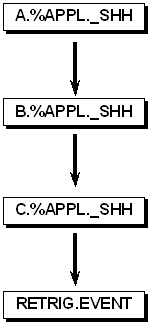
A link named RETRIG.EVENT waits for all jobs in the Application to complete successfully. This RETRIG.EVENT link waits 60 minutes before it becomes ready. It then checks the actual time (WOB._RHH) and if the time is before 7 p.m. on the same day, it retriggers the original Event. The execTrigger built-in function with the ADD option is used so that the regular daily scheduled Event at midnight is not affected.
|
Copyright © 2011 CA.
All rights reserved.
|
|