

WLP executes as a single job step. WLP simulates the processing of jobs based on a defined workload model and as many resource models as are necessary to correspond to the anticipated changes in environment.
The CA 7 text editor, or any comparable text editing facility, can tailor the workload model to specific needs. Jobs can be added, changed, or deleted as necessary to complete the accurate definition of the workload model before running the actual planning job.
Resource models for WLP can be based on the workload balancing processing objectives used in production. Those processing objectives used in actual workload processing can be used, without change, in WLP. New processing objectives, when necessary, can also be defined for use in WLP to accomplish the wanted results. Predefined processing objectives used in the current production control function can be selected when the workload model parameters are specified. If these planning objectives have been previously defined and scheduled with the UCC7Rxxx convention, they can be selected and automatically included at the appropriate position in the file containing the workload model produced by FWLP. Changes to processing objectives, including additions, or deletions can alternatively be made to the data file. This is done in a manner similar to the technique for modifying job detail in the workload model, because both are physically intermixed in the data file that becomes input to WLP. Global overrides and additional parameters are also available on the WLP1 control statement.
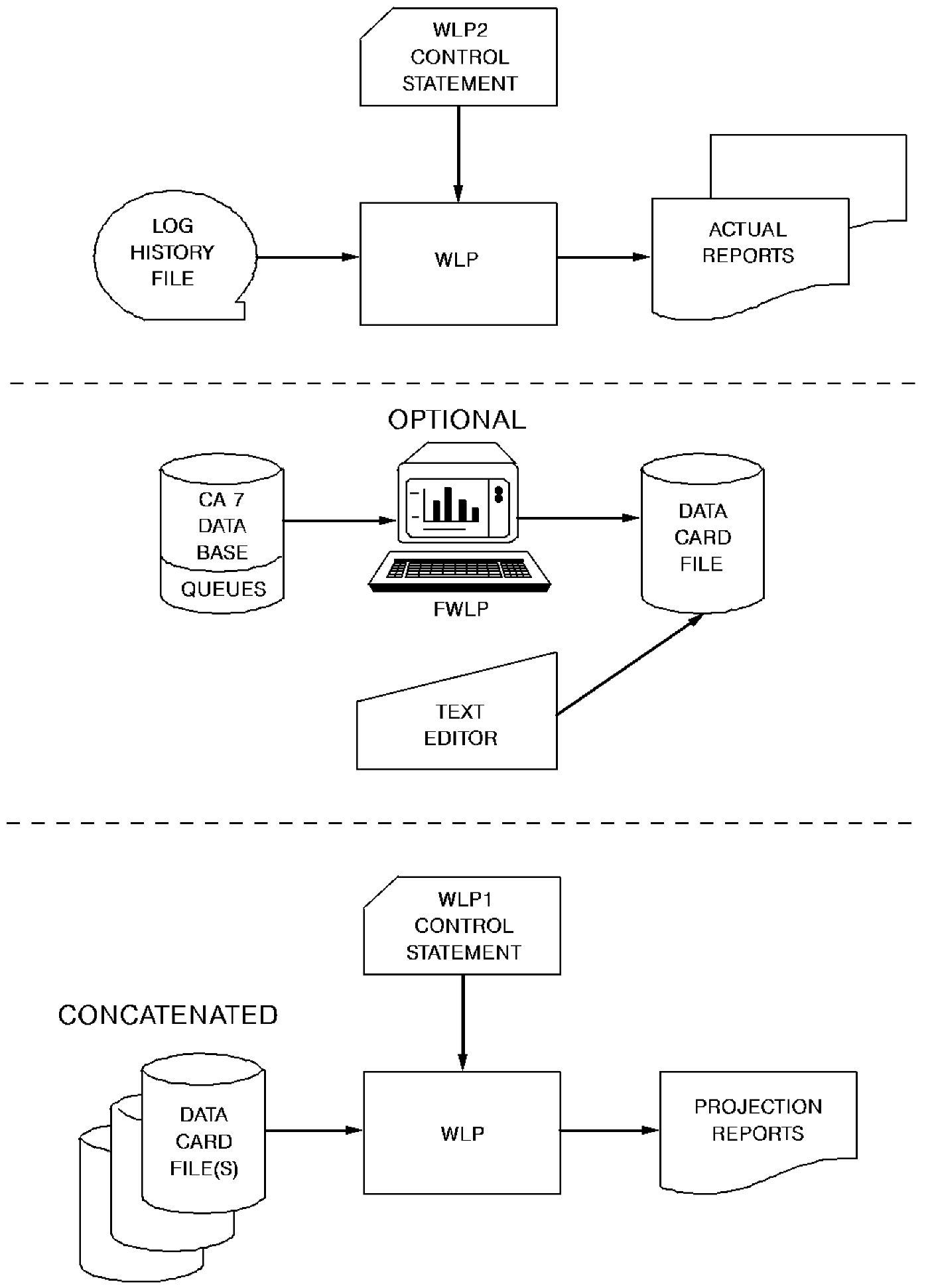
Once the data representing the wanted workload and resources is prepared, the workload planning job is run. Different reports are produced depending on whether log history or data statement information is used. Reports with the title suffix PROJECTION are produced whenever data statement information and the WLP1 control statement are used for the workload model. Reports with the title suffix ACTUAL are produced whenever history information and the WLP2 control statement are used for the model. The workload planning summary display is also provided for workload models selected from the database with the FWLP command.
The following figure illustrates the flow of the workload planning facility.
|
Copyright © 2015 CA Technologies.
All rights reserved.
|
|