

Agents are the key integration components of CA Technologies workload automation products. Agents let you automate, monitor, and manage workload on all major platforms, applications, and databases. To run workload on a particular system, you install an agent on that system. If your workload must run on a UNIX computer, for example, you can install and configure the CA WA Agent for UNIX. The agent lets you run UNIX scripts, execute UNIX commands, transfer files using FTP, monitor file activity on the agent computer, and perform many other tasks.
You can extend the functionality of the agent by installing one or more agent plug-ins in the agent installation directory. If you have a relational database such as Oracle, for example, you can install a database agent plug-in to query and monitor the database. Other agent plug-ins are also available. For more information about agent plug-ins, see the Implementation Guide for the appropriate agent plug-in.
Note: The agent plug-ins are only available for UNIX, Linux, and Windows operating environments.
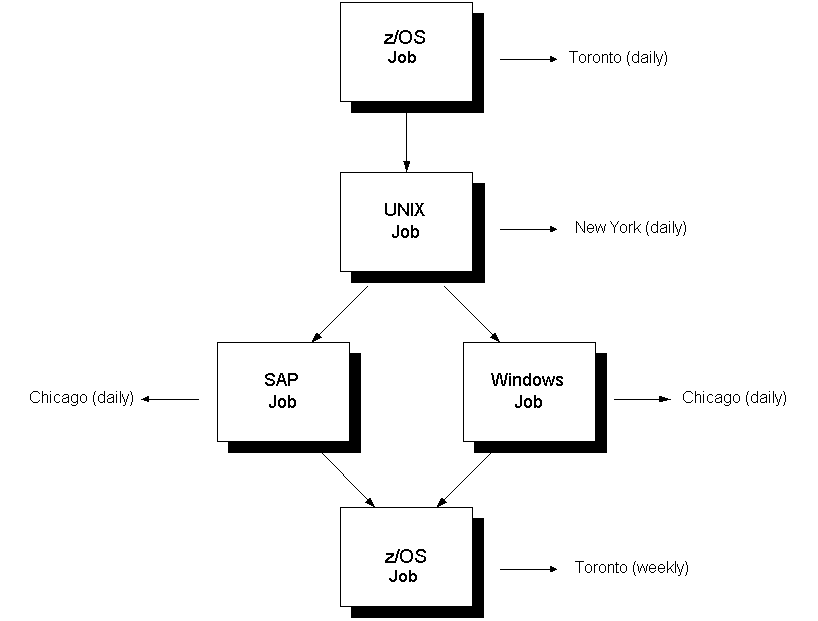
Example: Workload with Different Types of Jobs
The following workload contains z/OS jobs, a UNIX job, an SAP job, and a Windows job, running on different computers, in different locations, and at different times:
|
Copyright © 2013 CA.
All rights reserved.
|
|