

As a scheduler, you can use Quick View to search for jobs, monitor critical aspects of jobs, execute commands on selected jobs, and access job definitions. You can access Quick View by clicking the Quick View tab, or it can be opened for a selected job in Monitoring.
You can use Quick View to do any of the following:
The following scenario walks you through the process of finding a specific job, and viewing job details.
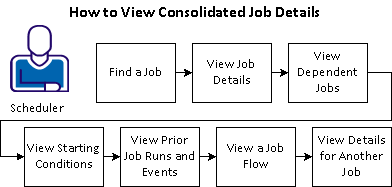
To find a job and view the job details, you can follow these steps:
Example: View Detailed Properties for the WORLD01_001 Job
Perhaps you are interested in seeing a consolidated view of the WORLD01_001 job properties, dependencies, and past run history. You can find the job in Quick View and then view the job properties, dependencies, and run history on a single page. After viewing the details of that job, you can view the details for dependent job WORLD01_002B.
|
Copyright © 2013 CA.
All rights reserved.
|
|