Administration Guide › Managing Virtual Environments › VMware vCloud › How to Configure the vCloud Director Management Components › Add the AIM Instance for the vCloud Server › Troubleshoot the vCloud AIM Instance Connection
Troubleshoot the vCloud AIM Instance Connection
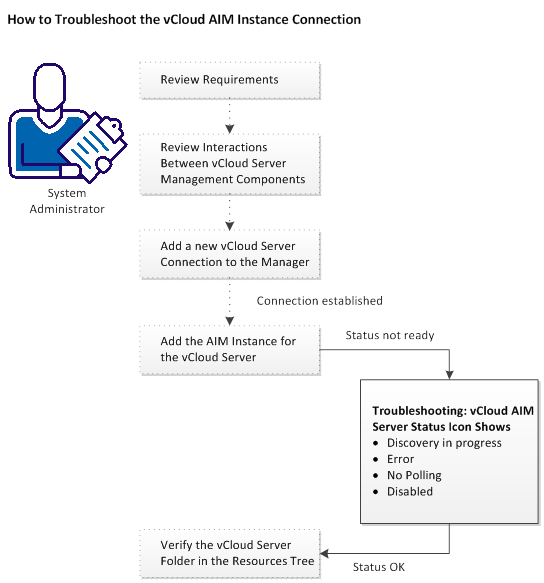
The vCloud AIM Connection is in not-ready status. One of the following status icons appears:
 Discovery in progress - Wait until the platform manager synchronizes all data.
 Error - Unable to connect to the AIM. Check the network configuration.
 No Polling - The CA Virtual Assurance manager does not poll this AIM instance.
 Disabled - This instance is not managed.
Follow the troubleshooting information indicated in the following diagram:
More information:
vCloud AIM Instance Status Icon Shows Discovery in Progress
vCloud AIM Instance Status Icon Shows Error
vCloud AIM Instance Status Icon Shows No Polling
vCloud AIM Instance Status Icon Shows Disabled
|
Copyright © 2013 CA.
All rights reserved.
|
|

