

PF keys are keys that automatically invoke commands based on preset functions.
The following diagram represents the standard PF key structure. Keys are labeled by name (for example, 1/13 is either PF key 1 or PF key 13). Some keys are also identified with their default definitions, which correspond to system-wide commands. UP, DOWN, LEFT, and RIGHT are SCROLL commands.
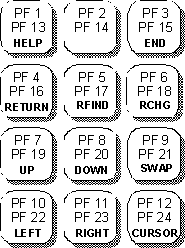
Pressing a PF key that is defined as a command is the same as entering that command. Also, as with commands, you can enter data as parameters in conjunction with PF key usage. To do this, enter the parameter data on the command line, then press the appropriate PF key.
Note: If the command exceeds 48 characters in length, only the first 48 characters will be used.
Example
With PF 8 defined as DOWN, if you type 20 on the command line and press PF 8, the results are exactly the same as if you had typed DOWN 20 on the command line and pressed Enter.
|
Copyright © 2015 CA Technologies.
All rights reserved.
|
|